A Smarter Way To Learn HTML & CSS(2015)
43
Tables:
spanning columnsand rows
Sometimes you need to combine two or more cells into a single, extra-wide cell.

The table above shows the early-afternoon schedule for three facilities. I’ve added borders, and I’ve highlighted the two spanned rows that I want you to pay attention to. Neither the borders nor the highlighting are part of the code below. You’ll learn how to add both kinds of styling in subsequent chapters. This is the code.
<table>
<tr>
<th scope="col"></th>
<th scope="col">1 pm</th>
<th scope="col">2 pm</th>
<th scope="col">3 pm</th>
</tr>
<tr>
<th scope="row">Gym</th>
<td>Dodge ball</td>
<td>Kick boxing</td>
<td>Sack racing</td>
</tr>
<tr>
<th scope="row">Exercise room</th>
<td>Spinning</td>
<td colspan="2">Yoga marathon</td>
<tr>
<th scope="row">Pool</th>
<td colspan="3">Water polo</td>
</tr>
</table>
The code for a column-span cell looks like a regular <td> cell, except for the code colspan="[number of columns to span]". The closing tag is the same as for a regular <td> cell. Notice that a <td> with the colspan feature replaces the same number of regular <td>s as the number of columns that are spanned. In the first row, there are three regular <td>s. In the second row, where two columns are spanned, there’s one regular <td> plus the span. In the third row, where three columns are spanned, there’s no regular <td>. You can make table headings span columns, too. The code is…
<th scope="row" colspan="[number of columns to span]">Whatever</th>
Spanning rows works the same way as spanning columns, but uses rowspan. Here’s the table above, reconfigured so the facilities are at the top and the times are on the left.

This is the code.
<table>
<tr>
<th scope="col"></th>
<th scope="col">Gym</th>
<th scope="col">Exercise Room</th>
<th scope="col">Pool</th>
</tr>
<tr>
<th scope="row">1 pm</th>
<td>Dodge ball</td>
<td>Spinning</td>
<td rowspan="3">Water polo</td>
</tr>
<tr>
<th scope="row">2 pm</th>
<td>Spinning</td>
<td rowspan="2">Yoga marathon</td>
<tr>
<th scope="row">3 pm</th>
<td rowspan="3">Sack racing</td>
</tr>
</table>
You can make table headings span rows, too. The code is…
<th scope="column" rowspan="[number of rows to span]">Whatever</th>
You can divide a table into three sections: a header, body, and footer. This helps screen readers, but doesn’t do anything for sighted users that you can’t do using the code I’ve already taught you. I’ll show you an example. You won’t be tested on it in the exercises.
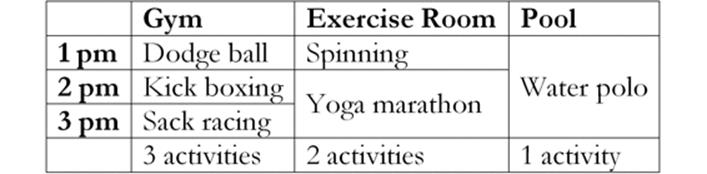
This is the code.
<table>
<thead>
<tr>
<th></th>
<th>Gym</th>
<th>Exercise Room</th>
<th>Pool</th>
</tr>
</thead>
<tfoot>
<tr>
<th></th>
<th>3 activities</th>
<th>2 activities</th>
<th>1 activity</th>
</tr>
</tfoot>
<tbody>
<tr>
<th scope="row">1 pm</th>
<td>Dodge ball</td>
<td>Spinning</td>
<td rowspan="3">Water polo</td>
</tr>
<tr>
<th scope="row">2 pm</th>
<td>Spinning</td>
<td rowspan="2">Yoga marathon</td>
<tr>
<th scope="row">3 pm</th>
<td rowspan="3">Sack racing</td>
</tr>
</tbody>
</table>
Code a simple table with two rows and two columns. In the second row, span the columns.
Sample HTML code is at:
http://asmarterwaytolearn.com/htmlcss/practice-43-1.html.
Find the interactive coding exercises for this chapter at:
http://www.ASmarterWayToLearn.com/htmlcss/43.html