The Principles of Object-Oriented Javascript (2014)
Chapter 3. Understanding Objects
Even though there are a number of builtin reference types in JavaScript, you will most likely create your own objects fairly frequently. As you do so, keep in mind that objects in JavaScript are dynamic, meaning that they can change at any point during code execution. Whereas class-based languages lock down objects based on a class definition, JavaScript objects have no such restrictions.
A large part of JavaScript programming is managing those objects, which is why understanding how objects work is key to understanding JavaScript as a whole. This is discussed in more detail later in this chapter.
Defining Properties
Recall from Chapter 1 that there are two basic ways to create your own objects: using the Object constructor and using an object literal. For example:
var person1 = {
name: "Nicholas"
};
var person2 = new Object();
person2.name = "Nicholas";
❶ person1.age = "Redacted";
person2.age = "Redacted";
❷ person1.name = "Greg";
person2.name = "Michael";
Both person1 and person2 are objects with a name property. Later in the example, both objects are assigned an age property ❶. You could do this immediately after the definition of the object or much later. Objects you create are always wide open for modification unless you specify otherwise (more on that in Preventing Object Modification). The last part of this example changes the value of name on each object ❷; property values can be changed at any time as well.
When a property is first added to an object, JavaScript uses an internal method called [[Put]] on the object. The [[Put]] method creates a spot in the object to store the property. You can compare this to adding a key to a hash table for the first time. This operation specifies not just the initial value, but also some attributes of the property. So, in the previous example, when the name and age properties are first defined on each object, the [[Put]] method is invoked for each.
The result of calling [[Put]] is the creation of an own property on the object. An own property simply indicates that the specific instance of the object owns that property. The property is stored directly on the instance, and all operations on the property must be performed through that object.
NOTE
Own properties are distinct from prototype properties, which are discussed in Chapter 4.
When a new value is assigned to an existing property, a separate operation called [[Set]] takes place. This operation replaces the current value of the property with the new one. In the previous example, setting name to a second value results in a call to [[Set]]. See Figure 3-1 for a step-by-step view of what happened to person1 behind the scenes as its name and age properties were changed.
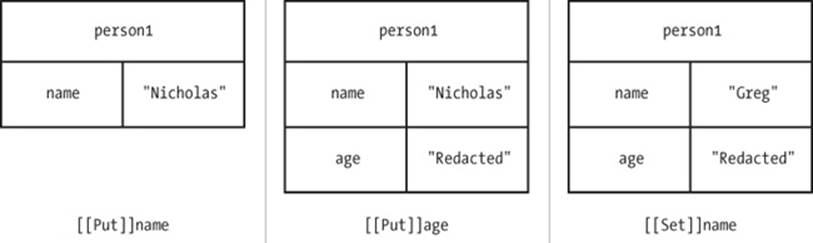
Figure 3-1. Adding and changing properties of an object
In the first part of the diagram, an object literal is used to create the person1 object. This performs an implicit [[Put]] for the name property. Assigning a value to person1.age performs a [[Put]] for the age property. However, setting person1.name to a new value ("Greg") performs a [[Set]] operation on the name property, overwriting the existing property value.
Detecting Properties
Because properties can be added at any time, it’s sometimes necessary to check whether a property exists in the object. New JavaScript developers often incorrectly use patterns like the following to detect whether a property exists:
// unreliable
if (person1.age) {
// do something with age
}
The problem with this pattern is how JavaScript’s type coercion affects the outcome. The if condition evaluates to true if the value is truthy (an object, a nonempty string, a nonzero number, or true) and evaluates to false if the value is falsy (null, undefined, 0, false, NaN, or an empty string). Because an object property can contain one of these falsy values, the example code can yield false negatives. For instance, if person1.age is 0, then the if condition will not be met even though the property exists. A more reliable way to test for the existence of a property is with the in operator.
The in operator looks for a property with a given name in a specific object and returns true if it finds it. In effect, the in operator checks to see if the given key exists in the hash table. For example, here’s what happens when in is used to check for some properties in the person1 object:
console.log("name" in person1); // true
console.log("age" in person1); // true
console.log("title" in person1); // false
Keep in mind that methods are just properties that reference functions, so you can check for the existence of a method in the same way. The following adds a new function, sayName(), to person1 and uses in to confirm the function’s presence.
var person1 = {
name: "Nicholas",
sayName: function() {
console.log(this.name);
}
};
console.log("sayName" in person1); // true
In most cases, the in operator is the best way to determine whether the property exists in an object. It has the added benefit of not evaluating the value of the property, which can be important if such an evaluation is likely to cause a performance issue or an error.
In some cases, however, you might want to check for the existence of a property only if it is an own property. The in operator checks for both own properties and prototype properties, so you’ll need to take a different approach. Enter the hasOwnProperty() method, which is present on all objects and returns true only if the given property exists and is an own property. For example, the following code compares the results of using in versus hasOwnProperty() on different properties in person1:
var person1 = {
name: "Nicholas",
sayName: function() {
console.log(this.name);
}
};
console.log("name" in person1); // true
console.log(person1.hasOwnProperty("name")); // true
console.log("toString" in person1); // true
❶ console.log(person1.hasOwnProperty("toString")); // false
In this example, name is an own property of person1, so both the in operator and hasOwnProperty() return true. The toString() method, however, is a prototype property that is present on all objects. The in operator returns true for toString(), but hasOwnProperty() returnsfalse ❶. This is an important distinction that is discussed further in Chapter 4.
Removing Properties
Just as properties can be added to objects at any time, they can also be removed. Simply setting a property to null doesn’t actually remove the property completely from the object, though. Such an operation calls [[Set]] with a value of null, which, as you saw earlier in the chapter, only replaces the value of the property. You need to use the delete operator to completely remove a property from an object.
The delete operator works on a single object property and calls an internal operation named [[Delete]]. You can think of this operation as removing a key/value pair from a hash table. When the delete operator is successful, it returns true. (Some properties can’t be removed, and this is discussed in more detail later in the chapter.) For example, the following listing shows the delete operator at work:
var person1 = {
name: "Nicholas"
};
console.log("name" in person1); // true
delete person1.name; // true - not output
console.log("name" in person1); // false
❶ console.log(person1.name); // undefined
In this example, the name property is deleted from person1. The in operator returns false after the operation is complete. Also, note that attempting to access a property that doesn’t exist will just return undefined ❶. Figure 3-2 shows how delete affects an object.
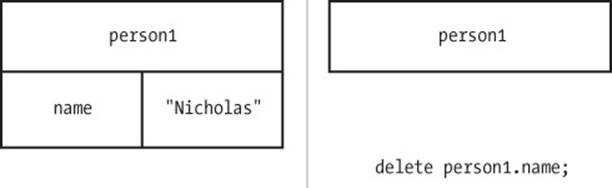
Figure 3-2. When you delete the name property, it completely disappears from person1.
Enumeration
By default, all properties that you add to an object are enumerable, which means that you can iterate over them using a for-in loop. Enumerable properties have their internal [[Enumerable]] attributes set to true. The for-in loop enumerates all enumerable properties on an object, assigning the property name to a variable. For example, the following loop outputs the property names and values of an object:
var property;
for (property in object) {
console.log("Name: " + property);
console.log("Value: " + object[property]);
}
Each time through the for-in loop, the property variable is filled with the next enumerable property on the object until all such properties have been used. At that point, the loop is finished and code execution continues. This example uses bracket notation to retrieve the value of the object property and output it to the console, which is one of the primary use cases for bracket notation in JavaScript.
If you just need a list of an object’s properties to use later in your program, ECMAScript 5 introduced the Object.keys() method to retrieve an array of enumerable property names, as shown here:
❶ var properties = Object.keys(object);
// if you want to mimic for-in behavior
var i, len;
for (i=0, len=properties.length; i < len; i++){
console.log("Name: " + properties[i]);
console.log("Value: " + object[properties[i]]);
}
This example uses Object.keys() to retrieve the enumerable properties from an object ❶. A for loop is then used to iterate over the properties and output the name and value. Typically, you would use Object.keys() in situations where you want to operate on an array of property names and for-in when you don’t need an array.
NOTE
There is a difference between the enumerable properties returned in a for-in loop and the ones returned by Object.keys(). The for-in loop also enumerates prototype properties, while Object.keys() returns only own (instance) properties. The differences between prototype and own properties are discussed in Chapter 4.
Keep in mind that not all properties are enumerable. In fact, most of the native methods on objects have their [[Enumerable]] attribute set to false. You can check whether a property is enumerable by using the propertyIsEnumerable() method, which is present on every object:
var person1 = {
name: "Nicholas"
};
console.log("name" in person1); // true
❶ console.log(person1.propertyIsEnumerable("name")); // true
var properties = Object.keys(person1);
console.log("length" in properties); // true
❷ console.log(properties.propertyIsEnumerable("length")); // false
Here, the property name is enumerable, as it is a custom property defined on person1 ❶. The length property for the properties array, on the other hand, is not enumerable ❷ because it’s a built-in property on Array.prototype. You’ll find that many native properties are not enumerable by default.
Types of Properties
There are two different types of properties: data properties and accessor properties. Data properties contain a value, like the name property from earlier examples in this chapter. The default behavior of the [[Put]] method is to create a data property, and every example up to this point in the chapter has used data properties. Accessor properties don’t contain a value but instead define a function to call when the property is read (called a getter), and a function to call when the property is written to (called a setter). Accessor properties only require either a getter or a setter, though they can have both.
There is a special syntax to define an accessor property using an object literal:
var person1 = {
❶ _name: "Nicholas",
❷ get name() {
console.log("Reading name");
return this._name;
},
❸ set name(value) {
console.log("Setting name to %s", value);
this._name = value;
}
};
console.log(person1.name); // "Reading name" then "Nicholas"
person1.name = "Greg";
console.log(person1.name); // "Setting name to Greg" then "Greg"
This example defines an accessor property called name. There is a data property called _name that contains the actual value for the property ❶. (The leading underscore is a common convention to indicate that the property is considered to be private, though in reality it is still public.) The syntax used to define the getter ❷ and setter ❸ for name looks a lot like a function but without the function keyword. The special keywords get and set are used before the accessor property name, followed by parentheses and a function body. Getters are expected to return a value, while setters receive the value being assigned to the property as an argument.
Even though this example uses _name to store the property data, you could just as easily store the data in a variable or even in another object. This example simply adds logging to the behavior of the property; there’s usually no reason to use accessor properties if you are only storing the data in another property—just use the property itself. Accessor properties are most useful when you want the assignment of a value to trigger some sort of behavior, or when reading a value requires the calculation of the desired return value.
NOTE
You don’t need to define both a getter and a setter; you can choose one or both. If you define only a getter, then the property becomes read-only, and attempts to write to it will fail silently in nonstrict mode and throw an error in strict mode. If you define only a setter, then the property becomes write-only, and attempts to read the value will fail silently in both strict and nonstrict modes.
Property Attributes
Prior to ECMAScript 5, there was no way to specify whether a property should be enumerable. In fact, there was no way to access the internal attributes of a property at all. ECMAScript 5 changed this by introducing several ways of interacting with property attributes directly, as well as introducing new attributes to support additional functionality. It’s now possible to create properties that behave the same way as builtin JavaScript properties. This section covers in detail the attributes of both data and accessor properties, starting with the ones they have in common.
Common Attributes
There are two property attributes shared between data and accessor properties. One is [[Enumerable]], which determines whether you can iterate over the property. The other is [[Configurable]], which determines whether the property can be changed. You can remove a configurable property using delete and can change its attributes at any time. (This also means configurable properties can be changed from data to accessor properties and vice versa.) By default, all properties you declare on an object are both enumerable and configurable.
If you want to change property attributes, you can use the Object.defineProperty() method. This method accepts three arguments: the object that owns the property, the property name, and a property descriptor object containing the attributes to set. The descriptor has properties with the same name as the internal attributes but without the square brackets. So you use enumerable to set [[Enumerable]], and configurable to set [[Configurable]]. For example, suppose you want to make an object property nonenumerable and nonconfigurable:
var person1 = {
❶ name: "Nicholas"
};
Object.defineProperty(person1, "name", {
❷ enumerable: false
});
console.log("name" in person1); // true
❸ console.log(person1.propertyIsEnumerable("name")); // false
var properties = Object.keys(person1);
console.log(properties.length); // 0
Object.defineProperty(person1, "name", {
❹ configurable: false
});
// try to delete the Property
delete person1.name;
❺ console.log("name" in person1); // true
console.log(person1.name); // "Nicholas"
❻ Object.defineProperty(person1, "name", { // error!!!
configurable: true
});
The name property is defined as usual ❶, but it’s then modified to set its [[Enumerable]] attribute to false ❷. The propertyIsEnumerable() method now returns false ❸ because it references the new value of [[Enumerable]]. After that, name is changed to be nonconfigurable ❹. From now on, attempts to delete name fail because the property can’t be changed, so name is still present on person1 ❺. Calling Object.defineProperty() on name again would also result in no further changes to the property. Effectively, name is locked down as a property onperson1.
The last piece of the code tries to redefine name to be configurable once again ❻. However, this throws an error because you can’t make a nonconfigurable property configurable again. Attempting to change a data property into an accessor property or vice versa should also throw an error in this case.
NOTE
When JavaScript is running in strict mode, attempting to delete a nonconfigurable property results in an error. In nonstrict mode, the operation silently fails.
Data Property Attributes
Data properties possess two additional attributes that accessors do not. The first is [[Value]], which holds the property value. This attribute is filled in automatically when you create a property on an object. All property values are stored in [[Value]], even if the value is a function.
The second attribute is [[Writable]], which is a Boolean value indicating whether the property can be written to. By default, all properties are writable unless you specify otherwise.
With these two additional attributes, you can fully define a data property using Object.defineProperty() even if the property doesn’t already exist. Consider this code:
var person1 = {
name: "Nicholas"
};
You’ve seen this snippet throughout this chapter; it adds the name property to person1 and sets its value. You can achieve the same result using the following (more verbose) code:
var person1 = {};
Object.defineProperty(person1, "name", {
value: "Nicholas",
enumerable: true,
configurable: true,
writable: true
});
When Object.defineProperty() is called, it first checks to see if the property exists. If the property doesn’t exist, a new one is added with the attributes specified in the descriptor. In this case, name isn’t already a property of person1, so it is created.
When you are defining a new property with Object.defineProperty(), it’s important to specify all of the attributes because Boolean attributes automatically default to false otherwise. For example, the following code creates a name property that is nonenumerable, nonconfigurable, and nonwritable because it doesn’t explicitly make any of those attributes true in the call to Object.defineProperty().
var person1 = {};
Object.defineProperty(person1, "name", {
value: "Nicholas"
});
console.log("name" in person1); // true
console.log(person1.propertyIsEnumerable("name")); // false
delete person1.name;
console.log("name" in person1); // true
person1.name = "Greg";
console.log(person1.name); // "Nicholas"
In this code, you can’t do anything with the name property except read the value; every other operation is locked down. If you’re changing an existing property, keep in mind that only the attributes you specify will change.
NOTE
Nonwritable properties throw an error in strict mode when you try to change the value. In nonstrict mode, the operation silently fails.
Accessor Property Attributes
Accessor properties also have two additional attributes. Because there is no value stored for accessor properties, there is no need for [[Value]] or [[Writable]]. Instead, accessors have [[Get]] and [[Set]], which contain the getter and setter functions, respectively. As with the object literal form of getters and setters, you need only define one of these attributes to create the property.
NOTE
If you try to create a property with both data and accessor attributes, you will get an error.
The advantage of using accessor property attributes instead of object literal notation to define accessor properties is that you can also define those properties on existing objects. If you want to use object literal notation, you have to define accessor properties when you create the object.
As with data properties, you can also specify whether accessor properties are configurable or enumerable. Consider this example from earlier:
var person1 = {
_name: "Nicholas",
get name() {
console.log("Reading name");
return this._name;
},
set name(value) {
console.log("Setting name to %s", value);
this._name = value;
}
};
This code can also be written as follows:
var person1 = {
_name: "Nicholas"
};
Object.defineProperty(person1, "name", {
get: function() {
console.log("Reading name");
return this._name;
},
set: function(value) {
console.log("Setting name to %s", value);
this._name = value;
},
enumerable: true,
configurable: true
});
Notice that the get and set keys on the object passed in to Object.defineProperty() are data properties that contain a function. You can’t use object literal accessor format here.
Setting the other attributes ([[Enumerable]] and [[Configurable]]) allows you to change how the accessor property works. For example, you can create a nonconfigurable, nonenumerable, nonwritable property like this:
var person1 = {
_name: "Nicholas"
};
Object.defineProperty(person1, "name", {
get: function() {
console.log("Reading name");
❶ return this._name;
}
});
console.log("name" in person1); // true
console.log(person1.propertyIsEnumerable("name")); // false
delete person1.name;
console.log("name" in person1); // true
person1.name = "Greg";
console.log(person1.name); // "Nicholas"
In this code, the name property is an accessor property with only a getter ❶. There is no setter or any other attributes to explicitly set to true, so the value can be read but not changed.
NOTE
As with accessor properties defined via object literal notation, an accessor property without a setter throws an error in strict mode when you try to change the value. In nonstrict mode, the operation silently fails. Attempting to read an accessor property that has only a setter defined always returns undefined.
Defining Multiple Properties
It’s also possible to define multiple properties on an object simultaneously if you use Object.defineProperties() instead of Object.defineProperty(). This method accepts two arguments: the object to work on and an object containing all of the property information. The keys of that second argument are property names, and the values are descriptor objects defining the attributes for those properties. For example, the following code defines two properties:
var person1 = {};
Object.defineProperties(person1, {
❶ // data property to store data
_name: {
value: "Nicholas",
enumerable: true,
configurable: true,
writable: true
},
❷ // accessor property
name: {
get: function() {
console.log("Reading name");
return this._name;
},
set: function(value) {
console.log("Setting name to %s", value);
this._name = value;
},
enumerable: true,
configurable: true
}
});
This example defines _name as a data property to contain information ❶ and name as an accessor property ❷. You can define any number of properties using Object.defineProperties(); you can even change existing properties and create new ones at the same time. The effect is the same as calling Object.defineProperty() multiple times.
Retrieving Property Attributes
If you need to fetch property attributes, you can do so in JavaScript by using Object.getOwnPropertyDescriptor(). As the name suggests, this method works only on own properties. This method accepts two arguments: the object to work on and the property name to retrieve. If the property exists, you should receive a descriptor object with four properties: configurable, enumerable, and the two others appropriate for the type of property. Even if you didn’t specifically set an attribute, you will still receive an object containing the appropriate value for that attribute. For example, this code creates a property and checks its attributes:
var person1 = {
name: "Nicholas"
};
var descriptor = Object.getOwnPropertyDescriptor(person1, "name");
console.log(descriptor.enumerable); // true
console.log(descriptor.configurable); // true
console.log(descriptor.writable); // true
console.log(descriptor.value); // "Nicholas"
Here, a property called name is defined as part of an object literal. The call to Object.getOwnPropertyDescriptor() returns an object with enumerable, configurable, writable, and value, even though these weren’t explicitly defined via Object.defineProperty().
Preventing Object Modification
Objects, just like properties, have internal attributes that govern their behavior. One of these attributes is [[Extensible]], which is a Boolean value indicating if the object itself can be modified. All objects you create are extensible by default, meaning new properties can be added to the object at any time. You’ve seen this several times in this chapter. By setting [[Extensible]] to false, you can prevent new properties from being added to an object. There are three different ways to accomplish this.
Preventing Extensions
One way to create a nonextensible object is with Object.preventExtensions(). This method accepts a single argument, which is the object you want to make nonextensible. Once you use this method on an object, you’ll never be able to add any new properties to it again. You can check the value of [[Extensible]] by using Object.isExtensible(). The following code shows examples of both methods at work.
var person1 = {
name: "Nicholas"
};
❶ console.log(Object.isExtensible(person1)); // true
❷ Object.preventExtensions(person1);
console.log(Object.isExtensible(person1)); // false
❸ person1.sayName = function() {
console.log(this.name);
};
console.log("sayName" in person1); // false
After creating person1, this example checks the object’s [[Extensible]] attribute ❶ before making it unchangeable ❷. Now that person1 is nonextensible, the sayName() method ❸ is never added to it.
NOTE
Attempting to add a property to a nonextensible object will throw an error in strict mode. In nonstrict mode, the operation fails silently. You should always use strict mode with nonextensible objects so that you are aware when a nonextensible object is being used incorrectly.
Sealing Objects
The second way to create a nonextensible object is to seal the object. A sealed object is nonextensible, and all of its properties are nonconfigurable. That means not only can you not add new properties to the object, but you also can’t remove properties or change their type (from data to accessor or vice versa). If an object is sealed, you can only read from and write to its properties.
You can use the Object.seal() method on an object to seal it. When that happens, the [[Extensible]] attribute is set to false, and all properties have their [[Configurable]] attribute set to false. You can check to see whether an object is sealed using Object.isSealed() as follows:
var person1 = {
name: "Nicholas"
};
console.log(Object.isExtensible(person1)); // true
console.log(Object.isSealed(person1)); // false
❶ Object.seal(person1);
❷ console.log(Object.isExtensible(person1)); // false
console.log(Object.isSealed(person1)); // true
❸ person1.sayName = function() {
console.log(this.name);
};
console.log("sayName" in person1); // false
❹ person1.name = "Greg";
console.log(person1.name); // "Greg"
❺ delete person1.name;
console.log("name" in person1); // true
console.log(person1.name); // "Greg"
var descriptor = Object.getOwnPropertyDescriptor(person1, "name");
console.log(descriptor.configurable); // false
This code seals person1 ❶ so you can’t add or remove properties. Since all sealed objects are nonextensible, Object.isExtensible() returns false ❷ when used on person1, and the attempt to add a method called sayName() ❸ fails silently. Also, though person1.name is successfully changed to a new value ❹, the attempt to delete it ❺ fails.
If you’re familiar with Java or C++, sealed objects should also be familiar. When you create a new object instance based on a class in one of those languages, you can’t add any new properties to that object. However, if a property contains an object, you can modify that object. In effect, sealed objects are JavaScript’s way of giving you the same measure of control without using classes.
NOTE
Be sure to use strict mode with sealed objects so you’ll get an error when someone tries to use the object incorrectly.
Freezing Objects
The last way to create a nonextensible object is to freeze it. If an object is frozen, you can’t add or remove properties, you can’t change properties’ types, and you can’t write to any data properties. In essence, a frozen object is a sealed object where data properties are also read-only. Frozen objects can’t become unfrozen, so they remain in the state they were in when they became frozen. You can freeze an object by using Object.freeze() and determine if an object is frozen by using Object.isFrozen(). For example:
var person1 = {
name: "Nicholas"
};
console.log(Object.isExtensible(person1)); // true
console.log(Object.isSealed(person1)); // false
console.log(Object.isFrozen(person1)); // false
❶ Object.freeze(person1);
❷ console.log(Object.isExtensible(person1)); // false
❸ console.log(Object.isSealed(person1)); // true
console.log(Object.isFrozen(person1)); // true
person1.sayName = function() {
console.log(this.name);
};
console.log("sayName" in person1); // false
❹ person1.name = "Greg";
console.log(person1.name); // "Nicholas"
delete person1.name;
console.log("name" in person1); // true
console.log(person1.name); // "Nicholas"
var descriptor = Object.getOwnPropertyDescriptor(person1, "name");
console.log(descriptor.configurable); // false
console.log(descriptor.writable); // false
In this example, person1 is frozen ❶. Frozen objects are also considered nonextensible and sealed, so Object.isExtensible() returns false ❷ and Object.isSealed() returns true ❸. The name property can’t be changed, so even though it is assigned to "Greg", the operation fails ❹, and subsequent checks of name will still return "Nicholas".
NOTE
Frozen objects are simply snapshots of an object at a particular point in time. They are of limited use and should be used rarely. As with all nonextensible objects, you should use strict mode with frozen objects.
Summary
It helps to think of JavaScript objects as hash maps where properties are just key/value pairs. You access object properties using either dot notation or bracket notation with a string identifier. You can add a property at any time by assigning a value to it, and you can remove a property at any time with the delete operator. You can always check whether a property exists by using the in operator on a property name and object. If the property in question is an own property, you could also use hasOwnProperty(), which exists on every object. All object properties are enumerable by default, which means that they will appear in a for-in loop or be retrieved by Object.keys().
There are two types of properties: data properties and accessor properties. Data properties are placeholders for values, and you can read from and write to them. When a data property holds a function value, the property is considered a method of the object. Unlike data properties, accessor properties don’t store values on their own; they use a combination of getters and setters to perform specific actions. You can create both data properties and accessor properties directly using object literal notation.
All properties have several associated attributes. These attributes define how the properties work. Both data and accessor properties have [[Enumerable]] and [[Configurable]] attributes. Data properties also have [[Writable]] and [[Value]] attributes, while accessor properties have [[Get]] and [[Set]] attributes. By default, [[Enumerable]] and [[Configurable]] are set to true for all properties, and [[Writable]] is set to true for data properties. You can change these attributes by using Object. defineProperty() orObject.defineProperties(). It’s also possible to retrieve these attributes by using Object.getOwnPropertyDescriptor().
When you want to lock down an object’s properties in some way, there are three different ways to do so. If you use Object.preventExtensions(), objects will no longer allow properties to be added. You could also create a sealed object with the Object.seal() method, which makes that object nonextensible and makes its properties nonconfigurable. The Object.freeze() method creates a frozen object, which is a sealed object with nonwritable data properties. Be careful with nonextensible objects, and always use strict mode so that attempts to access the objects incorrectly will throw an error.
All materials on the site are licensed Creative Commons Attribution-Sharealike 3.0 Unported CC BY-SA 3.0 & GNU Free Documentation License (GFDL)
If you are the copyright holder of any material contained on our site and intend to remove it, please contact our site administrator for approval.
© 2016-2026 All site design rights belong to S.Y.A.