Programming Rust (2016)
Chapter 7. Enums and patterns
Like the devil, our next topic is potent, as old as the hills, happy to help you get a lot done in short order (for a price), and known by many names in many cultures. Unlike the devil, it really is quite safe, and the price it asks is no great privation. It is a kind of data type, known in other languages as sum types, discriminated unions, or algebraic data types. In Rust, they are called enumerations, or simply enums.
In the simplest case, Rust enums are like those in C++ or C#. The values of such an enum are simply constants. But Rust takes enums much further. A Rust enum can also contain data, even data of varying types, like a C union, but type-safe.
It is in this capacity, as type-safe unions, that enums truly shine. They are just the right tool for modeling situations where a value might be either one thing or another. They can be used to build rich tree-like data structures with very little code, compared to Java or C++. If that’s not enough, they are the perfect complement to Rust’s fast and expressive pattern-matching, our topic for the second half of this chapter.
Patterns, too, may be familiar if you’ve used unpacking in Python or destructuring in JavaScript, but Rust takes patterns to extremes of usefulness. Rust patterns are a little like regular expressions for all your data. They’re used to test whether or not a value has a particular desired shape. They can extract several fields from a struct or tuple into local variables all at once. And like regular expressions, they are concise, typically doing it all in a single line of code.
Enums
Simple, C-style enums are straightforward:
enum Ordering {
Less,
Equal,
Greater
}
This declares a type Ordering with three possible values, called variants or constructors: Ordering::Less, Ordering::Equal, and Ordering::Greater. This particular enum is part of the standard library, so Rust code can import either the type by itself:
use std::cmp::Ordering;
talk(Ordering::Less);
smile(Ordering::Greater);
or all its constructors:
use std::cmp::Ordering::*; // `*` to import all children
talk(Less);
smile(Greater);
To do the same for an enum declared in the current module, use a self import:
enum Pet {
Orca,
Giraffe,
...
}
use self::Pet::*;
The constructors of a public enum are automatically public.
In memory, values of C-style enums are stored as integers. Occasionally it’s useful to tell Rust which integers to use:
enum HttpStatus {
Ok = 200,
NotModified = 304,
NotFound = 404,
...
}
Otherwise Rust will assign the numbers for you, starting at 0.
By default, Rust stores C-style enums using the smallest built-in integer type that can accomodate them. Most fit in a single byte.
use std::mem::size_of;
assert_eq!(size_of::<Ordering>(), 1);
assert_eq!(size_of::<HttpStatus>(), 2); // 404 doesn't fit in a u8
You can override Rust’s choice of representation by adding a #[repr] attribute to the enum. For details, see [Link to Come].
Casting a C-style enum to an integer is allowed:
assert_eq!(HttpStatus::Ok as i32, 200);
However, casting in the other direction, from the integer to the enum, is not. Unlike C and C++, Rust guarantees that an enum value is only ever one of the values spelled out in the enum declaration. An unchecked cast from an integer type to an enum type could break this guarantee, so it’s not allowed. Short of unsafe code, the only built-in way to convert an integer to an enum is to write the desired function yourself:
fn to_http_status(i: u32) -> Option<HttpStatus> {
match i {
200 => Some(HttpStatus::Ok),
304 => Some(HttpStatus::NotModified),
404 => Some(HttpStatus::NotFound),
...
_ => None
}
}
As with structs, the compiler will implement features like the == operator for you, but you have to ask.
#[derive(Copy, Clone, Debug, PartialEq)]
enum TimeUnit {
Seconds, Minutes, Hours, Days, Months, Years
}
In a similar vein, several crates on crates.io offer macros to autogenerate integer-to-enum methods like to_http_status for you.
So much for C-style enums. The more interesting sort of enum is the kind that contains data.
Tuple and struct variants
/// A timestamp that has been deliberately rounded off, so our program
/// says "6 months ago" instead of "February 9, 2016, at 9:49 AM".
#[derive(Copy, Clone, Debug, PartialEq)]
enum RoughTime {
InThePast(TimeUnit, u32),
JustNow,
InTheFuture(TimeUnit, u32)
}
Two of the variants in this enum, RoughTime::InThePast and RoughTime::InTheFuture, take arguments. These are called tuple variants. Like tuple structs, these constructors are functions that create new RoughTime values.
let four_score_and_seven_years_ago =
RoughTime::InThePast(TimeUnit::Years, 4*20 + 7);
let three_hours_from_now =
RoughTime::InTheFuture(TimeUnit::Hours, 3);
Enums can also have struct variants, which contain named fields, just like ordinary structs:
enum Shape {
Sphere { center: Point3d, radius: f32 },
Box { point1: Point3d, point2: Point3d }
}
let unit_sphere = Shape::Sphere { center: ORIGIN, radius: 1.0 };
In all, Rust has three kinds of enum variant, echoing the three kinds of struct we showed in the previous chapter. Variants with no data correspond to unit-like structs. Tuple variants look and function just like tuple structs. Struct variants have curly braces and named fields. A single enum can have variants of all three kinds.
enum RelationshipStatus {
Single,
InARelationship,
ItsComplicated(Option<String>),
ItsExtremelyComplicated {
car: DifferentialEquation,
cdr: EarlyModernistPoem
}
}
Enums in memory
In memory, enums with data are stored as a small integer tag, plus enough memory to hold all the fields of the largest variant. The tag field is for Rust’s internal use. It tells which constructor created the value, and therefore which fields it has.
As of Rust 1.8, RoughTime fits in 8 bytes, as shown in Figure 1.
Figure 1 - RoughTime values in memory
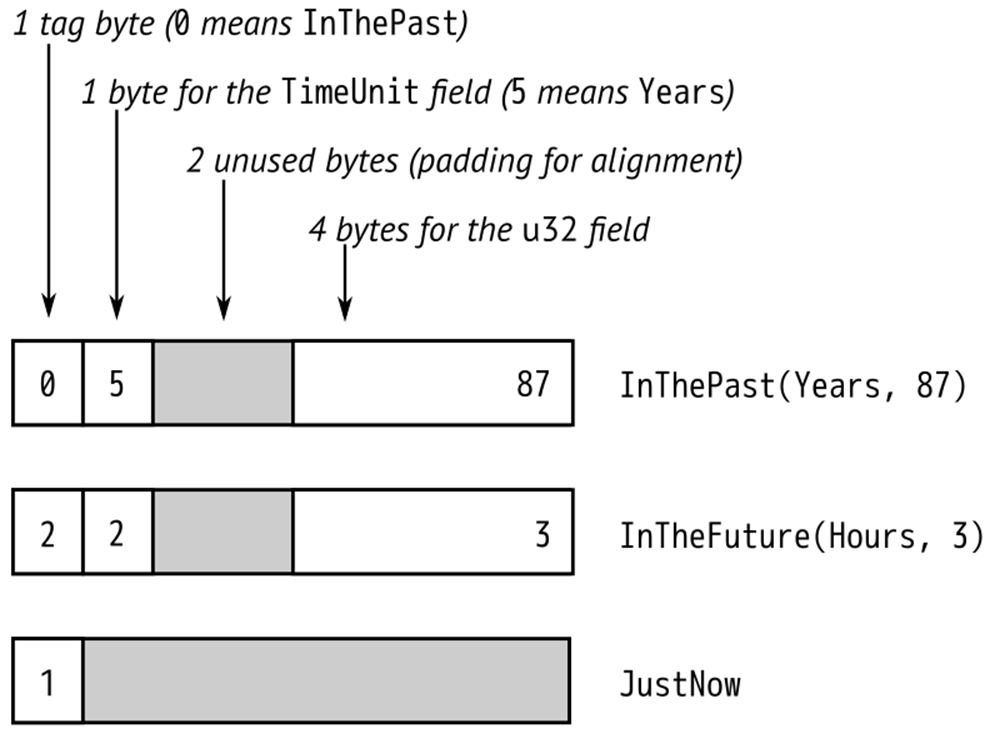
Rust makes no promises about enum layout, however, in order to leave the door open for future optimizations. In some cases, it would be possible to pack an enum more efficiently than Figure 1 suggests. We’ll show later in this chapter how Rust can already optimize away the tag field for some enums.
Rich data structures using enums
Enums are also useful for quickly implementing tree-like data structures. For example, suppose a Rust program needs to work with arbitrary JSON data. In memory, any JSON document can be represented as a value of this Rust type:
enum Json {
Null,
Boolean(bool),
Number(f64),
String(String),
Array(Vec<Json>),
Object(Box<HashMap<String, Json>>)
}
The explanation of this data structure in English can’t improve much upon the Rust code. The JSON standard specifies the various data types that can appear in a JSON document: null, boolean values, numbers, strings, arrays of JSON values, and objects with string keys and JSON values. The Json enum simply spells out these types.
This is not a hypothetical example. A very similar enum can be found in serde_json, a serialization library for Rust structs that is one of the most-downloaded crates on crates.io.
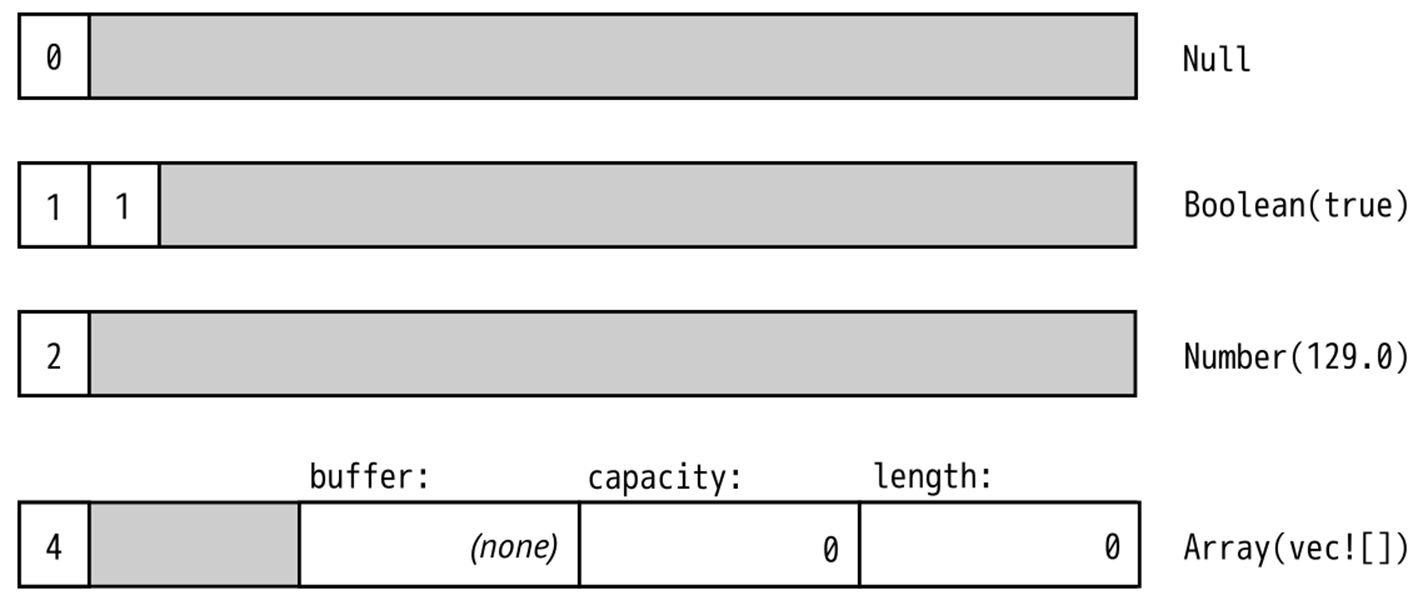
The Box around the HashMap that represents an Object serves only to make all Json values more compact. In memory, values of type Json take up four machine words. String and Vec values are three words, and Rust adds a tag byte. Null and Boolean values don’t have enough data in them to use up all that space, but all Json values must be the same size. The extra space goes unused. Figure 2 shows some examples of how Json values actually look in memory.
A HashMap is larger still. If we had to leave room for it in every Json value, they would be quite large, eight words or so. But a Box<HashMap> is a single word: it’s just a pointer to heap-allocated data. We could make Json even more compact by boxing more fields.
Figure 2 - Json values in memory
What’s remarkable here is how easy it was to set this up. In C++, one might write a class for this:
class JSON {
private:
enum Tag {
Null, Boolean, Number, String, Array, Object
};
union Data {
bool boolean;
double number;
shared_ptr<string> str;
shared_ptr<vector<JSON>> array;
shared_ptr<unordered_map<string, JSON>> object;
Data() {}
~Data() {}
...
};
Tag tag;
Data data;
public:
bool is_null() const { return tag == Null; }
bool is_boolean() const { return tag == Boolean; }
bool get_boolean() const {
assert(is_boolean());
return data.boolean;
}
void set_boolean(bool value) {
this->~JSON(); // clean up string/array/object value
tag = Boolean;
data.boolean = value;
}
...
};
At 30 lines of code, we have barely begun the work. This class will need constructors, a destructor, and an assignment operator. An alternative would be to create a class hierarchy with a base class JSON and subclasses JSONBoolean, JSONString, and so on. Either way, when it’s done, our C++ JSON library will have more than a dozen methods. It will take a bit of reading for other programmers to pick it up and use it. The entire Rust enum is 8 lines of code.
Generic enums
Enums can be generic. Two examples from the standard library are among the most-used data types in the language:
enum Option<T> {
None,
Some(T)
}
enum Result<T, E> {
Ok(T),
Err(E)
}
These types are familiar enough by now, and the syntax for generic enums is the same as for generic structs. One unobvious detail is that Rust can eliminate the tag field of Option<T> when the type T is a Box or some other smart pointer type. An Option<Box<i32>> is stored in memory as a single machine word, 0 for None and nonzero for Some boxed value.
Generic data structures can be built with just a few lines of code:
enum BinaryTree<T> {
Empty,
NonEmpty(Box<(T, BinaryTree<T>, BinaryTree<T>)>)
}
These four lines of code define a BinaryTree type that can store any number of values of type T.
A great deal of information is packed into this definition, so we will take the time to translate the code word-for-word into English. Each BinaryTree value is either Empty or NonEmpty. If it’s Empty, then it contains no data at all. If NonEmpty, then it is a Box, a pointer to heap-allocated data. Since the boxed data contains a value of type T and two more BinaryTree values, a NonEmpty tree can have any number of descendents.
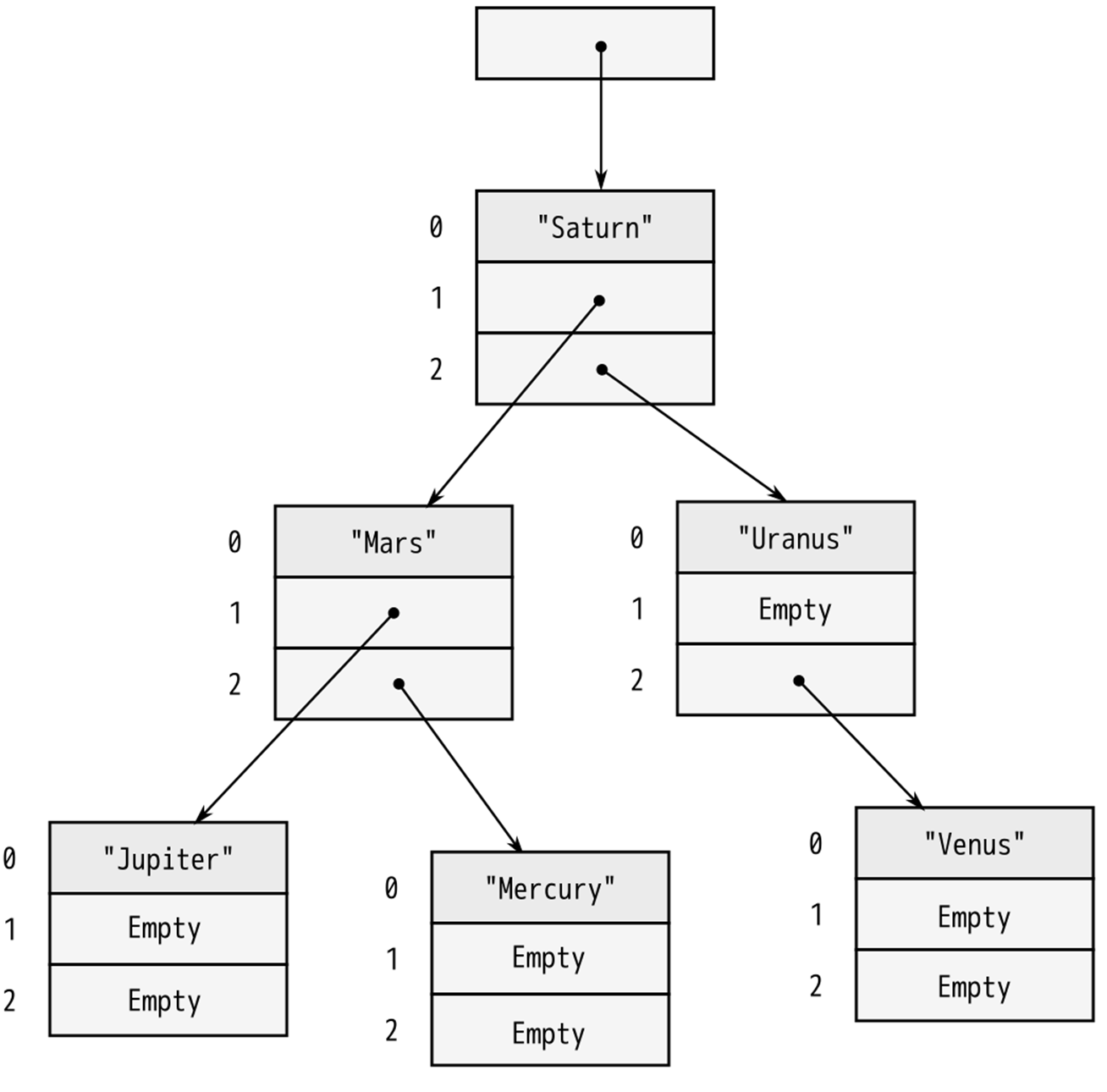
A sketch of a value of type BinaryTree<&str> is shown in Figure 3. As with Option<Box<T>>, Rust eliminates the tag field, so a BinaryTree value is just one machine word.
Figure 3 - A BinaryTree containing six strings
Building any particular node in this tree is straightforward:
use self::BinaryTree::*;
let jupiter_node = Box::new(("Jupiter", Empty, Empty));
Larger trees can be built from smaller ones:
let mars_node = Box::new(("Mars",
NonEmpty(jupiter_node),
NonEmpty(mercury_node)));
Naturally, this assignment transfers ownership of jupiter_node and mercury_node to their new parent node.
The remaining parts of the tree follow the same patterns. The root is a BinaryTree::NonEmpty value.
let tree = NonEmpty(saturn_node);
Later in this chapter, we will show how to implement an add method on the BinaryTree type, so that we can instead simply write:
let mut tree = Empty;
for planet in planets {
tree.add(planet);
}
Now we come to the diabolical “price” mentioned in the introduction. The tag field of an enum costs a little memory, up to 8 bytes in the worst case, but that is usually negligible. The downside to enums (if it can be called that) is that Rust code cannot throw caution to the wind and try to access fields regardless of whether they are actually present in the value.
let r = shape.radius; // error: no field with that name
The only way to access the data in an enum is the safe way: using patterns.
Patterns
We’ve shown examples of pattern matching throughout the book. Now it’s time to show in detail how it works.
1 fn rough_time_to_english(rt: RoughTime) -> String {
2 match rt {
3 RoughTime::InThePast(units, count) =>
4 format!("{} {} ago", count, units.plural()),
5 RoughTime::JustNow =>
6 format!("just now"),
7 RoughTime::InTheFuture(units, count) =>
8 format!("{} {} from now", count, units.plural())
9 }
10 }
Lines 3, 5, and 7 consist of a pattern followed by =>. Patterns that match RoughTime values look just like the expressions used to create RoughTime values. They both look just like function calls. This is no coincidence. Expressions produce values; patterns consume values. The two use a lot of the same syntax.
Suppose rt is the value RoughTime::InTheFuture(TimeUnit::Months, 1). Rust first tries to match this value against the pattern on line 3. It doesn’t match:
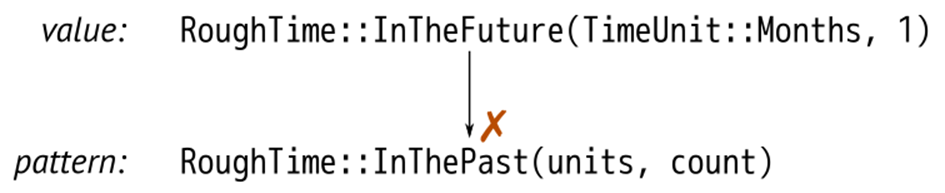
Pattern matching on an enum, struct, or tuple works as though Rust is doing a simple left-to-right scan, checking each component of the pattern to see if the value matches it. If it doesn’t, Rust moves on to the next pattern.
The patterns on lines 3 and 5 fail to match. But the pattern on line 7 succeeds:

When a pattern contains simple identifiers like units and count, those become local variables in the code following the pattern. Whatever is present in the value is copied or moved into the new variables. Rust stores TimeUnit::Months in units and 1 in count, runs line 8, and returns the string "1 months from now".
The output has a minor grammatical issue which can be fixed by adding another arm to the match:
RoughTime::InTheFuture(unit, 1) =>
format!("a {} from now", unit.singular()),
This arm matches only if the count field is exactly 1. Note that this new code must be added before line 7. If we add it at the end, Rust will never get to it, because the pattern on line 7 matches all InTheFuture values. The Rust compiler notices this kind of bug and flags it as an error.
Unfortunately, even with the new code, there is still a problem with RoughTime::InTheFuture(TimeUnit::Hours, 1). Such is the English language. (This too can be fixed by adding another arm to the match. Try it out.)
A common beginner mistake with pattern matching is trying to use an existing variable in a pattern:
fn print_if_equal(x: i32, y: i32) {
match x {
y => // trying to match only if x == y
// (it doesn't work: see explanation below)
println!("{} == {}", x, y),
_ => // error: unreachable pattern
println!("not equal")
}
}
This fails because identifiers introduce new bindings. The pattern y here creates a new local variable y, shadowing the argument y.
Tuple and struct patterns
Tuple patterns contain a subpattern for each element. A tuple can be used to get multiple pieces of data involved in a single match:
fn describe_point(x: i32, y: i32) -> &'static str {
use std::cmp::Ordering::*;
match (x.cmp(&0), y.cmp(&0)) {
(Equal, Equal) => "at the origin",
(_, Equal) => "on the x axis",
(Equal, _) => "on the y axis",
(Greater, Greater) => "in the first quadrant",
(Less, Greater) => "in the second quadrant",
_ => "somewhere else"
}
}
As the example shows, _ works as a subpattern, and it does exactly the same thing it does as a pattern: match any value. Because it doesn’t store the value anywhere, it also provides a hint to other programmers that the program doesn’t care about that value. _ is called the wildcard pattern, or sometimes the “don’t-care” pattern.
Struct patterns use curly braces, just like struct expressions. They contain a subpattern for each field:
match balloon.location {
Point { x: 0.0, y: height } =>
println!("straight up {} meters", height),
Point { x: x, y: y } =>
println!("at ({}m, {}m)", x, y)
}
In this example, if the first arm matches, then balloon.location.y is bound to the new local variable height.
Suppose balloon.location is Point { x: 3.0, y: 4.0 }. As always, Rust checks each component of each pattern in turn:
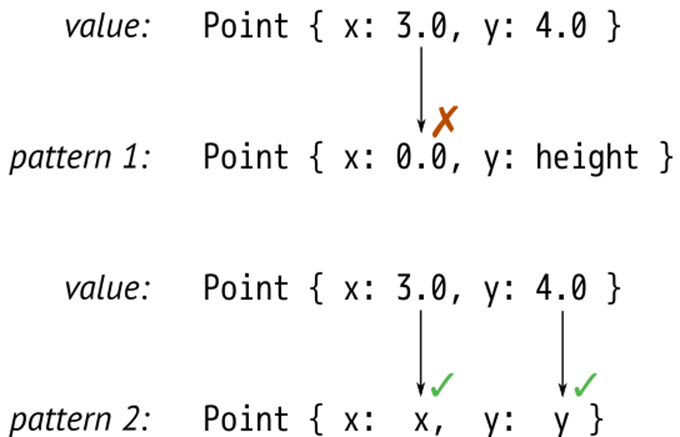
Patterns like Point { x: x, y: y } are common when matching structs, and the redundant names are visual clutter, so Rust has a shorthand for this: Point {x, y}. The meaning is the same. This pattern still stores a point’s x field in a new local x and its y field in a new local y.
Even with the shorthand, it is cumbersome to match a large struct when we only care about a few fields:
match get_account(id) {
...
Some(Account {
name, language, // <--- the 2 things we care about
id: _, status: _, address: _, birthday: _, eye_color: _,
pet: _, security_question: _, hashed_innermost_secret: _,
is_adamantium_preferred_customer: _ }) =>
language.show_custom_greeting(name)
}
To avoid this, use .. to tell Rust you don’t care about any of the other fields.
Some(Account { name, language, .. }) =>
language.show_custom_greeting(name)
Reference patterns
Rust patterns support two features for working with references. ref patterns borrow parts of a matched value. & patterns match references.
Matching on a non-copyable value moves the value. Continuing with the account example above, this code would be invalid:
match account {
Account { name, language, .. } => {
ui.greet(&name, &language);
account.show_hats(ui); // error: use of moved value
}
}
account cannot be used after pattern matching, because its name and language fields were moved into local variables, and the rest were dropped. The program needs to borrow account.name and account.language instead of moving them. The ref keyword does just that:
match account {
Account { ref name, ref language, .. } => {
ui.greet(name, language);
account.show_hats(ui); // ok
}
}
In this example, the local bindings name and language are references to the corresponding fields in account. Since account is only being borrowed, not consumed, it’s OK to continue calling methods on it.
The opposite kind of reference pattern is the & pattern. A pattern starting with & matches a reference.
match sphere.center() {
&Point3d { x, y, z } => ...
}
In this example, suppose sphere.center() returns a reference to a private field of sphere, a common pattern in Rust. The value returned is the address of a Point3d. If the center is at the origin, we could say:
assert_eq!(sphere.center(), &Point3d { x: 0.0, y: 0.0, z: 0.0 });
So pattern matching proceeds like this:
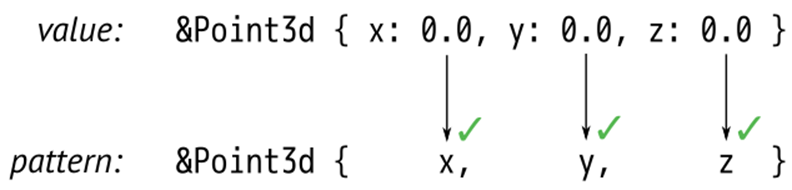
This is a bit tricky because Rust is following a pointer here, an action we usually associate with the * operator, not the & operator. The thing to remember is that patterns and expressions are natural opposites. The expression (x, y) makes two values into a new tuple, but the pattern (x, y)does the opposite: it matches a tuple and breaks out the two values. It’s the same with &. In an expression, & produces a reference. In a pattern, & consumes a reference.
Let’s look at one more example of an & pattern. Suppose we have an iterator chars over the characters in a string, and it has a method chars.peek() that returns an Option<&char>: a reference to the next character, if any. (Peekable iterators do in fact return an Option<&ItemType>, as we’ll see in [Link to Come].)
A program can use an & pattern to get the pointed-to character:
match chars.peek() {
Some(&c) => println!("coming up: {:?}", c),
None => println!("end of chars")
}
Matching multiple possibilities
The vertical bar, ‘|’, can be used to combine several patterns in a single match arm.
let at_end =
match chars.peek() {
Some(&'\r') | Some(&'\n') | None => true,
_ => false
};
In an expression, | is the bitwise OR operator, but here it works more like the | symbol in a regular expression. at_end is set to true if chars.peek() matches any of the three patterns.
Use ... to match a whole range of values. Range patterns include the begin and end values, so '0' ... '9' matches all the ASCII digits.
match next_char {
'0' ... '9' =>
self.read_number(),
'a' ... 'z' | 'A' ... 'Z' =>
self.read_word(),
' ' | '\t' | '\n' =>
self.skip_whitespace(),
_ =>
self.handle_punctuation()
}
Pattern guards
Use the if keyword to add a guard to a match arm. The match succeeds only if the guard evaluates to true:
match robot.last_known_location() {
Some(point) if self.distance_to(point) < 10 =>
short_distance_strategy(point),
Some(point) =>
long_distance_strategy(point),
None =>
searching_strategy()
}
@ patterns
Lastly, identifier @ pattern creates a new variable, like identifier, but only succeeds if the given pattern matches. It’s used to grab a value and simultaneously check something about its internal structure:
match self.job_status() {
// bind the result to 'success', but only if it's an Ok result
success @ Ok(_) => return success,
Err(err) => report_error(err)
}
It’s also useful with range patterns:
match chars.next() {
Some(digit @ '0' ... '9') => read_number(digit, chars),
...
}
Table 7-1 summarizes Rust’s pattern language.
|
Pattern type |
Example |
Notes |
|
Constant |
100 "name" None |
matches an exact value |
|
Range |
0 ... 100 'a' ... 'k' |
matches any value in range, including the end value |
|
Wildcard |
_ |
matches any value and ignores it |
|
Binding |
name mut count |
like _ but moves the value into a new local variable |
|
Binding with subpattern |
val @ 0 ... 99 ref circle @ Shape::Circle { .. } |
match the pattern to the right of @, use the variable name to the left |
|
Borrow |
ref field |
match all or part of a value without moving it |
|
Enum pattern |
Some(value) None Pet::Orca |
|
|
Tuple pattern |
(key, value) (r, g, b) |
|
|
Struct pattern |
Color(r, g, b) Point { x, y } Card { suit: Clubs, rank: n } Account { id, name, .. } |
always matches unless a subpattern fails to match |
|
Dereference |
&value &(k, v) |
matches only reference values |
|
Multiple patterns |
'a' | 'A' |
in match only (not valid in let, etc.) |
|
Guard expression |
x if x * x <= r2 |
in match only (not valid in let, etc.) |
|
Table 7-1. Patterns |
||
Where patterns are allowed
Although patterns are most prominent in match expressions, they are also allowed in several other places, typically in place of an identifier. The meaning is always the same: instead of just storing a value in a single variable, Rust uses pattern matching to take the value apart.
This means patterns can be used to...
// ...unpack a struct into three new local variables
let Point3d { x, y, z } = center;
// ...iterate over keys and values of a HashMap
for (id, document) in &cache_map {
println!("Document #{}: {}", id, document.title);
}
// ...run some code only if a table lookup succeeds
if let Some(document) = cache_map.get(&id) {
return send_cached_response(document);
}
// ...manually loop over an iterator
while let Some(_) = lines.peek() {
read_paragraph(&mut lines);
}
// ...automatically dereference an argument to a closure
// (handy because sometimes other code passes you a reference
// when you'd rather have a copy)
let sum = numbers.fold(0, |a, &num| a + num);
Each of these saves two or three lines of boilerplate code.
Populating a binary tree
Earlier we promised to show how to implement a method, BinaryTree::add(), that adds a node to a BinaryTree of this type:
enum BinaryTree<T> {
Empty,
NonEmpty(Box<(T, BinaryTree<T>, BinaryTree<T>)>)
}
We now know enough about patterns to write this method. An explanation of binary search trees is beyond the scope of this book, but for readers already familiar with the topic, it’s worth seeing how it plays out in Rust.
1 impl<T: Ord> BinaryTree<T> {
2 fn add(&mut self, value: T) {
3 match *self {
4 Empty =>
5 *self = NonEmpty(Box::new((value, Empty, Empty))),
6 NonEmpty(ref mut node) =>
7 if value <= node.0 {
8 node.1.add(value);
9 } else {
10 node.2.add(value);
11 }
12 }
13 }
14 }
Line 1 tells Rust that we’re defining a method on BinaryTrees of ordered types. This syntax is explained in the next chapter.
The pattern on line 5 is the key:
NonEmpty(ref mut node) =>
This pattern matches if *self is a non-empty tree. A successful match borrows a mutable reference to the Box, so we can access and modify data inside the box. That reference is named node, and it’s in scope from line 7 to line 11. The rest is simply a matter of accessing the three fields of that boxed triple.
The big picture
Enums and structs are complementary. Structs group together values that are so closely related that they occur together; enums are just the opposite, grouping values that are so closely related they don’t occur together.
enum ThatGuyStandingOverThere {
ClarkKent(Glasses, Notebook, Pencil),
Superman(SpecialPowers, Cape, Tights)
}
Rust’s enums may be new to systems programming, but they are not a new idea. Traveling under various academic-sounding names, like “algebraic data types”, they have been used in functional programming languages for more than forty years. It’s unclear why so few other languages in the C tradition have ever had them. Perhaps it is simply that for a programming language designer, combining variants, references, mutability, and memory safety is extremely challenging. Functional programming languages dispense with mutability. C unions, by contrast, have variants, pointers, and mutability—but are so spectacularly unsafe that even in C, they’re a last resort. Rust’s borrow checker is the magic that makes it possible to combine all four without compromise.
Programming is data processing. Getting data into the right shape can be the difference between a small, fast, elegant program and a slow, gigantic tangle of duct tape and virtual method calls.
This is the problem space enums address. They are a design tool for getting data into the right shape. For cases when a value may be one thing, or another thing, or perhaps nothing at all, enums are better than class hierarchies on every axis: faster, safer, less code, easier to document.
The limiting factor is flexibility. End users of an enum can’t extend it to add new variants. Variants can only be added by changing the enum declaration. And when that happens, existing code breaks. Every match expression that individually matches each variant of the enum must be revisited—it needs a new arm to handle the new variant. In some cases, trading flexibility for simplicity is just good sense. After all, the structure of JSON is not expected to change. And in some cases, revisiting all uses of an enum when it changes is exactly what we want. For example, when an enum is used in a compiler to represent the various operators of a programming language, adding a new operator should involve touching all code that handles operators.
But sometimes more flexibility is needed. For those situations, Rust has traits, the topic of our next chapter.
All materials on the site are licensed Creative Commons Attribution-Sharealike 3.0 Unported CC BY-SA 3.0 & GNU Free Documentation License (GFDL)
If you are the copyright holder of any material contained on our site and intend to remove it, please contact our site administrator for approval.
© 2016-2026 All site design rights belong to S.Y.A.