The Enterprise Cloud: Best Practices for Transforming Legacy IT (2015)
Chapter 2. Operational Transformation
Key topics in this chapter:
§ Transforming managed services into cloud services
§ Virtualization of servers, network, and storage
§ The relentless pursuit of automation
§ Adding customer visibility and transparency into cloud operations, monitoring, and reports
§ Accessing cloud services
§ Data sovereignty and on-shore support operations
§ New backup and recovery techniques
§ Cloud operational changes in an Information Technology Infrastructure Library model (ITIL)
§ Operational transformation best practices
This chapter focuses on the operational lessons learned during the initial years of the cloud services industry. Based on customer cloud deployments and industry leader experience, it became apparent that the transition to the cloud is much more than just implementing new technology. The day-to-day aspects of how an organization operates also need to evolve, whether you’re following a public cloud consumption model or especially if you’re deploying an enterprise private cloud for your organization.
Whether you have started your cloud transition or are still considering it, this chapter will help you on your way. We will discuss topics valuable to any organization looking to gain the benefits of cloud computing or just modernize a traditional IT department. I will cover the changes relating to IT and datacenter operations, changes in staffing skills, processes, and recommended organizational changes to carry out a successful transition to the cloud — in other words, how to transform to this new style of IT service delivery.
Transforming Managed Services
Many organizations have a significant amount of existing network, computer, and application infrastructure hosted on one or more datacenters. Modernizing these existing datacenters involves deploying new technology and processes that are also critical to a cloud environment. In this section, I will cover specific people, process, and technology topics to transform from a traditional managed service within existing enterprise datacenters to a cloud environment.
An area in which organizations fail is underestimating the transformation from a managed service to a cloud service. One common mistake made by even the most experienced IT managers is to take a traditional server farm or datacenter used over the past 10+ years, implement some form of virtualization, and then declare that you now have a cloud service. Although many are successful in staging some individual cloud-like capabilities and processes within traditional enterprise datacenters, it is the traditional managed services model that must be replaced with a service-oriented cloud model. You can begin the transition to a cloud service model within an existing enterprise datacenter by first adopting new procedures and technologies, improving IT personnel skillsets, and then deploying an initial private cloud infrastructure within the existing datacenter. Here are some high-level guidelines for modernizing an enterprise datacenter, and managed services mode, that will start your journey to cloud services:
Automation
A key aspect of cloud computing is the automated provisioning of compute and application services. To truly meet the cloud characteristics of elasticity and on-demand resource ordering, allocation, and provisioning, you cannot rely on human beings or manual processes. Your cloud service must be able to provision new services on the fly, anytime, 24-7-365, without delay or human intervention. If you are still relying heavily on manual processes and personnel, you are still in the managed services model, not a cloud model. To host cloud services at an appropriately low price, you must implement automation in as many places as possible, or you will not achieve the proper financial business model to support a cloud service offering. Automation isn’t just about cost efficiency: it’s also about providing consistent quality, rapid provisioning and scale up/scale down, continuous software updates and patching, and auditable processes for security and compliance.
Key Take-Away
If you still rely on manual processes and extensive operational staff, you are still in a managed services model — not a cloud model.
Security
Although you are automating the provisioning of new servers or virtual machines (VMs), you should not remove the process for a security accreditation or security officer’s approval. The cloud provider, along with the customer in private cloud scenarios, must adapt legacy security processes to fit within this automated cloud provisioning environment. This usually means preapproving or certifying the templates by which all new VMs are launched. If the template is approved, so too should be any VM that is an exact replica of that template. All manual security approvals or pausing within the automated ordering and provisioning workflow should be avoided.
Key Take-Away
Security operations need to adapt to support the automated deployment of new servers, applications, and software-defined datacenter resources (e.g. storage, networking, monitoring). Security operations are often one of the most difficult legacy processes that must adapt to the new style of IT.
Operations and monitoring
Due to the level of automation, the cloud system should also automatically update asset and configuration management databases within the cloud datacenter. This means updating server, network, application, and security monitoring systems at all hours of the day or night. When you bring new cloud services (e.g., VMs) online, you should immediately add them to the security and operational systems so that proper management and monitoring can begin. If a manual process by a human being is involved, there will be delays in the system going online and becoming part of the monitored ecosystem, which will result in less guaranteed consistency and build quality.
Attempting to use existing IT or datacenter staffing and processes can lead to failure. Many legacy pre-cloud IT operational team structures and skillsets are aligned by technology such as servers, operating system (OS) type, storage, networking, and security. Consider implementing staff and structure in a more service-oriented model such as automation, infrastructure, and applications, with a focus on the end-customer application and use case. I discuss this in depth later in this chapter.
Key Take-Away
Legacy enterprise operational staff and processes should be evaluated and possibly restructured with a new cloud service-oriented model.
Cloud management
The cloud management system usually begins with a web-based portal that gives customers visibility into their cloud services, billing, reporting, and self-service management of their applications and user accounts. A cloud management platform, which is detailed in Chapter 7, performs all IT systems management, provisioning, and automation. If you do not have this self-service control panel, and customers must place a support ticket for a manual administration task, you have a managed service, and not a cloud service.
Cloud management systems are by far the most underestimated and overlooked area in the transformation to cloud services. This is especially true when a large organization deploys a private cloud without a well-designed and carefully configured cloud management platform. The cloud management system forms the basis for the customer’s user interface and user experience, automation, provisioning, billing and financial tracking, and system operations.
Key Take-Away
The cloud management system is by far the most underestimated and overlooked area in using or deploying a cloud service. Without the automated provisioning, resource tracking, elasticity, and on-demand service ordering provided by the cloud management system, you do not have a cloud service.
Cloud security
Security is often pointed to as the number one concern of organizations planning their cloud transition. The first thing to understand is that clouds are not automatically less secure than an internal enterprise network — this is a common misconception. As a basic starting point, take all of the traditional IT security best practices and then combine them with security risks that are specific to a cloud environment, as I detail in Chapter 6. Also evaluate all of your applications and data to determine which are more sensitive workloads that should have special protections in a cloud environment, or if they should remain an on-premises mission-critical application not deployed in a cloud environment. Lastly, reevaluate all security processes and update them to support the elasticity, automation, and on-demand nature inherent to a cloud environment. As discussed in Chapter 6, with proper planning, technology, processes, and governance, cloud environments can be even more secure than a typical on-premises enterprise cloud.
Beginning the Cloud Transition
Most successful organizations begin to use cloud services for rather simple applications or use cases and then steadily migrate more and more applications and data to the cloud over time. Organizations cannot adopt and move to the cloud instantaneously. Migrating applications and data to the cloud takes significant time and planning. Organizations can begin with the services easiest to migrate, such as public website hosting and email services, and then move on to databases, development and testing, multitier platforms, and custom enterprise application transformation.
Figure 2-1 illustrates how organizations often move to cloud-based services in phases — because this is a complex process, moving too quickly can result in spiraling costs, delayed schedules, and other negative impacts to the organization’s mission.
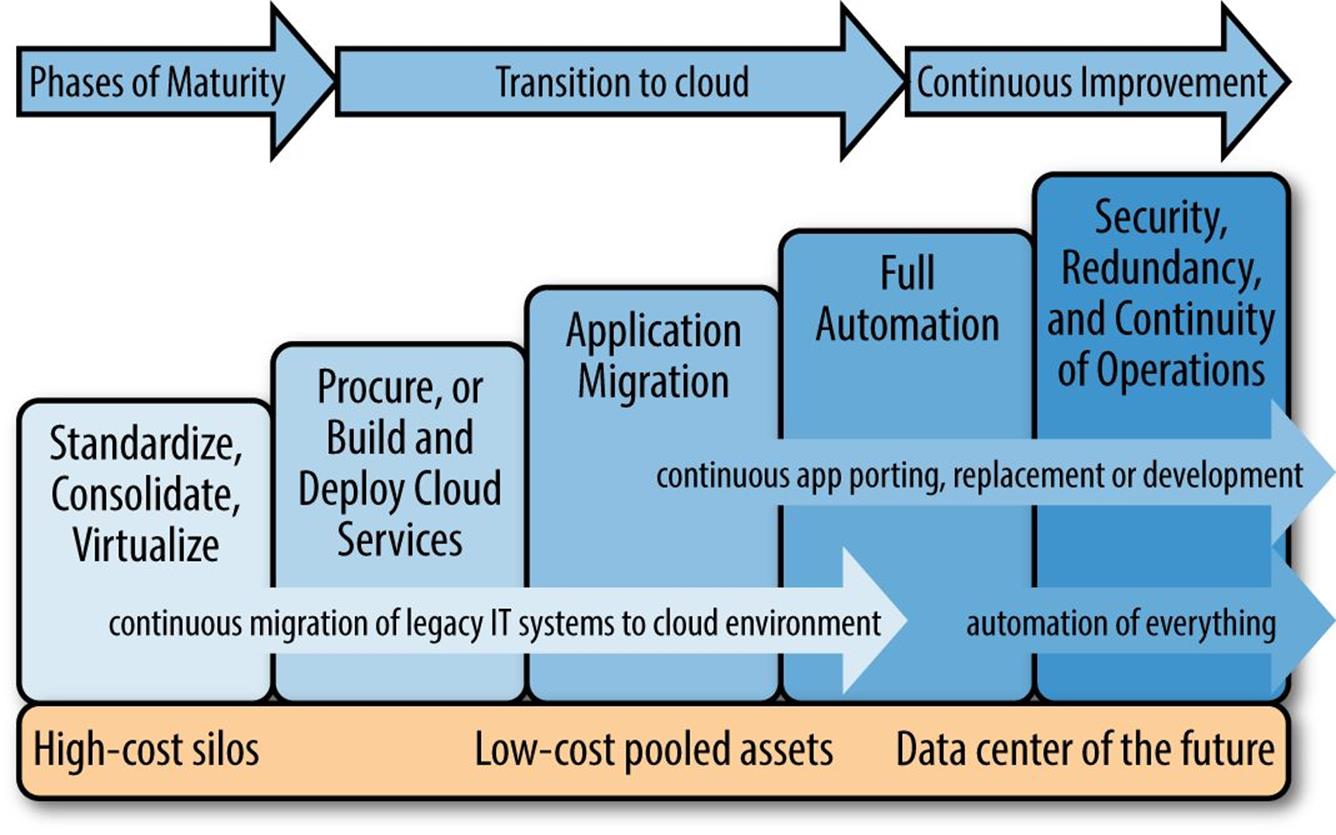
Figure 2-1. Phases of the cloud transition
The transition to cloud-based services is represented in five phases, which are described in the following list (note that some of these phases are more applicable to the transition to an enterprise private cloud — a core focus of this book — and less applicable to consumption of a public cloud service):
Phase 1: Standardized, consolidate, virtualize
To begin the transition, organizations often begin (even in their legacy datacenters) to standardize technologies and consolidate their server farms and datacenters — this is part of any datacenter modernization project, even if the cloud is not the end goal. This often includes implementing virtualization instead of physical servers as well as the implementation of centralized or virtualized storage using storage area networks (SANs) or similar storage systems. This phase is also where you should begin automating all existing server, OS, and applications using a combination of scripting and automated software installation tools (achieving full automation is phase 4).
Phase 2: Procure or build and deploy cloud services
A second phase of cloud deployment and transition is the deployment of a private cloud management platform (this is discussed further in Chapter 7), often within an existing enterprise datacenter. Building a private cloud requires careful planning, design, and implementation, so hiring an experienced cloud systems integrator is often the best way to ensure success. You might also begin procuring and using some public cloud services in this phase, such as one or more SaaS applications, Dev/Test services, or cloud storage.
Phase 3: Application migration
After the basic infrastructure and services of the cloud are deployed, you need to consolidate and modernize legacy applications. As detailed earlier, you can port some applications to a cloud service model rather easily, whereas some will require significant software development and transformation. Some large organizations have so many internal software products that this phase can take many years. At a minimum, you should target all new application development projects for cloud deployment while legacy applications are carefully evaluated on their return on investment (ROI) and feasibility for migration.
Phase 4: Full automation
Use the cloud management platform to configure automated ordering, approvals, provisioning, upgrades and patching, and monitoring. It is important to continuously evaluate and transform all legacy IT processes into automated ones. As much as possible, you should automate every process, from online ordering to provisioning of VMs and applications, to shorten deployment time, reduce personnel labor costs, and improve the accuracy and consistency of systems configuration. Although you should have begun basic automation in phase 1, this phase is where you bring the numerous individual scripts, application installers, and automation tools into an overall orchestration system in which you create service designs and workflows using the cloud management platform.
Phase 5: Security, redundancy, continuity of operations
You should evaluate legacy operational and security processes, because many will need to change before the cloud services are completed and online. Automated provisioning requires some precertification or blessing from IT security personnel of the VM templates, software-defined networks, storage mapping, OSs, and application platforms. This phase also includes building redundancy and resiliency, including the ability to continue operations of server farms, VMs, applications, and the cloud management platform in the event of localized or complete datacenter failure. Security operations and governance will be fully defined and matured in this phase — eventually transitioning to a fully operational state at the end of this five-phase cloud transition plan.
Virtualization
There are several types of virtualization technologies ranging from servers to networks and storage. Virtualization is an essential tool in setting up cloud computing, automated service provisioning, distributed computing, and portability of cloud services. Virtualization is part of modernizing a datacenter, but deploying virtualization in a legacy datacenter is not the same as a fully automated, on-demand, elastic cloud environment.
Figure 2-2 depicts the evolution from traditional on-premises datacenters to enterprise cloud computing. Similar to Figure 2-1, this illustration shows the maturity and evolution of capabilities, such as virtualization and automation, that a traditional IT service goes through during the journey to a cloud — whether it’s a private on-premises option or hosted with a third-party or public cloud.
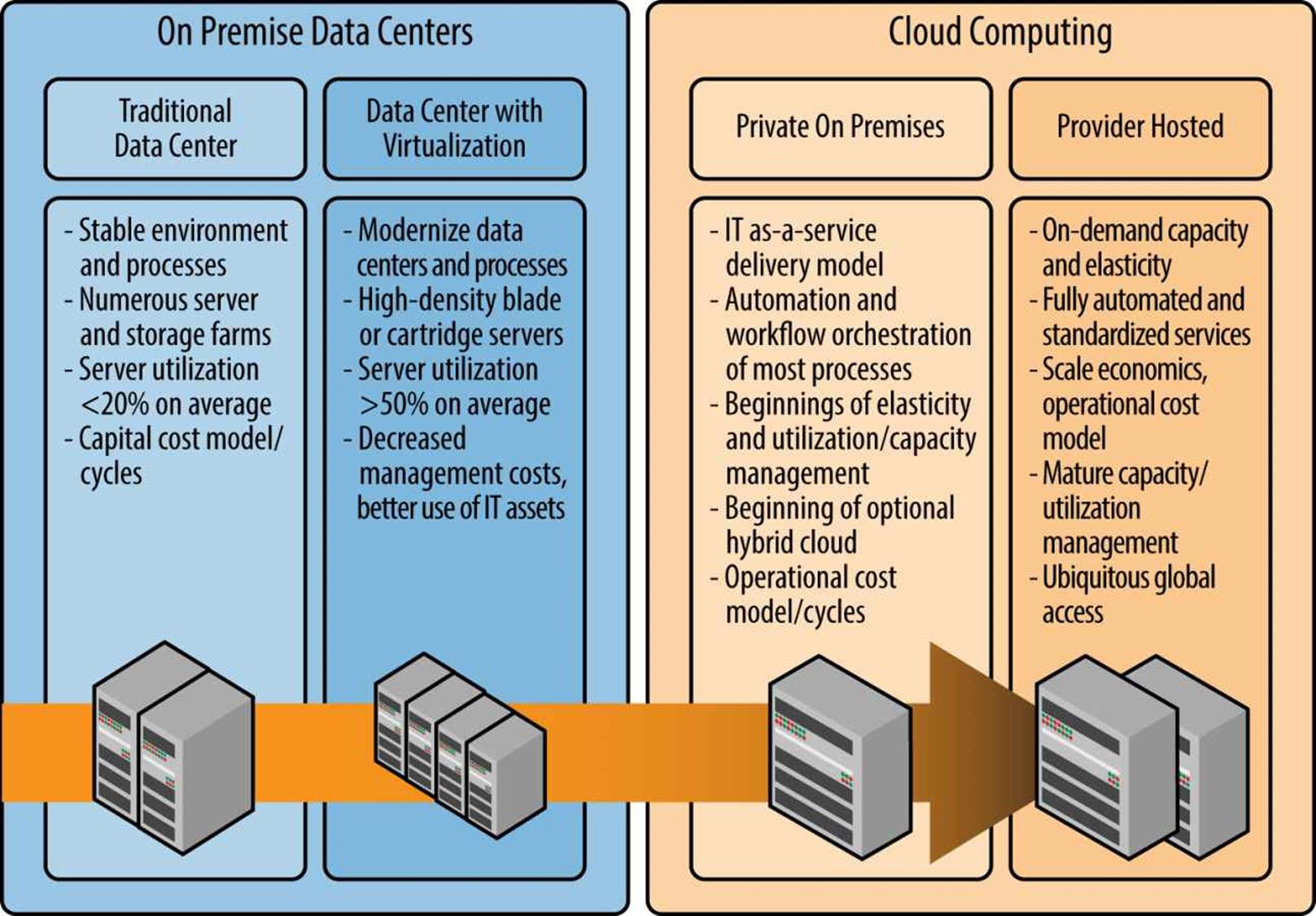
Figure 2-2. Modernizing datacenters with virtualization and the evolution to the cloud
Server Virtualization
Virtualization of servers is often the first thing everyone envisions when you talk about cloud computing. This technology makes possible the virtualization of physical servers into multiple VMs using hypervisor software systems such as VMware or Microsoft Hyper-V. Server virtualization means that instead of loading one OS onto a physical server, you split that server into multiple logical or virtual servers, each of the virtual sessions being a VM. There are numerous software applications that load on the physical server to create multiple VMs — these are usually calledhypervisors. Microsoft Hyper-V, VMware, Kernel-based Virtual Machine (KVM), Citrix Xen, and Parallels are the five most common virtualization products on the market. Although VMware is arguably the most mature product in this category, I will not compare these products in this book — there are benefits to each, and cloud providers often use multiple hypervisors.
Key Take-Away
Virtualization is a tool often used to modernize datacenters and is a critical technology for cloud environments; however, implementing virtualization does not mean you now have a cloud environment.
There is a certain amount of overhead resources (compute, memory, and storage) used by the hypervisor itself that affects both the number and size of VMs that can fit onto a single physical server. Using numerous physical servers — whether they are rack mounted or blade based — you have access to a pool of servers, each running the selected hypervisor. This gives you significant capacity to start multiple VMs as needed, with each capable of being a different sized VM, based on how much processor power, memory, and storage is needed. By splitting the physical servers into many VMs, you gain efficiencies that you would not normally have using strictly physical servers. This is one of the primary techniques that cloud providers use, as well as within traditional datacenters, to make better use of hardware assets.
Virtualization of servers brings several unique advantages to a cloud-computing environment:
Better CPU utilization
Most physical servers with a single OS suffer a significant amount of underutilization. A properly sized physical server is deployed to handle the normal workload expected for its business purpose, but often these workloads have spikes in utilization, such as when users first log on each morning or during large batch jobs or processes that run every evening. During the lesser-used period of time, all of the excess CPU cycles are idle. A hypervisor virtualization system will take all spare CPU cycles from across all VMs and use them on the VMs that need and can benefit most from the additional processing power. This dynamic allocation of CPU resources is handled by the underlying hypervisor product and is completely transparent to both the consuming organization and usually the OS and applications running on the VMs. Note that hypervisors and VMs can be configured (by the cloud provider) so that they guarantee a minimum level of performance at all times, but it is also possible for the system to be “oversubscribed,” and VMs could compete for available CPU cycles. Consumers of VMs should understand their hypervisor and VM configurations and the minimum guaranteed VM CPU service level.
Memory allocation
Each VM and the operating system running within it must be allocated a certain amount of memory in order to run. Because of the limitations of most OSs, it is difficult or impossible to dynamically allocate additional memory on the fly without an OS reboot. A common but mistaken belief is that you can dynamically allocate memory on all running OSs — this is only possible in some situations, but it will become increasingly common in future OS versions from some software vendors. The solution is to install a lot of memory into each physical server and continue using static memory allocations for each VM. This is made realistic due to the relatively low cost of memory.
VM portability
In a properly configured cloud environment, each VM can be booted from any available physical server node in the server farm, datacenter, or across multiple datacenters. This provides a level of continuity of operations and redundancy, with the OS and applications within the VM being unaware of this capability. This portability, or moving a VM to any available node, also affords infinite expansion of the server farm for more capacity as well as flexibility in operations and maintenance. You can shut down physical servers easily for maintenance purposes, with all VMs moving to another hardware node with zero customer impact.
Hypervisor Virtualization Types
The exact method that each hypervisor utilizes to virtualize the OS into VMs is proprietary to each software vendor. Most hypervisors are capable of running different types and versions of the most popular Windows and Linux OSs. Where hypervisors differ is in the way they handle processor, memory, and network isolation within each physical server and in the way large quantities of VMs are managed. There are essentially two types of hypervisor architectures, which were originally defined back in the mid-1970s but are still valid today: Type 1 and Type 2. Both of these are defined and described here:
Type 1
A Type 1 hypervisor runs on “bare-metal” computer hardware as the system kernel or base OS and then manages multiple VMs — each VM running its own OS and applications. This is the most commonly used form of hypervisor for IaaS virtual machines.
Figure 2-3 shows an example of a Type 1 hypervisor architecture in which one physical server is divided into multiple VMs, using software (the hypervisor) to create individual OS and application stacks. This notional example in Figure 2-3 presents only 3 VM “stacks,” but physical servers can often host 20 or more VMs depending on its installed processor and memory.
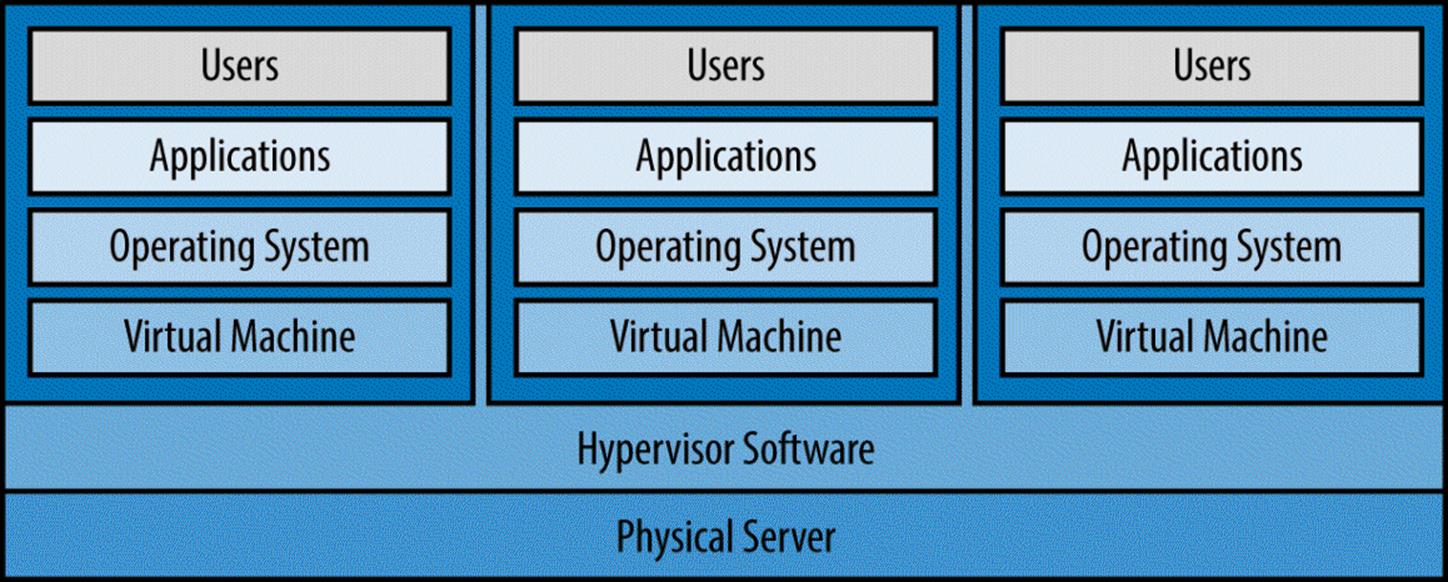
Figure 2-3. Type 1 hypervisor architecture
Type 2
A Type 2 hypervisor runs a single OS and virtually provides multiple users with their own applications and/or desktop sessions — technically, there is only one instance of the OS with virtual sessions (simulating a VM) allocated to each user. Figure 2-4 shows a Type 2 hypervisor architecture. Notice that there is one instance of the OS running on the physical machine and, technically, there are no VMs — the hypervisor isolates applications and user sessions from one another rather than creating actual VMs as in a Type 1 architecture.
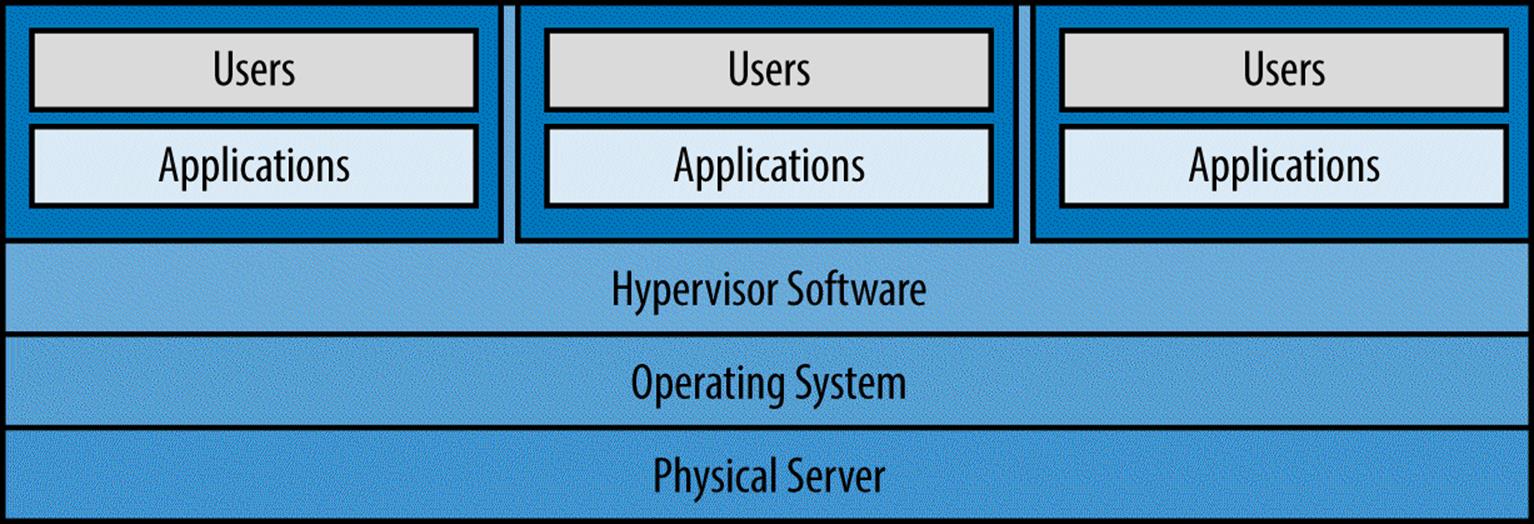
Figure 2-4. Type 2 hypervisor architecture
Throughout this book I use the term hypervisor, but I do not specify which type; however, commercial cloud providers most often utilize Type 1 hypervisors because they provide more separation and isolation of VMs and user sessions. Type 2 hypervisors are most often used for virtual desktop sessions such as remote desktop protocol (RDP) access into Microsoft Windows Server operating systems. Table 2-1 lists examples of each hypervisor type.
|
Type |
Hypervisor |
|
1 |
§ VMware ESX/ESXi § Microsoft Hyper-V § Kernel-based VM (KVM) § Citrix XenServer § Parallels Server Bare Metal |
|
2 |
§ Microsoft Terminal Services — RDP § VMware Workstation § VirtualBox § Parallels Virtuozzo § Oracle VM Server |
|
Table 2-1. Examples of hypervisor types |
|
Although not a specific type of hypervisor, there is significant new movement in the industry for application container technology. This involves an application engine running on each VM with multiple application containers, each container running a separate isolated application in its own memory space. You can load and run application containers on multiple VMs as a scale-out, redundancy, and resiliency technique. This technology is further discussed in Chapters 7 and 9, but I mention it here because this application container technology is often incorrectly defined as a form of hypervisor. Although application containers are similar to Type 2 hypervisors, they are actually just an individual application platform running on top of an OS that happens to support multiple application containers and handles allocation of memory.
Figure 2-5 demonstrates this application container architecture. In this example, the application engine is run on top of a Type 1 hypervisor architecture (i.e., within VMs); however, these application engines could be run on a dedicated physical server without a hypervisor. Also note that this example shows only three VMs and only two application containers, but in a real-world production scenario, there could likely be 20 or more VMs and application containers in each, depending on the amount of available memory and processor capacity in the physical server.
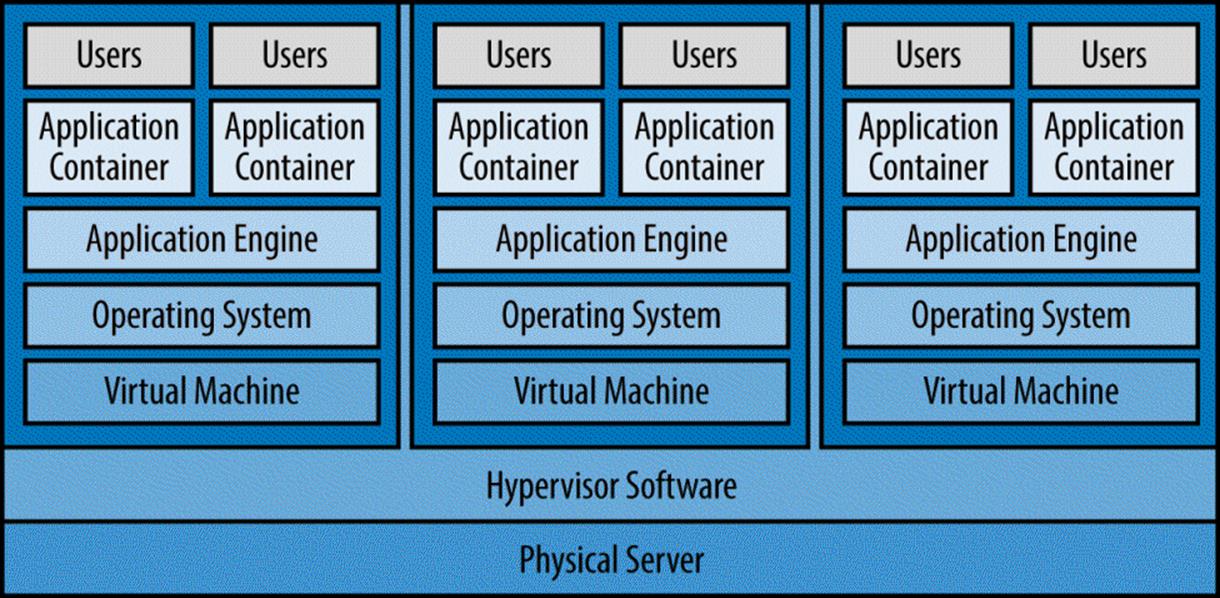
Figure 2-5. Application container architecture
VM Templates
One of the critical time-savers and benefits of using VM or hypervisor technology is the ability to define one or more VM images. These machine images, also called VM templates, are preconfigured images of the OS, updates and patches, and any software applications. When a cloud customer orders a new VM, it can select from one or more VM templates, with each one offering a unique configuration, OS version, or preinstalled applications. Upon the automated provisioning of each VM, the hypervisor copies the template and the OS is booted — all within seconds. The cloud system can normally boot dozens, if not hundreds, of new VMs within minutes of being ordered, which is a capability provided by automation within the cloud management system.
It is best to avoid having so many templates that their management becomes a burden. For every template you have, you must also manage that template going forward so that the latest OS version, patches, and applications are preloaded. If you have too many variations of the templates because every customer claims they are “unique,” you end up paying for the management of all these templates, either directly or through the cost of the hosted cloud service provider. Also understand that when you take on responsibility for each VM template, you own all future updates and new OS revisions for that VM until that OS is retired many years from now.
Another consideration is the use of templates and “recipe-based” application installation packages. Templates are fully configured images of a disk preconfigured with an OS and applications. An installation package approach means that you stick with a very basic template that contains the base OS to launch the VM, followed by a scripted installation process that installs all of the latest updates and most of the application software. Using this installation approach, you can have fewer templates, and whenever you want to change or update your cloud service offering, you simply change the scripts and application installation packages.
Network Interface Virtualization
Within each VM are virtual network interface cards (NICs). These virtual cards emulate physical NICs found in a physical server. The flexibility is tremendous in a VM environment, because you can have numerous virtual networks per VM, creating subnetworks for VMs to communicate with one another, all within the same physical server. You can create multilayer networks for frontend web application servers, middleware application servers, and backend database servers, each with their own network subnet and each using virtualized NICs. Of course, some of the virtual NICs will need an external network address and connection to the real production network. The key here is that you do not need to use physical network switches, routers, and load balancers to set up all of the networking, VLANs, and subnets you need. The virtual networking tools within the hypervisor can handle much of the work and be launched and configured in an automated fashion when a customer orders and starts a new VM. You can configure this level of automation on physical network hardware, but it is often risky and against traditional IT security policies.
The preceding is solely a description of virtualized network interfaces within a VM configuration. The overall topics of network virtualization, software-defined networking, and software-defined datacenters are covered in Chapter 9.
Storage Virtualization
Virtualization of storage is typically implemented by using a SAN or other hardware and software devices that present massive pools of storage through a unified storage management interface. When you configure and start a VM, the needed amount of storage is allocated from the existing pool of available storage logical unit numbers (LUNs) on the SAN. Storage is mapped to VMs over a SAN or network fabric or switch in most cases.
You can also utilize local storage installed within each physical server when configuring hypervisors and VMs, but it is not recommended, because you lose significant capabilities. This is a somewhat controversial topic, given that some modern clouds and storage systems now recommend numerous scaled-out storage nodes with direct-attached storage rather than deploying a SAN. I will explain here and in Chapter 3 why SANs are arguably still superior for traditional IT data centers and enterprise cloud environments. For example, if you have a VM mapped to a storage LUN (not an internal hard drive), you can then relocate the VM to another physical server anywhere in your server farm, or even another datacenter, and still have it map back to the correct storage LUN. If the storage on the local physical server were used, the only way to have the VM “move” to another physical server would be to replicate all of the data to the other physical server. However, in a true cloud computing environment, you don’t know which other physical server the VM will be moved to, and therefore you don’t know where to precopy the data. This virtualization of storage is a key technology used in cloud computing and most modern datacenters, because it utilizes both the flexibility of VMs with the flexibility of virtual storage mapping.
Storage needs, whether structured or unstructured, increase massively each year. To handle this data, there are two possible solutions: either store less data for less time, or keep increasing the storage. Many organizations are finally starting to realize that they cannot keep up with the amount of new data being created and are thus setting limits on what should be stored — and more important, evaluating whether we really need to keep aging data forever. For those organizations that cannot delete older data, due perhaps to compliance or legal reasons, storage technologies such as compression and de-duplication come into play.
The relationship between storage and cloud compute is clear. You cannot have cloud computing without storage, and currently, disk-based storage (or hard drives) is the primary method. Advancements in solid-state drives (SSDs) and memory-based storage will ultimately bring about the end of disk platters within storage systems. We will also see technologies such as memory resistors (or memristors, for short) potentially replace all existing storage devices. This storage technology is important both in terms of capacity and performance, but it would take an entire book to cover this development in great detail.
As for the importance of storage as it relates to cloud computing, the backend storage system for a cloud service requires unique characteristics that might not normally be required of traditional server farms:
§ Ability to provide multiple types of cloud storage (e.g., object, block, application-specific), regardless of actual physical storage hardware
§ Ability to quickly replicate data or synchronize across datacenters.
§ Ability to take a snapshot of data while the system still operational. These are used for backup or restoration to a point in time.
§ Ability to de-duplicate data across entire enterprise/storage system.
§ Ability to thin-provision storage volumes.
§ Ability to back up data offline from production networks, and back up huge data online without system outage.
§ Ability to expand storage volumes on the fly while the service is online.
§ Ability to maintain storage performance levels, even as data changes and load increases. It also must have the ability to automatically groom data across multiple disk types and technologies in order to maintain maximum performance levels.
§ Ability to recover now-unused storage blocks when VMs are shut down (auto-reclamation).
§ Ability to virtualize all storage systems, new and legacy, so that all storage is represented as a single storage system.
§ Ability to provide multiple tiers of storage to give customers a variety of performance levels, each at a price per gigabyte or terabyte, depending on need.
Figure 2-6 depicts how server virtualization combined with key cloud attributes is the foundation for cloud computing. That being said, these same virtualization and cloud characteristics (e.g., automation, scalability, and self-service) can easily be part of any datacenter modernization project, even if cloud computing is not the goal.
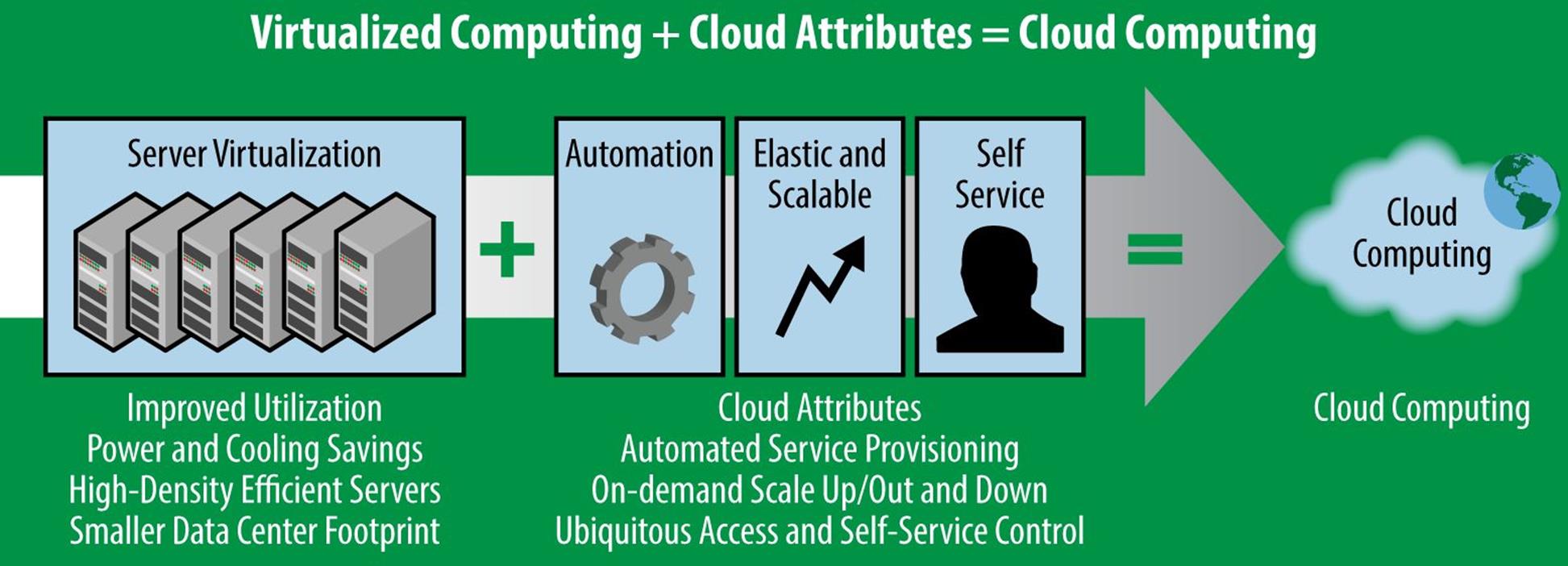
Figure 2-6. Virtualization + cloud attributes = cloud computing
Automation
The automation of provisioning and launching of new services has been mentioned throughout this chapter. Cloud management systems are covered in depth in Chapter 7, but the important point to note at this juncture is the importance of automation in cloud computing environments. Without automation, many of the benefits and characteristics of cloud computing could not be achieved at a price point and service level that makes cloud services attractive to customers while still allowing the business to be viable. Failure to automate as many processes as possible results in higher personnel labor costs, slower time to deliver the new service to customers, and ultimately higher cost with less reliability.
What is meant by automation? This can best be described by going through a typical case scenario of a customer placing an order within their cloud service portal, and following the steps necessary to bring the service online.
USE-CASE SCENARIO: AUTOMATION WITHIN CLOUD MANAGEMENT SOFTWARE
1. A staff member of a small business that works with a cloud services provider logs on to a web-based cloud portal and views a catalog of available services.
2. She selects a cloud service: a medium-sized VM running the Linux OS. The service catalog shows this VM size comes with two CPUs, four GB of memory, and 50 GB of disk storage at a price of $250 per month. She choses two of these packages and then goes to the checkout section of the cloud provider’s website.
3. In a public cloud, customers normally pays for services using a credit card or an existing financial account or purchase order agreement that is on file with the cloud provider. Private cloud customers often use a chargeback method of accruing fees that are billed back to one or more departments at the end of each billing period. The customer’s employee completes the checkout process.
4. The customer has an approval process in place (especially for a private cloud deployment) that requires the organization’s procurement team to sign off on the order before it is finalized. So, the cloud management system sends an email to the designated approver of this order. The procurement team’s designee receives the email, clicks the URL link, logs on to the cloud portal, and approves the order.
5. The cloud management system sees the order was approved and immediately begins the process of building the requested VMs. The system knows which server farms and pools of available resources it has, and automatically selects which physical server node will host the VMs initially. Storage is allocated and assigned to the new VMs and a template is used to create them.
6. The VMs are booted for the first time and any needed patches or updates are automatically installed. The cloud management system detects that the VMs have launched and are ready for the customer. It charges the customer’s credit card or deducts funds from the customer’s online account with the provider.
7. The cloud management system automatically updates internal assets and configurations, and operational and security systems about the newly created and booted VMs. This triggers other internal IT operational systems for performance, capacity, configuration, and security monitoring of the new VMs — there is no manual process or delay bringing these new VMs under full management and operational control within the datacenter.
8. The cloud management system sends a welcome email to the customer’s employee indicating the network address along with logon instructions for how to use her new VMs. The email also contains information on where to obtain documentation and who to call for support.
9. The customer’s employee logs on to the VMs and performs any further application installations, configurations, and loading of production data. The cloud provider manages all future system updates and ensures that systems are operational at all times, while the customer’s employee manages her organization’s applications and custom configurations. Many cloud providers offer optional fully managed services for OS and application patching and updates.
10. The cloud management system automatically renews and bills the customer every month (or whatever the billing cycle is). Depending on the type of service offered, there also might be variable expenses; for example, if she wants the VMs to automatically increase memory, processors, or storage upon increased load. The cloud management system will provide the metered resource information to the customer, and charge her organization accordingly.
Key Take-Away
Without automation, most of the characteristics and benefits of cloud could not be achieved at an economical price.
The preceding scenario demonstrates that there does not need to be a human involved with the cloud service provider anywhere in this process. In a real public cloud scenario, this process takes place repeatedly at all hours, thousands of times each day. This is where the cloud provider gains such scales of economy that the customer is paying less for their cloud service than it would have if it built and hosted the service itself. Without automated processes and cloud management systems, none of these economies of scale are possible and the cloud provider’s costs would be anticompetitive. For an enterprise private cloud, automation provides cost savings and efficiency, but other benefits are just as important, such as rapid time to market and provisioning, consistent quality, improved compliance and security, elasticity, and so on.
There are many other aspects of automation, provisioning, and self-service control panels, which you can read about in Chapter 7. This is an incredibly important topic — arguably a top-five reason why a cloud provider or on-premises cloud system will succeed or fail in the long run.
Providing Customers Transparency to the Cloud
An important yet often overlooked feature of a successful cloud is the ability for the consuming organization to have visibility into its service status, security, costs, and utilization statistics. When an organization moves its services to the cloud, it depends on the cloud service provider to perform the organization’s mission-critical business functions or service its customers. A major obstacle for new cloud customers to overcome is the feared loss of visibility and control.
In a cloud that is owned and operated by a cloud provider, there is normally a centralized staff and an array of deployed tools to handle cloud management, monitoring, assets, alerts, security, and network operations. The goal is to minimize staffing labor costs and best service the customers; the problem is that all the centralized data and the aforementioned software tools are not often designed to allow numerous customers to see these activities. The best tools that a cloud provider might utilize are not necessarily the best tools for multitenant access and separation of dashboards, statistics, and reports for each customer. This leaves the customers essentially blind when using cloud services as compared to legacy IT environments, in which the customer might have hosted server farms and applications themselves and had a complete view or access to their system.
Implicit trust in the cloud provider only goes so far; customers who cannot see their service status, performance statistics, security, and event logs might not be able to satisfy the needs of their customers, their internal employees, and their executive management. Imagine that you have no way to track the usage of your cellular phone minutes, history, or missed calls. Now, imagine you needed this data for your compliance requirements, chargeback to specific departments, or to just confirm that your service plan isn’t so large that you are overpaying for the actual amount of services you use. This cell phone example is simplistic, but it effectively illustrates the idea.
Customers looking to procure services from a cloud provider — or implement their own private or community cloud — must evaluate providers and services. The cloud service must be able to share needed metrics, reports, system status, logs, and other data in real-time; less ideal is receiving a monthly report that is already a week or two old when you receive it.
Key Take-Away
Customers shifting to cloud computing want visibility into all of their systems, including status, utilization, and event logs, just as they had (or even better than what they had) with their internally hosted IT systems.
Cloud Provider Management Tools and Customer Visibility
It is important to note that cloud providers are not intentionally concealing all of this data from customers. The base software systems for network, security, and operations management within datacenters and server farms are usually the weak link. Major customer organizations and cloud providers often deploy software tools that provide robust features to monitor and manage the hypervisors, applications, and network infrastructure. However, these software tools are often not “cloud aware,” or cloud friendly; they often have no concept of multitenancy, so events, statistics, and logs across all server farms and applications end up in one giant database for the centralized support team to utilize. In fact, these software tools were designed to consolidate utilization and system events from thousands of IT systems for a centralized IT team to view, manage, and remediate problems. These tools have no awareness of which VMs, for example, are being used by a certain customer — each physical IT asset and VM is identified only by IP address or some other nomenclature that is not personally identifiable to a customer. The bottom line is that some of the best compute and network management tools available in the industry are not necessarily the best for multitenant cloud environments.
To tackle these issues, leading cloud providers either create their own infrastructure monitoring tools that integrate with their cloud management systems or heavily adapt multiple commercial off-the-shelf (COTS) products. This is an enormous and expensive undertaking and the reason why there is a significant gap in capabilities between one cloud provider/cloud management system and another when you compare them carefully.
The most flexibility and customization of infrastructure management tools and the cloud management platform is in a private cloud deployment, whereby a public cloud will have significantly less configuration flexibility. This is not intended to excuse cloud providers; rather, it’s to help you better understand why they will often have significant issues providing the visibility their customers desire at the expected low cloud computing prices.
Multiple Tenants/Customers
A key feature of a public cloud — and even some private clouds — is the ability to host services for multiple customers, departments, and users. When a cloud is sold to multiple organizations or departments, all customers benefit from the shared environment in the form of reduced costs and increased capabilities that no single organization could afford or have the skills necessary to deploy and manage. Multitenant is the term used when referring to hosting multiple customers — or tenants — in a shared environment. Critical to offering services to multiple tenants is the isolation and security of data, portals, workflows, and reporting such that no customer would otherwise be aware that other customers even exist. This separation of functions and security of data is done through a combination of security roles, policies, permissions, access control lists, and, in some cloud models, physical separation of servers, storage, networks, or applications.
Shared customer management
Some customers want to share the work of managing the cloud or its applications; a common solution is for the cloud system to have a customer-accessible, web-based control panel. From this portal, the provider defines roles for each customer, giving its administrators and support personnel a limited view of the services and applications. The customer might be allowed to configure the applications or manage user accounts. This self-service control panel also hides the complexity of the behind-the-scenes computing and applications, providing customers with consistent user-friendly administration across many applications. This concept is very common in public cloud services, but more flexibility and control is possible in a private cloud model.
Chapter 7 is dedicated to cloud management and addresses this issue and what customers can expect — and should demand — from a cloud provider or an enterprise private cloud management platform.
Accessing Cloud Services
Another often-overlooked area is how your organization will access its cloud services. By definition, cloud services are available via the Internet, or a wide area network (WAN) communications circuit between an organization and cloud provider. The concerns to be discussed involve bandwidth, network or Internet latency between end users and the cloud provider, and physical or virtual network circuits.
Many organizations that have traditionally hosted their own server farms have now moved their systems to a cloud provider, so the servers and applications they access might lie somewhere very distant. Because this distance might entail network hops and bandwidth limitations, your end users might no longer experience the same level of performance to which they had become accustomed. You must carefully plan a combination of application architecture, cloud infrastructure, and communication paths.
Application Performance
Applications hosted by a cloud provider can both benefit and suffer from the cloud transition. The applications themselves will likely run faster and, of course, be more scalable because the cloud offers more compute, memory, and storage capacity as needed. All cloud compute and storage systems reside with each other in the same datacenters, so performance is often improved. Also, other applications, VMs, and hosted virtual desktops all being located in the same facility can improve performance. End users might now access these services via Internet connections with greater bandwidth than a single customer datacenter would possess.
The potential downside of cloud applications is encountered with chatty (also called thick) client-server applications. These programs are characterized by running the server portion on the cloud, with a locally installed application on desktop workstations. Many legacy applications are considered chatty (noisy is yet another term), meaning they have a significant amount of network traffic between the user’s workstation and the backend server-side application. If these legacy applications exist, they are good candidates for being rewritten, or customers might consider using Workplace as a Service, which deploys virtual desktops in the cloud, located in the same datacenter as the server-side application. Another approach is to use similar Workplace as a Service technology to implement application publishing rather than full virtual desktop. This is described at greater length in Chapter 4.
Key Take-Away
Large legacy applications can sometimes use virtual desktop or application publishing techniques — allowing legacy applications to be hosted in the cloud without rewriting them. These legacy applications might not fully benefit from cloud elasticity and scalability, but you can use application publishing as a temporary bridge while apps are redesigned as a cloud-enabled system.
Cloud Compute VMs
Accessing VMs hosted in the cloud, as in Infrastructure as a Servce (IaaS) and Development/Testing as a Service (Dev/Test), is normally accomplished in two ways. The first is for customer IT staff or administrators to log on to the cloud management portal, from which there is normally a self-service control panel with which customers can start, stop, reboot, or check the status of their VMs. Also through this control panel, the customer might be able to remotely control the VM, similar to a virtual desktop sending display, keyboard, and mouse activity back to the end user. However, the actual VM and OS are hosted and running in the cloud.
Accessing the cloud-based VMs through self-service cloud management is sometimes cumbersome. Often, the customer only wants to grant higher-level managers access to the cloud management portal. How does an average network administrator log on to his VM to install software or change the configurations of the OS? You can do this through remote control software such as the Microsoft Remote Display Protocol (RDP) client application, which is a part of the base Windows OS. Another popular alternative is Virtual Network Connect (VNC), which is native on some OSs, or the customer can install it on top of an OS. The cloud provider will need to have its firewalls configured to allow such remote control sessions.
When assessing VM services and various public cloud providers or cloud management platforms for private cloud, there are key features that you should compare. Not all VMs or IaaS applications are the same when you really take an in-depth look. The following are some important features to compare:
OS availability
Do you have choice of OSs and versions?
Size of VMs
Do the VMs scale large enough for your current and future needs?
High availability
Look for redundancy, disaster recovery, availability groups, and the ability to easily configure additional continuously replicated clones of each VM within same datacenter or secondary datacenters/regions.
Scale up and scale out
The ability to increase the size of VMs (scale up) or increase the quantity of VMs (scale out) automatically based on workload or peak usage, and then scale down automatically when workloads return to normal.
Updates and patching
Does the cloud provider continuously update and patch the OS and applications, or is this the customer’s (i.e., your) responsibility? Cloud providers might charge more for this optional service.
System events and visibility
As the customer, what real-time visibility do you have into utilization statistics, and event monitoring (e.g., security or system status events)?
Workplace as a Service
Workplace as a Service (WPaaS) is dependent on connecting end-user thin-client devices with a virtual desktop, hosted at the cloud provider’s datacenter. This requires more bandwidth than was needed when the desktop OS was running locally on a physical workstation. The cloud provider or systems integrator can assist with the planning, testing, and upgrades to network circuits to meet the increased bandwidth needs. Sometimes, you can use network acceleration appliances, but they cannot perform miracles if the available bandwidth is too low.
WPaaS offerings also have other network-related considerations that you should discuss with the cloud provider or IT systems integrator. This includes network access from virtual desktops hosted at the cloud provider facility, and the ability to print or access shared data located at the end user’s home network.
USE-CASE SCENARIO: PRINTING VIA VIRTUAL DESKTOP
Imagine a situation in which a virtual desktop user wants to send a file to a network printer located in his office. Because he is accessing the virtual desktop via a thin-client laptop or tablet, all of the computing is actually occurring in the cloud with just the display, keyboard, and mouse activity transmitted over the Internet.
When he prints his document, if the printer is hardwired to his thin-client device, the virtual desktop software knows how to send the print job to the printer via his laptop. However, if the printer is not locally attached just down the hall, this is a different problem entirely. Now, the virtual desktop running in the cloud needs to send the print job over the Internet and then into the company’s internal network to that printer located down the hall. How does the cloud provider know from which office the end user is logging on? Although today he is logging on from the company’s main office, tomorrow he might be doing so from a hotel room across the country. In most cases, the virtual desktop does not have the ability to detect this.
Assuming that the necessary firewall ports are open and configured for this, the print job frequently involves a large amount of data. So, in this scenario, not only is it difficult to determine which printer is the closest device, but due to the size of the print job, the user experience is often very poor — the amount of data being sent over the network is so large that the printing is slow or it times-out with an error before the printer completes the job.
For the network firewalls to allow a remotely running virtual desktop to send a print job back into the corporate network, the IT staff at the user’s office will most likely need to know the IP addresses of the remote virtual desktops. This is a problem because the cloud provider is hosting thousands or tens of thousands of virtual desktop users, and the IP addresses are dynamically assigned as each one logs on; IP addresses are often not in a fixed range.
Another area to be considered for WPaaS is personal and shared files. When users migrate from traditional workstations to virtual cloud-hosted desktops, there is no ability to store files locally. This means that the virtual desktop has both personal and corporate file shares hosted in the cloud, where users can access their files. Part of the WPaaS transition means moving this data to the cloud; but what if not all users are migrating to virtual desktops? Where are the shared data files for the corporation held? What if, on some days, a user logs on via a workstation with local storage, but on other days she logs on to virtual desktops? How then does the user edit a document that she doesn’t have on her virtual desktop, which she might be accessing via tablet or smartphone?
WPaaS is not a new technology; there was a huge push for this thin-client service in the IT industry more than 10 years ago, but the challenges that existed back then still exist today. These challenges are not insurmountable, but they do require more than just purchasing WPaaS from the cloud provider; this particular service needs significant planning to be successful.
Software as a Service
Software as a Service (SaaS) provided and hosted by a cloud provider does not normally include any ability for a customer to log on to the backend servers or OSs. These SaaS offerings are fully managed services, and only the provider’s IT staff are permitted such access to upgrade or manage the applications. To allow customers the capability to configure routine aspects of the software, they create web-based cloud management or self-service control panels. Through these typically web-based portals, the cloud provider grants some level of management of the SaaS applications. This is convenient when a customer has multiple SaaS applications, because this simple user-friendly control panel provides a consistent interface across all applications hosted by the cloud provider, hiding the complexity of numerous individual software consoles that the provider has to deal with on a daily basis. For more details on cloud management systems and self-service control panels for SaaS applications, refer to Chapter 7.
When assessing a SaaS application or service provider, consider the following in your planning and comparison:
§ Which traditional applications running in my organization can be replaced by a SaaS tool? What gaps in functionality would there be?
§ What level of customization is available through a web-based self-service control panel from the SaaS provider?
§ Can any existing software licenses you might have for the traditional application be tranferred to the SaaS application?
§ Are there any minimal contract duration terms or commitments? What steps will you need to take if you decide to stop the SaaS application? Are there early termination fees? How would you export any hosted/online data?
§ Does my cloud management platform have preintegrated support for this SaaS provider and is there a published API by the SaaS provider so that integration and automation can be created?
§ SaaS applications are provided and hosted for multiple customers; they are often less customizable than a traditional IT application run inside the firewall of an enterprise IT organization — this is part of the cost-benefit trade-off.
§ What are the SaaS provider’s standard backup, recovery, and disaster recovery procedures? What about recovery time objectives (RTO) and recovery point objectives (RPO)? What are the service-level agreement (SLA) terms and any limitations on liability to protect data availability and integrity?
Data Sovereignty and On-Shore Support Operations
Data sovereignty refers to the actual geographic location at which the data is stored in the cloud, whether that data is stored in one or more datacenters hosted by your own organization or by a public cloud provider. Due to differing laws in each country, the data can be legally subpoenaed, potentially forcing the cloud provider, or any organization, to turn over the requested data. There is an increasing trend for customers to require that data never be hosted or stored outside of a specific country — meeting mandatory regulations or simply satisfying customer preferences. Further government monitoring, or snooping, on behalf of law enforcement agencies has also become a concern.
Data sovereignty and data residency has become a more significant challenge and decision point than most organizations — and cloud service providers — originally anticipated. Initially, a cloud service provider would state that “you, the customer, shouldn’t care or be bothered with where and how the cloud provider stores your information: we provide service-level guarantees to protect you.” Experience now informs us to ask or contractually force your cloud provider to store your data in the countries or datacenter locations that satisfy your data sovereignty requirements. Customers can also ask that all operational support personnel at the cloud provider be located within your desired country and be local citizens (potentially with background checks performed regularly) — this in combination with data sovereignty will help to ensure that your data remains private and is not unnecessarily exposed to foreign governments or other parties with whom you did not intend to share it.
Key Take-Away
In addition to data sovereignty and residency, customers can ask that all operational support personnel at the cloud provider be located within your desired country and be local citizens (potentially with background checks performed regularly).
Other security regulations and industry standards for data privacy, financial and credit card transactions (e.g., Payment Card Industry Data Security Standard [PCI DSS]), data retention, and archiving might also apply to customer organizations. The more customized and unique the requirement, the more often a private cloud is needed to meet the requirements — public clouds usually service a large number of customers and are less likely to provide individual customization.
The Information Technology Infrastructure Library (ITIL) and Operational Process Changes
When you migrate or add a cloud service to a traditional datacenter or managed service, there are numerous recommended changes in operational procedures. Many of these are based on lessons learned in transitioning from traditional managed service datacenters to cloud-enabled service environments. Some organizations use the term Concept of Operations (ConOps) to introduce these new operational procedures to existing staff. This doesn’t relate as much to a public cloud service, because the provider handles most of these functions for you; the ConOps changes are really for private cloud models, in which the customer is involved with all operations. The operational topics that follow are arranged in Information Technology Infrastructure Library (ITIL) format and nomenclature, to match the many organizations that have adopted ITIL as their service management model.
Most of these ITIL-based process changes are specific to a private or hybrid-cloud models in which the customer or contracted support vendor is performing the daily management and operations of the system. In a public cloud, the cloud provider has most of these responsibilities that must be met to achieve the promised SLA.
Request Management
Ordering of cloud services will be done through the cloud management system, usually a web-based portal. This portal includes a service catalog of all available offerings and options. All orders, cancellation orders, and usage tracking for billing purposes will be handled within this system. Legacy methods for consumers to order services will normally be retired, with this service catalog becoming the new method for ordering services — even if money does not change hands, as in some private or communication clouds.
There can be a link from the cloud management portal to a traditional support ticketing system to allow customers to request assistance. These will be handled in the same manner as any other legacy user request or support ticket.
Incident Management
A common change to incident management will be the monitoring of additional event logs within the cloud services. Because the majority of cloud compute provisioning will be performed in an automated fashion, careful tracking of the event logs and creation of alerts will be essential to detect any failures in the automated processes. For example, you could run out of available memory or storage space — something which you should be proactively monitoring — and therefore all new orders for VMs would fail. As the cloud manager, you will have two areas to monitor and manage incidents:
Cloud infrastructure
You must manage the cloud infrastructure itself, meaning the datacenter facilities, server farms, storage, networks, security, and applications.
Customer services
You will also need to detect when a new VM or other resource is automatically provisioned so that you can begin monitoring it immediately. Because customers will use these services, you might be managing virtual instances of a server or monitoring how many resources a customer is using for billing purposes.
Another area of change in a cloud environment is the integration with any existing helpdesk, incident, or ticketing systems. It is common that the cloud service provider is not the same contracting company that provides the helpdesk or user support ticketing system — often, the ticket system is an internally hosted function of the organization. Integration between cloud-based services, applications, and internal or externally hosted ticketing systems is not a difficult technical task, but it will require support process and operational changes.
Key Take-Away
Organizations often underestimate the changes to traditional IT operations and support when transitioning to a cloud environment. Although there is cost-savings potential in moving to the cloud, it is often the organization’s culture, procurement, security, and political challenges that prevent or delay realized cost reductions.
Change Management
Due to online customer ordering, approval workflow, and automated provisioning systems within the cloud service, change control will be significantly affected, and will need to adapt existing processes.
New VMs
When a customer places an order, the VM(s) will be automatically provisioned. Each VM will be based on preapproved and security-certified OS images, applications, and patch levels. The cloud service portal should be programmed to automatically generate a change control request, with a completed status, upon every successfully automated provisioning event. Any exceptions or errors in the automated provisioning process will be handled through alerts and generate a “completed” change ticket when the VM is online.
Changes to servers and hosts
Customer-requested changes would follow normal change control procedures already in place. Routine maintenance, updates, security patches, and new software revisions will also follow existing change control procedures. A typical exclusion is the Dev/Test service, because these are often VMs provisioned behind a firewall to keep noncertified development applications isolated from production networks. With this service, VMs do not require a change control to allow the developers to do their job without unnecessary delays.
Updates to the Common Operating Environment (COE)
Cloud services automatically deploy templates or build-images of standard configurations. These COE templates will be created by the cloud provider or customer with all updates, patches, and security certifications included. These COE images can be automatically deployed within the cloud environment without going through the typical manual accreditation process for each server. The cloud provider is usually required to update COEs at least every six months to keep the catalog of available OSs and applications up to date. All updated COEs will again go through the manual security approval process, and then they can be ordered and deployed using the cloud’s automated systems.
Key Take-Away
Creating and managing too many common operating environments or VM templates can quickly become costly and unmanageable. Transitioning to the cloud should be accompanied by better discipline and standardization for COEs and templates.
Adding a server (VM) to a network and domain
As each VM is automatically provisioned, it will automatically be added to the network domain. This will be an automated process, but the specific steps required as well as legacy change and security control policies involved need to be adjusted to facilitate this; in the past, this process of joining the domain typically required manual security approval.
User and administrator permissions to new servers and hosts
Similar to the preceding process, as new machines are automatically added to the network, permission to log on to the new OS will be granted to the cloud management system, usually by using a service account. Specific steps to automate this process and adjustments to the existing security processes will need to be made to accommodate this automated process.
Network configuration requests
Every VM-based server has a preconfigured network configuration. In the case of an individual machine — physical or VM — standard OS and applications are installed that require outbound initiation of traffic within the production network, and possibly to the Internet.
All network configuration, load balancing, or firewall change requests follow existing procedures. When possible, the cloud management self-service control panel will allow customers to configure some of this by themselves, although advanced network changes will need to go through normal change control and possibly security approval.
In some VM templates or COEs, there might be multiple servers deployed as part of a COE. For example, a complex COE might include one or more database servers, middleware application servers, and possibly frontend web servers; this collection of VMs is called a platform. In these situations, the VMs have already been configured (as part of the overall platform package) to communicate with one another via the virtual networking built into the VM hypervisor. In the given example, only the frontend web servers would have a production network address, whereas all other servers are essentially “hidden” within the VM network enclave.
Cloud consumers may submit requests to have production firewalls, load balancers, or other network systems custom configured for their needs. When evaluating these requests, the cloud provider should always default to making the changes within the hypervisor virtual network environment. If that is not sufficient, he might consider changing physical datacenter switches, routers, and firewalls; many of the requests can be handled using virtual networking settings within the hypervisor tool.
VM configuration changes
Customers may have the ability to upgrade or downgrade their VM CPU, memory, or disk space within the cloud management portal. Changing this configuration requires a reboot of the customer’s VMs, but no loss of data.
If a customer requests a manual change through a support ticket, the cloud provider will make this change using the cloud management software so that billing and new VM configurations are automatically updated. Do not make changes to the backend hypervisor directly, or the cloud management system will have no knowledge of that change.
Key Take-Away
Manually changing the VM configurations is not the appropriate process; billing and configuration management will not be aware of the new settings, and the downstream asset and change control databases will not be updated. Never make a manual change to a configuration that the cloud management system cannot track.
Release management
All VM templates, COEs, and software will be fully tested in an offline lab or staging network. It will then be quality checked and security approved before any changes to production cloud service is scheduled. Due to the level of automation and precertification of VM compliance and security, software, updates, and so on, release management will be an ongoing effort with increased impact. If new releases go into production with errors or inadequate planning and testing, automation and the cloud will multiply the impact compared to traditional IT.
Configuration Management
The cloud management system will automatically populate the configuration management database of all VMs as part of the automated provisioning process. Because cloud compute services can be ordered, approved, and automatically deployed at any time and on any day the customer desires, this automated update to configuration management is critical. Following are changes to configuration management that you should consider in a cloud environment:
§ Changes to the actual VM servers and hypervisor software should be treated differently than customer-owned (also called guest) VMs. Normally, the cloud provider upgrades its server farm. Then, in a different maintenance window, it schedules any necessary customer upgrades.
§ Customers expect near-zero downtime in a cloud environment, so traditional maintenance windows or outages should be replaced, when possible, with rolling-over production systems to secondary hosts, performing upgrades on the offline systems, and then transitioning back to the primary hosts — preferably without customers experiencing any downtime.
§ VMs running within isolated Dev/Test subnetworks may not require the same level of configuration management as production VMs because they are sandboxes in which developers can work. There is little point in enforcing strict change and configuration management, which only slows down development efforts. Only when the VMs are deployed into production must the developers begin to follow all change, security, and configuration management policies.
§ Updates to the Common Operation Environment (COE) must also be considered. Cloud compute services automatically deploy templates or build-images of standard operating environments. These COE templates will be created by the cloud provider or customer with all updates, patches, and security certifications completed. These COE images can be automatically deployed within the cloud environment without going through the typical manual security process for each server. The cloud provider is usually required to update COEs at least every six months to keep the catalog of available OSs and applications up to date. All updated or new COEs will again go through the manual security approval process before they can be ordered and deployed using the cloud’s automated systems.
§ Finally, update notifications must be considered. Users or consumers of the cloud must be provided with advanced notice — 10 days, for example — before any changes or updates are made to already deployed customer VMs. Customers may “opt out” of any planned upgrade within this window if they believe it will have a negative impact on their project, timeline, or code stability. It is the cloud provider’s goal to keep all new and existing VMs up to date; therefore, the cloud provider should adequately document the need, importance, testing results, and impact of each upgrade to encourage customer adoption of the new updates.
IT Asset Management
All existing procedures for asset management should be followed; however, the automation within the cloud management platform will automatically update asset databases. This automatic real-time update is often part of many government IT security requirements.
As the number of customer orders increases, additional physical blade servers and storage will be required; capacity planning and monitoring is critical to success. As new servers or storage is added, the asset management system will be updated as per normal procedures.
VMs running within Dev/Test (preproduction) and IaaS/PaaS (production) networks must have all assets tracked, including the VM itself and potentially applications contained within VMs.
Cloud environments are normally based on shared infrastructure equipment within datacenters. Assets are usually not owned or dedicated to any one customer. It might be difficult or impossible to assign physical equipment to individuals, departments, or subagencies in an asset database.
Service Desk Function
Most cloud providers — certainly public cloud providers — do not provide tier-1 end-user support; customers normally provide this function or contract a third party. The cloud provider manages all devices and software within its cloud service, and customer IT staff typically manage only their applications or VMs. However, issues can be escalated to the cloud provider through the management portal, email, or telephone, depending on the offering, terms, and conditions.
It should be noted that Dev/Test customers might attempt to submit tickets relating to software development programs or problems found in their custom applications; each of these are development issues that should be handled by the customer’s development staff, not the cloud provider. As a private cloud operator, you might have a software developer support provider or internal team that would be able to assist these Dev/Test consumers.
Key Take-Away
A traditional service management ticketing system is usually not suitable for use as a cloud management system. You can use service management systems as portals for requesting cloud services, but legacy service management systems lack the backend architecture, automation, IT orchestration workflows, and preintegration with various Anything as a Service (XaaS) systems and providers.
As described earlier, the integration with an existing helpdesk, incident, or ticketing systems and the cloud services is necessary. It is common that the cloud service provider is not the same contracting company that provides the helpdesk or user support ticketing system — often the ticket system is an internally hosted function of the organization. Integration between cloud-based services, applications, and internal or externally hosted ticketing systems is not a difficult technical task, but it will require support process and operational changes.
Service-Level Management
Service-level management (SLM) has increased importance in a cloud environment. Cloud services are ultimately based on service availability rather than a detailed scope of work or contract terms between a provider and consumers. This applies to public and enterprise-private clouds. In a cloud environment, the theory is that the cloud provider offers one or more services and a guaranteed level of availability. As long as this is met, the service is considered delivered as promised. This service-oriented approach is more simplistic for a cloud provider to sell its services, but there are many areas a consumer of cloud services, even an on-premises private cloud consumer, should consider.
Although the cloud provider normally establishes service levels, customers might request additional or more enhanced SLAs. Accepting the modified terms is ultimately up to the cloud provider — normally public providers do not change their SLAs; this benefit is available mainly to private deployments. The provider should offer customers some form of reporting mechanisms, such as the following:
§ Online dashboards as well as monthly manual reports (typically included with invoices).
§ SLA performance dashboards showing current and historical SLA adherence and alerts.
§ Utilization metrics shown on dashboards, showing VM CPU utilization levels, memory, disk, network and disk throughput, and uptime. These are all examples of what is normally measured and reported.
§ Billing history as well as all reports and metering should be shown per customer and department.
In a multivendor cloud broker environment, the aggregation of SLA data gathered from all XaaS providers is critical. The cloud broker management system normally performs this aggregation and reporting, providing customers with a single view of the entire hybrid/broker cloud ecosystem.Chapter 8 covers cloud brokering roles, technology, and definitions in more detail.
Availability Management
Cloud providers will utilize numerous technologies such as autoscaling and bursting, redundancy, failover, disaster recovery, data replication, and multiple datacenters to ensure system availability. Inclusion of availability statistics should be included in the cloud management portal for customer visibility.
Other than the cloud service provider(s) meeting the contracted SLAs, availability management and dynamic allocation of resources are functions performed by the cloud provider. Details regarding how the cloud provider performs these functions as well as event logs on activities might not be available to customers or consumers of the cloud service; in this service-level-driven business, the cloud provider’s ability to maintain system availability is built into its SLA calculations and guaranteed availability level.
It is important to remember that, although not specifically part of the definition of the cloud, cloud consumers and the industry have an expectation of near 100% system availability. Public and private cloud operators should not plan or expect to use weekly or monthly maintenance windows or other declared service outages. The technologies used in a modern datacenter and in cloud facilitate failing-over active servers, VMs, and applications to secondary systems to accommodate maintenance and upgrades. The expectation is that a cloud provider should never intentionally or accidentally have all systems offline and unavailable to its customers.
Capacity Management
Constant monitoring of the cloud compute servers and storage systems is required. Because ordering and provisioning is done automatically, 24-7, it is easy for the system to run out of available physical servers or storage, thus causing a failure in future provisioning of new orders. There is lead time required to purchase, install, configure, and certify any new equipment, so monitoring and establishing alert thresholds is critical; the cloud provider needs sufficient time to add capacity. The cloud provider could purchase too much capacity that remains idle until utilized, but this costs money to procure, power, and cool — costs which are eventually passed on to customers. It is far preferable to have a reasonable amount of extra capacity but also put into place rapid replenishment plans.
Note that capacity management needs to consider that the following technologies are deployed in the cloud environment, affecting methods and calculations for capacity planning:
§ All cloud compute physical servers normally run a hypervisor product such as VMware or Hyper-V. These servers and VMs boot from a shared storage and may have no local hard drives.
§ Thin provisioning is commonly used throughout the SAN, thus you need to carefully calculate actual disk usage versus what has been sold and what is remaining in capacity.
§ Thin provisioning free-space reclamation might be a scheduled process to run, not an automatic one. Automatic is preferable, but not all SAN system support it.
§ If over subscription of processors or memory was calculated within the hypervisor configuration, monitoring of system performance and capacity is even more critical.
§ Usable capacity on the SAN does not include additional space to hold any daily backups or snapshots, so actual usable capacity will be 25%-50% higher.
§ Consider having the SAN supplier provide a utility storage agreement, whereby it stages additional SAN capacity at the cloud provider’s datacenters but does not charge the cloud provider until it is utilized. This shares the costs and risk of managing extra storage capacity between the cloud provider and its SAN vendor.
Key Take-Away
Note that several VM sizes are normally available to the customer; as such, the more that an “extra-large” VM is ordered, the more processors, memory, and disk space must be allocated. This means fewer VMs will fit on each physical server, so additional capacity might be needed sooner than expected.
The most important thing to remember with capacity management in a cloud environment is the impact of failure. In a traditional IT environment, running out of capacity might cause a minor inconvenience, a delay in staging a new service or application, or even a short outage while you free up some disk space. In an automated, highly elastic, rapid-provisioning, multitenant cloud environment, failure to monitor, anticipate, and keep up with capacity needs will effect a significant number of customers, costing the organization significant money, reputation, loss of future business, and more. The bottom line is that capacity management has gone from a relatively low-importance item to an extremely high-importance role in a cloud environment.
IT Service Continuity
Cloud providers utilize numerous technologies such as data replication, failover, and multiple datacenters to ensure system availability and continuity of service and operations. Details into how the cloud provider performs these functions as well as event logs on activities might not be available to consumers of the cloud service — the SLA is the key reporting mechanism and standard of performance.
It’s important to understand that continuity is not necessarily just a technology issue. Although not unique to the cloud, your continuity plans might include procedures for how your employees access the company network and applications in the event of natural disasters, datacenter outages, and so on. The only cloud-specific consideration is that the use of a public cloud might give you more options and availability of applications and data because they are hosted in the cloud by a third party as opposed to hosted in a traditional on-premises datacenter.
As a private cloud operator, you are now responsible for both your internal organization and user continuity and any external consumers of your service. There are numerous technologies and products that can facilitate the load balancing, failover, and continuity functions. For details on how to plan and deploy a cloud service (for on-premises use or to become a cloud provider), refer to Chapter 3.
Remember that the redundant systems for high availability or disaster recovery must include the cloud management platform and the actual consumable XaaS servers, storage, and networking. The system will be severely limited and possibly unmanageable if all the XaaS VMs were to failover while the command and control (the cloud management) system remains offline.
Financial Management
Depending on the cloud provider and how billing occurs, customers might need to modify the way they procure the services, amortize IT assets, and manage their budgets. Customers might be able to use ongoing operational funding instead of capital funding to procure cloud services, as was discussed earlier.
Customers might want to establish pools of funding, or purchase orders, so that individual cloud service orders (called subscriptions) are charged against this pool of money. To avoid the finance or procurement department being involved in every microtransaction and subscription, these pools of money have proven to be a more acceptable financial management technique.
Given the ability to place orders through the cloud service provider’s portal, cloud owners must establish policies and governance to delegate authority to managers within the organization who are allowed to place new orders. Purchase orders and contracts would already be in place prior to online ordering but authorization to selected managers also means these managers are allowed to commit the funding of the services. Most service catalogs offer a customizable approval workflow that can be used by the organization to notify and/or seek active approvals from multiple persons to approve each new cloud service subscription.
Remember the key tenets of cloud computing: specifically, pay-as-you-go, shared infrastructure, and scalability. This means the chief information officer (CIO) has better control over utilization and has the ability to scale down as well as scale up as workload and projects require. By analyzing utilization statistics, CIOs can better identify trends in cost and resource usage to scale systems up or down depending on needs and budgets. This detailed level of statistical data is often difficult to collect and analyze for legacy IT systems, but it is a huge benefit to the cloud computing model. The ability to view this data across multiple departments, subagencies, and the organization as a whole will require changes in process, auditing, and oversight.
Security Management
Security management will be significantly involved in the certification of a private cloud offering. VM templates or COEs will need to be precertified by security teams so that users can order services at any time and have the automated cloud management launch everything immediately.
Key Take-Away
Precertification of COEs is often the most significant change to the way organizations run today, but this is critical to the automation of a cloud, and it saves time and money for the customer.
Security will also be involved with any networking change controls or custom COEs created or requested. Internal network changes between VMs in the cloud environment also need to be approved by security, unless the network settings are part of a preapproved COE, in which case security has already approved.
Monitoring and scanning of all physical servers and customer VMs must be continuously performed; data scanning of all new VMs to safeguard against sensitive data loss might also be necessary. The key to success here is to use the cloud management system to automatically add new compute devices to the monitoring systems, so security personnel are immediately aware of new systems, and the monitoring can begin immediately.
In a multivendor hybrid or cloud broker environment, the initial accreditation of each cloud service, provider, and process can be complex and time consuming. U.S. government organizations have recently adopted standards (refer to FedRAMP in Chapter 6) to reduce repetitive accreditation processes by individual agencies, providing a certification for each cloud provider, instead, that each consuming organization will accept.
Security event management and response is another area that often requires changes for cloud environments. The public cloud provider will certainly have its own IT security systems and experts monitoring and responding to potential issues; however, the provider might not share all of this detailed information to its customers. Depending on SLAs and contract terms, the provider might only provide a summary of system and security events every month, for example. Organizations that traditionally have in-depth involvement in every security incident, event, or threat, might not have this level of visibility or involvement when services are hosted and managed by a contracted cloud provider.
Technical Support
The public cloud provider will normally provide technical support to a set, specifically named group of customer personnel. End-user support is often not provided by cloud providers, which forces customers to escalate prevetted issues through select designees to the cloud provider.
The private cloud technical support staff, or developers within a Dev/Test environment, will need to become familiar with hypervisor and cloud management systems to conduct normal operations, troubleshooting, patching, and upgrades.
Key Take-Away
Most public cloud and Dev/Test cloud services do not include software development support for programmers. The public cloud provider is normally only responsible for keeping the IaaS or PaaS infrastructure available, not to respond to questions from software development teams, unless the customer is willing to purchase a higher-priced support option.
Figure 2-7 is a repeat of Figure 1-5, which I’m showing here again to emphasize the roles that the cloud provider handles versus those handled by the customer. Only the SaaS applications are fully managed by the cloud provider, so organizations using cloud services will need to contract for or maintain specific skills in house.
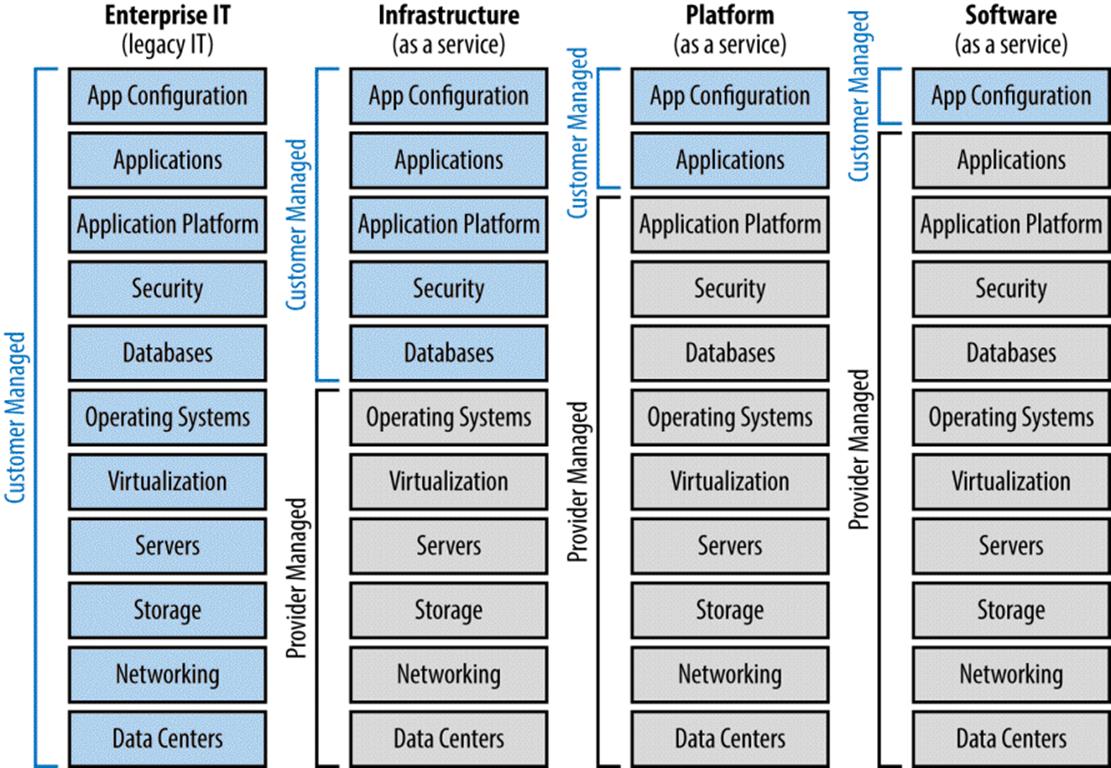
Figure 2-7. Cloud provider versus customer roles for managing cloud services and legacy/enterprise IT
Using Existing Operational Staff
Traditional datacenter or IT operations personnel have specific skills and experience with stable environments and applications, often managing day-to-day systems through runbooks, checklists, and standardized processes for any given event. Operational personnel are often not suited to build and deploy the newest systems and applications. The operational staffs are trained and accustomed to existing IT systems and applications; thus, there is a significant gap in skills when compared to experienced highly skilled cloud network, storage, server, and applications specialists.
Changes in staffing levels and skillsets to support the new cloud environment is a given. As the legacy IT systems are migrated to cloud-centric technologies or providers, the existing IT staff must also evolve. IT staff with new cloud-centric skillsets should be added to legacy IT staffs who are designated to morph into cloud roles. The truth is that the cloud does make it possible for an organization to support more users and applications with the same staff (assuming a growing consumer or customer base) or to reduce staff (for organizations with a fixed or stable consumer or customer base).
There are two recommended operational themes that you can promote and adopt:
Relentless pursuit of automation
All processes — from ordering to approvals and from provisioning to allocated storage and networking — should be automated by using the cloud management platform. Continuously improve the processes and remove manual processes. Use continuous monitoring and alerts to track anomalies and provisioning problems and catch problems before your customers call you.
Continuous migration to the cloud
It takes time and a continuous long-term effort to assess, plan, and migrate legacy data, servers, applications, storage, and the like to cloud-based services. Legacy systems were likely deployed with a three- to five-year technology refresh plan in mind, so this is a good time to roll applications and data to the cloud when the current lifecycle and depreciation has been completed. Mission-critical enterprise applications often require the most amount of planning and potential reengineering to shift to the cloud.
Staffing expectations for the Public Cloud
Organizations utilizing public cloud services should evaluate which applications and IT services can shift to cloud-based services. Based on how much and which workloads are shifted to the cloud, legacy IT staff are often refocused to other purposes critical to the mission of your organization. It is really a myth or extremely rare that an entire organization moves so wholly and quickly to the cloud that IT staff needs to be displaced. The existing staff does need to adapt to the fact that commodity servers, VMs, storage, and applications can now be more quickly staged in the public cloud than through traditional procurement, equipment installation, and configuration — what I call the new style of IT. Applications and server workloads that are shifted to the cloud are typically managed and operated by using a combination of the public cloud’s web-based management portal and remote control/remote desktop logon to the cloud-based server hosts.
Staffing expectations for the Private Cloud
When deployingand planning to operate your own private cloud, using and adapting current datacenter operations staff is more complex. There are many skillsets and legacy processes that need to evolve when managing cloud-based services; virtualized servers, networking, and storage; backup and recovery; software updates and patching; and application installation and maintenance. Experience has shown that many organizations encounter resistance or pushback from existing operational personnel who are now being asked to adapt to new processes and techniques. Usually the legacy staff have every good intention to do well at their job but might have difficulty accepting that their legacy skills and experience are not appropriate or no longer a “best practice” in this new style of IT.
Transforming legacy skillsets and team silos
Many legacy datacenters and operations teams are organized by technology or skillset. Often, teams are organized into silos with a department manager, based on technologies such as servers, OSs, storage, backup and recovery, networking, monitoring, operations, and patching and updates. Because a private cloud involves new processes and best practices that span all of these areas, this is a good time to consider redistributing personnel into different team structures more in line with a service-oriented architecture.
Table 2-2 shows some operational staffing recommendations to consider.
|
TEAM/ROLE |
DESCRIPTION |
TECHNICAL SKILLSET |
|
Service/offering manager |
This is usually a small team, or even a single staff member, that manages what services are offered and future roadmap of feature releases. Responsibilities include the following: Consider having one unique offering manager for every major XaaS offering, depending on customer demand and adoption. This is not a pure sales position; rather, it is an advisor to the customer but with enough technical knowledge to document customer feature requests and know how those requirements translate into new XaaS or cloud portal changes. Individual works closely with new contracted customers to smooth the initial onboarding process and ensure initial orders and needs are met. § Describing the solution, developing corresponding service offerings, and defining the necessary releases. § Working with the internal/external clients to articulate the cloud solution capabilities. § Coordinating with the deployment manager to direct project teams. § Acting as the escalation point from customers to cloud management and technical staff. § Demonstrating and promoting cloud solution to other departments, potential tenants, and customers within the greater (or peer) organizations. |
The person(s) in this role have a unique combination of business, consultative sales, and technical knowledge. Specific skills include the following: § Consulting expertise § Requirements analysis § Managing customer expectations and requests for new features (and determining financial, technical, and support impacts of potentially adding those features). § Ability to demonstrate all customer-facing portals, online ordering, and customization features to customers and end users § Ability to translate customer requests and issue escalation to internal sales, engineering, and support staff |
|
Cloud management platform and automation team |
This team focuses on configuring, monitoring, and continuously improving the private cloud management platform. Responsibilities include the following: § Implementing updates and additions to the consumer-facing cloud portal, the service catalog, XaaS specifications and pricing, and automated provisioning tools and scripts. § During initial cloud launch, this team will be heavily focused on monitoring all new orders, ensuring that they provision successfully, and immediately correcting both the failed provisioning but also the automation/scripts so that future customer orders process correctly. § It is highly recommended that the manager or director of this team also be the manager over server, storage, patch and update, and backup and recovery teams to eliminate individual manager silos and delays in decision making. |
These are the senior-most technical engineers in the operations team requiring knowledge across all network, server, storage, virtualization, OSs, and applications. Specific skills include the following: § Expertise in the cloud management platform, automation tools and scripts, virtualization tools, and APIs § Ability to continuously create and enhance automation processes and tools across all hardware and software components § Expert knowledge of network virtualization, VLANs, virtual private networks (VPNs), and software-defined networks § Expert knowledge of high-density server farms, storage systems, and datacenters spanning multiple datacenters § Expert knowledge of high availability at network, storage, server, and application levels § Expert knowledge of continuity of services across multiple datacenters and facilities or providers § Expert knowledge of service-oriented systems design and automated provisioning § Expert knowledge of multitenant security, operations, and user support |
|
Server infrastructure team |
This team focuses on all physical and virtualized servers, regardless of OS. Responsibilities include the following: This team of engineers is often taken from legacy server OS installation and configuration teams. § Handling the creation, testing, and management of existing and new VM templates, automated server provisioning and deployment, connectivity to storage, networking, and backup and recovery systems. § Planning and performing, on a continuous basis, migration from legacy datacenters and servers to the new cloud-based services. § Coordinating with the update and patching team that handles automated deployments of OS and application updates. |
The server infrastructure team should have the following skills: § Expert knowledge of server virtualization and hypervisors, Infrastructure as a Service § Expert knowledge of high-density cartridge or blade server systems, including virtual network/storage connections within shared server chassis § Expert knowledge of multiple OSs, current and legacy revisions of each OS, gold VM image creation, evaluation, and management § Proficiency with traditional and software-defined networking and storage to be able to understand and coordinate with storage and networking teams |
|
Storage team |
This team focuses on SANs or equivalent virtualized storage networks, and virtualization of multiple legacy storage systems to be managed in a consolidated environment. Responsibilities include the following: Most storage teams are small or an individual person in legacy environment. It is often not best practice to hire an all-new staff just for cloud-based storage systems, so training and shift in processes is recommended for existing staff. § Ensuring automation and server teams have preconfigured and readily available storage for new customer orders. § Managing capacity and keeping up with new and future storage demands as new customers onboard 24-7. Maintaining a relationship with hardware manufacturer for quick deployment of new storage as needed. § Configuring cloud storage services (based on object and block-storage technologies) and application frontends used by customers to access object storage. |
The storage team should have the following skills: § Expertise in all legacy storage and modern SAN technologies, disk striping and RAID (best performance and configuration practices vary per SAN hardware manufacturer) § Understanding and expertise using thin provisioning, de-duplication, encryption, compression, snapshot, and SAN-based replication § Expertise in best practices for mapping storage volumes to VMs — may vary depending on hypervisor(s) in use § Familiarity with new capacity management techniques to ensure there is always excess storage available for new orders § Knowledge of storage virtualization appliances, software platforms, and software-defined storage mappings to virtual servers over converged network fabrics § Understanding of network-attached storage (NAS) § Understanding of object and block-storage services and how to configure hardware and software to provide a cloud-based storage service |
|
Backup and recovery team |
This team focuses on the cloud-based backup and recovery systems. Responsibilities include the following: Legacy backup/recovery personnel can be used for this new team but sometimes these people have difficulty understanding new techniques and processes. § Maintaining backup systems for new private cloud platforms (this often requires new tapeless/VTL technologies with little or no traditional backup windows). § Enabling redundant/continuous replication to a secondary datacenter for DR purposes using compression, and de-duplication. § Working closely with storage and server/virtualization teams to adopt and best utilize new cloud technologies. |
The backup and recovery team should have the following skills: § Experience with high-speed, preferably tapeless, backup and recovery systems, data de-duplication, SAN replication, agentless backup software of mass-quantity VMs § Expertise on continuous backup technologies, SAN-based snapshots of data and VMs rather than legacy backup software agents on each server/OS § Knowledge of rapid data restoration from disk-based VTL into virtualized servers is different from many legacy environments |
|
Table 2-2. New operational team structure recommendations |
||
Operational Transformation Best Practices
Based on lessons learned and experience from across the cloud industry, the following best practices should be considered for your organization’s planning.
Transitioning to the Cloud
Very few organizations can migrate all of their legacy infrastructure and applications to the cloud immediately — nor should they. Here are some considerations:
§ Evaluate what applications are critical to your business customers and which applications most benefit by moving to the cloud.
§ Depending on the applications to be migrated, the decision to use a public cloud provider or build your own private cloud should be discussed. Sometimes, organizations will build their own private cloud as well as integrate some services from a public cloud provider.
§ Infrastructure services, VMs, and storage hosted in the cloud (IaaS) are widely available from numerous public cloud providers. You can also deploy IaaS techniques in a legacy datacenter as part of a modernization program that might lead to a future full of private or hybrid clouds.
§ It is all about the applications. Moving IaaS storage and VMs to a private or public cloud is relatively easy — it is the custom-built legacy applications that take time to evaluate, sometimes reprogram, and transition to the cloud.
Automation of Everything
The automation of the service ordering, provisioning, billing, and management of all infrastructure and software is critical to an efficient cloud environment. Here are some considerations:
§ Avoid the temptation to implement or continue manual provisioning processes with the intention of automating later. Experience shows that implementing automation after core IaaS, PaaS, or SaaS applications are launched is very difficult and disruptive to the cloud environment.
§ Automation means efficient and fast ordering and constituent provisioning (configuration management) with the lowest operational costs.
§ Automation requires careful monitoring of status, errors, and capacity. Continuously improving the automation tools and scripts is essential.
§ Automation applies to everything in the datacenter, not just cloud-based services. Automation is just one characteristic of a cloud service, but you can automate most technologies and processes within a datacenter to reduce costs, improve delivery times, and improve configuration consistency.
Security Preapprovals
Changes to security policies and procedures are necessary to accommodate the automated configuration and deployment of servers (physical or virtual), storage, network segments, and applications. Here are some considerations:
§ OS and server/virtual server configurations should be scanned, vetted, and preapproved by security teams so that they can be deployed in an automated manner, 24-7, whenever a cloud service is ordered.
§ Try to avoid having security involved in the approval process for every cloud order. Cloud service orders should be fully automated with almost immediate provisioning of services. Avoid adopting any manual processes, including security accreditation, in the actual provisioning workflow.
§ Build any security features, tools, and network configurations into prebuilt and precertified services that appear in the cloud portal service catalog.
§ Some organization, particularly in the public sector, might require that the overall cloud system, management tools, infrastructure, network, and applications be assessed and certified by the government or a third-party entity before the cloud can be officially brought online. One example of this certification is FedRAMP for public cloud providers servicing U.S. government customers.
Continuous Monitoring
Monitoring of the automation provisioning, customer orders, system capacity, system performance, and security are all critical in a 24-7, on-demand cloud system. Here are some considerations:
§ All new applications, servers and virtual servers, network segments, and the like should be automatically registered to a universal configuration database and trigger immediate scans and monitoring. Avoid manually adding new applications or servers to the security, capacity, or monitoring tools to ensure continuous monitoring begins immediately when services are brought online.
§ Monitoring of automated provisioning and customer orders is critical in an on-demand cloud environment. Particularly during the initial months of a new private cloud launch, there will be constant tweaks and improvements needed to the automation tools and scripts to continuously remove manual processes, error handling, and efficient resource allocation across multiple server farms, storage, and networks that make up the overall cloud environment.
§ Clouds often support multiple tenants or consuming organizations. Monitoring and security tools often consolidate or aggregate statistics and system events to a centralized console, database, and support staff. When tracking, resolving, and reporting events and statistics, the data must be segmented and reported back to each tenant so that they only see their information — often the COTS tools used by the cloud provider have limitations in maintaining sovereignty of customer reports to multiple tenants.
Synthetic Transaction Monitoring
Monitoring of the network, servers, and applications is commonplace in any cloud or datacenter. Improvements in operations and monitoring should include the following:
§ Utilize a system or third-party provider that can continuously process synthetic transactions to your websites and applications. These scripted transactions actually confirm that your customers are actually able to access and utilize your applications — not just simple ping test monitoring that only confirms the server is online.
§ Also utilize these synthetic transactions to send alerts when an application has a problem and to measure performance treading.
Capacity Management
Capacity management in a cloud environment is even more critical than traditional IT as the number of impacted users and applications is much greater. Recommendations for capacity management include:
§ An on-demand elastic cloud requires a new emphasis on capacity management and monitoring.
§ Avoid initially overbuilding the capacity of server, virtual server, storage, and application licenses, or your initial costs will far exceed revenues and destroy an ROI model.
§ Constant monitoring, alerts, and usage trending is necessary to ensure that the cloud infrastructure always has sufficient compute (CPU, memory, storage, network) resources for new customer orders.
§ Negotiate on-demand, preferably pay-as-you-go, contracts with hardware and software vendors to quickly add new capacity as needed. A cloud should never run out of available system capacity or resources.
§ Software manufacturers and vendors might initially demand up-front payment for a quantity of application licenses. The cloud model dictates that software licenses are prepurchased and then left unused until they are sold. A more preferable software agreement is to negotiate a pay-as-you-go license agreement with little or no up-front purchase and a true-up or end-of-month accounting (and payment to vendor) for all used software licenses.
§ It is becoming more common for hardware vendors, especially storage vendors, to support the concept of on-demand rapid delivery of new resources or prestaging of excess capacity that the cloud provider doesn’t pay for until actually utilized (and then more excess capacity is back-filled to maintain the level of available resources for future orders).
§ Include some terms in the cloud provider SLA that indicate how large spikes or periods of resource utilization are handled. For example, having excessive resources idle and available costs too much money for the cloud provider to be profitable. So, what is the right amount of excess capacity that should be maintained to allow for future customers orders without over-purchasing additional capacity? Experience has shown that 25%-50% excess capacity on-hand is a reasonable number with an SLA to customers requiring advanced notice of unusually large cloud purchases.
Legacy Migration and System-Lifecycles
Few organizations can move every legacy datacenter, server farm, network, and application to the cloud immediately. Soon after new cloud services are established, a long-term and ongoing process should begin to assess when and which of the existing legacy infrastructure and applications should be migrated to the cloud. Here are some considerations:
§ Cloud customers often have not fully utilized or depreciated existing IT assets, and therefore moving to cloud in mid-lifecycle might destroy existing ROI models.
§ Organizations or cloud providers that host a cloud service might actually cannibalize customers of legacy datacenter infrastructure and services if everyone suddenly demands the new, often cheaper, cloud service and pay-as-you-go pricing models. Have a migration strategy and plan in place to accommodate migrations and timing to avoid this cannibalization.
§ Consider moving legacy infrastructure (servers, storage, network) to the cloud only when the three to five-year systems lifecycle is about to expire. Instead of replacing legacy hardware or software, transition the system to the cloud. This plan can help reduce or prevent cannibalization of your existing datacenter services and customers moving to the cheaper cloud model too soon.
Patching and Upgrades
Although not technically unique to a cloud environment, the patching and upgrading of firmware, OSs, and application software is critical. Here are some considerations:
§ You should use automation tools for patching and software distribution wherever possible. Newly provisioned cloud services, such as IaaS VMs, are often deployed using a predefined VM template, but the patching and upgrade tools should immediately run against all new VMs to ensure standards and compliance.
§ Eventually, the number of patches and updates to an OS can become so extensive and take so much time to apply for new VMs that it might be better to update the master VM template(s) so that most of the patches and updates are included in the base VM image.
§ Some customers, particularly in a Dev/Test service, might not want to have updates and patches automatically applied because it can break or disrupt applications in development. Have a process for consumers to opt out of system updates, but then also include SLA terms that protect the cloud provider from liability when a customer declines these automatic updates.
§ Utilize monitoring software to scan for missing or removed software updates. Remember that customers sometimes remove or add software updates accidentally or on purpose and later claim the cloud provider is at fault.
Backup and Recovery
Backup and recovery processes change significantly in a cloud environment. New backup hardware using VTL/disk-based (nontape) storage is recommended. These modern backup storage systems include technology such as de-duplication, snapshots, encryption, and efficient replication to secondary datacenters. Legacy datacenter backup systems are not normally efficient or effective for use in a modern on-demand higher SLA cloud environment. Here are some considerations:
§ Backing up numerous VMs is best done through hypervisor and SAN-facilitated snapshots and replication with no backup software agents on each VM. Assuming that the cloud usage grows, there will be too many individual VMs to complete backups each day or night in the traditional manner. The more advanced cloud services are configured to take multiple snapshots per day for maximum data protection, lowest recovery point objective, and rollback if needed.
§ Maintenance windows each week or each month are decreasing industry wide. Customer expectations, particularly cloud customers, are 24-7-365 or 99.95% and higher availability. The days of declaring 4- to 8-hour system maintenance and outage windows, excluded from the SLA, are almost over. This means that all backup systems should be designed with little or no planned service outages in mind. You can do this easily with modern SAN-based storage systems, new disk-based backup hardware, hypervisor and SAN-facilitated snapshots, and the latest VM-aware backup software platforms.
§ Just as in cloud provisioning, automation is the key to a successful backup program. Everything should be automated with little or no manual processes remaining. Monitoring and alerts of successful or unsuccessful backups is critical, as is continuous improvements in automation tools and scripts. As capacity increases, so will backup windows, so diligence in managing the backup timing and processes is also important. Using SAN-based replication and snapshot technologies are recommended to greatly reduce backup windows.
§ Restoring entire VMs — replacing or in addition to a functioning VM — is a unique process in an automated cloud environment. New techniques and software to restore data from SAN or VTL are necessary to ensure that the automated patching and upgrading, provisioning/de-provisioning, and other monitoring systems function properly.
Disaster Recovery and Redundancy
Most major public cloud providers will already have some degree of redundancy, fault tolerance, and possibly redundant datacenters to ensure the guaranteed availability levels. When planning a private cloud to own and operate, disaster recovery and redundancy requires some initial design decisions, even if full continuity or recovery services are not part of the initial cloud deployment. Here are some considerations:
§ VM hypervisors are particularly complex when you are planning to enable high availability, redundancy, and continuity within a datacenter or across multiple facilities. If you plan to enable disaster recovery, VM replication, and spanning across multiple datacenters, ensure that your initial cloud design and selection of hypervisor and SAN platforms support your ultimate goals, even if you are not deploying multiple datacenters initially.
§ Automated provisioning when you also have high availability, replication, and multiple datacenters can be extremely complex to configure. The cloud management platform and the actual hypervisors, VMs, storage, and networks require specialized configurations. Different applications will use one or more techniques such as multiple mirroring, data replication, snapshots, or other forms of parallel processing to achieve high availability and redundancy across datacenters.
§ Some cloud services or applications are much easier to configure for multiple datacenters, load balancers, and redundancy (or elastic capacity expansion). Examples of easier use cases include websites, static data, and applications developed with multithreaded, multiprovider cloud in the original design. To obtain true multi-VM and multi-datacenter scalability, reliability, and performance, legacy enterprise applications often need significant redesign and redeployment.
Virtualization
Virtualization within an existing datacenter or cloud implementation is critical to achieving efficiencies, reliability, quality, and manageability of the infrastructure and applications. Here are some considerations:
§ Server virtualization using one or more hypervisor software products is often a first step toward modernizing a legacy server farm. Virtualization itself does not mean that you have a cloud, but server virtualization and VMs are critical technologies used in a cloud environment.
§ Virtualization of storage is a modern way of managing numerous existing and future storage systems through a common storage management platform. After a “master” storage virtualization platform is deployed, the brand, quantity, and configuration of the many disk systems and manufacturers become transparent — the virtualized storage platform performs all of the integration and management of disparate storage systems throughout the datacenter. An important feature of virtualized storage is its use of dynamic mappings between server farms, VMs/hypervisors, and the actual storage systems. It is no longer efficient to connect physical cables from each server to each storage system; instead, connect high-density cartridge or blade-server farms to a SAN fabric and use software to map storage volumes to hypervisors and VMs.
§ Virtualization of the network — also called software-defined networking — is also critical to cloud environments because it facilitates a dynamic mapping of multiple network segments, VLANs, or software-defined network zones to VMs and applications. By removing static and manually configured hardware routes and configurations, VMs and applications can be more easily scaled, stretched across datacenters or ported from one cloud provider to another.
Change Control
Legacy change control processes need to evolve in an automated cloud environment. When each new cloud service is ordered and automated provisioning is completed, an automated process should also be utilized to track change controls. Here are some considerations:
§ Avoid all manual processes that might slow down or inhibit the automated ordering and provisioning capabilities of the cloud platform.
§ When new IaaS VMs are brought online, for example, configure the cloud management platform to automatically enter an entry into the organization’s change control system as an “automatic approval.” You can use this immediate addition to the change database to trigger further notifications to appropriate operational staff or trigger automatic security or inventory scanning tools.
§ Utilize preapproved VM templates, applications, and network configurations for all automatically provisioned cloud services — avoid manual change control processes and approvals in the cloud ordering process.
§ Remember to record all VMs, OS, and application patching, updates, and restores in the change control database. Finally, also remember that you should immediately update the change control and inventory databases when a cloud service is stopped or a subscription canceled.
All materials on the site are licensed Creative Commons Attribution-Sharealike 3.0 Unported CC BY-SA 3.0 & GNU Free Documentation License (GFDL)
If you are the copyright holder of any material contained on our site and intend to remove it, please contact our site administrator for approval.
© 2016-2026 All site design rights belong to S.Y.A.