The Web Application Hacker's Handbook: Finding and Exploiting Security Flaws, 2nd Edition (2011)
Chapter 4. Mapping the Application
The first step in the process of attacking an application is gathering and examining some key information about it to gain a better understanding of what you are up against.
The mapping exercise begins by enumerating the application's content and functionality in order to understand what the application does and how it behaves. Much of this functionality is easy to identify, but some of it may be hidden, requiring a degree of guesswork and luck to discover.
After a catalog of the application's functionality has been assembled, the principal task is to closely examine every aspect of its behavior, its core security mechanisms, and the technologies being employed (on both the client and server). This will enable you to identify the key attack surface that the application exposes and hence the most interesting areas where you should target subsequent probing to find exploitable vulnerabilities. Often the analysis exercise can uncover vulnerabilities by itself, as discussed later in the chapter.
As applications get ever larger and more functional, effective mapping is a valuable skill. A seasoned expert can quickly triage whole areas of functionality, looking for classes of vulnerabilities as opposed to instances, while investing significant time in testing other specific areas, aiming to uncover a high-risk issue.
This chapter describes the practical steps you need to follow during application mapping, various techniques and tricks you can use to maximize its effectiveness, and some tools that can assist you in the process.
Enumerating Content and Functionality
In a typical application, the majority of the content and functionality can be identified via manual browsing. The basic approach is to walk through the application starting from the main initial page, following every link, and navigating through all multistage functions (such as user registration or password resetting). If the application contains a “site map,” this can provide a useful starting point for enumerating content.
However, to perform a rigorous inspection of the enumerated content, and to obtain a comprehensive record of everything identified, you must employ more advanced techniques than simple browsing.
Web Spidering
Various tools can perform automated spidering of websites. These tools work by requesting a web page, parsing it for links to other content, requesting these links, and continuing recursively until no new content is discovered.
Building on this basic function, web application spiders attempt to achieve a higher level of coverage by also parsing HTML forms and submitting these back to the application using various preset or random values. This can enable them to walk through multistage functionality and to follow forms-based navigation (such as where drop-down lists are used as content menus). Some tools also parse client-side JavaScript to extract URLs pointing to further content. Numerous free tools are available that do a decent job of enumerating application content and functionality, including Burp Suite, WebScarab, Zed Attack Proxy, and CAT (see Chapter 20 for more details).
Tip
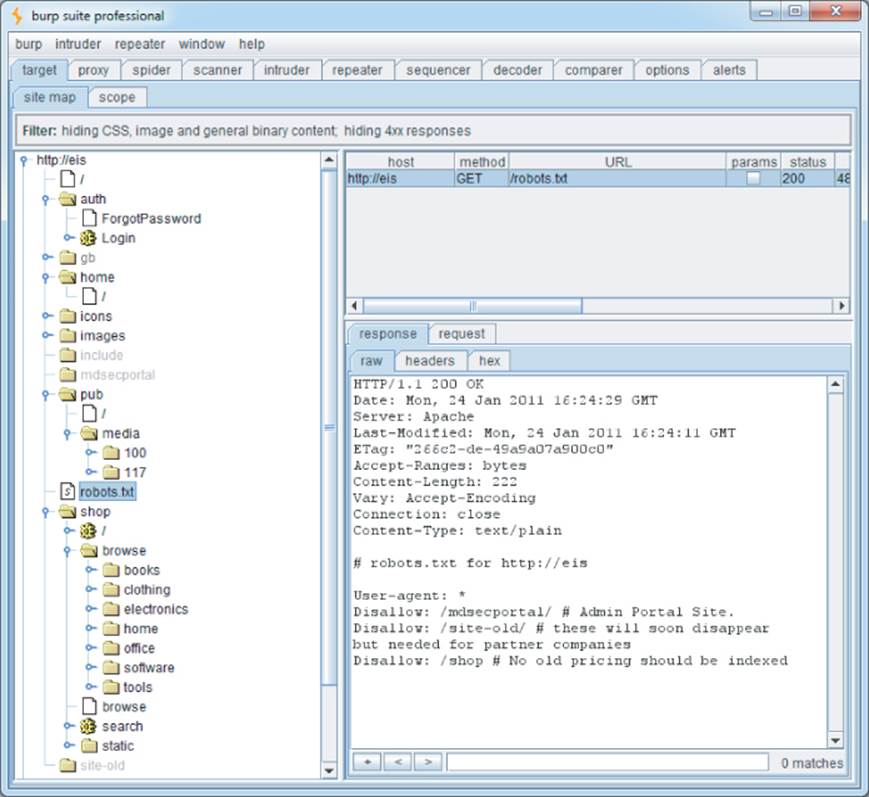
Many web servers contain a file named robots.txt in the web root that contains a list of URLs that the site does not want web spiders to visit or search engines to index. Sometimes, this file contains references to sensitive functionality, which you are certainly interested in spidering. Some spidering tools designed for attacking web applications check for the robots.txt file and use all URLs within it as seeds in the spidering process. In this case, the robots.txt file may be counterproductive to the security of the web application.
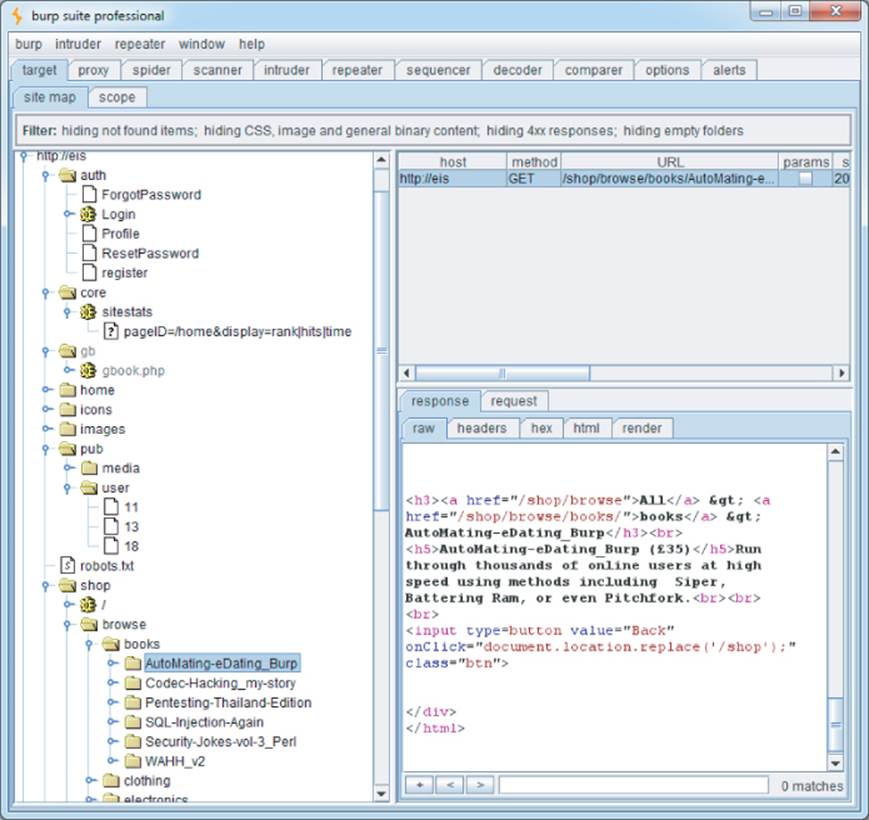
This chapter uses a fictional application, Extreme Internet Shopping (EIS), to provide examples of common application mapping actions. Figure 4.1 shows Burp Spider running against EIS. Without logging on, it is possible to map out the /shop directory and two news articles in the /mediadirectory. Also note that the robots.txt file shown in the figure references the directories /mdsecportal and /site-old. These are not linked from anywhere in the application and would not be indexed by a web spider that only followed links from published content.
Tip
Applications that employ REST-style URLs use portions of the URL file path to uniquely identify data and other resources used within the application (see Chapter 3 for more details). The traditional web spider's URL-based view of the application is useful in these situations. In the EIS application, the /shop and /pub paths employ REST-style URLs, and spidering these areas easily provides unique links to the items available within these paths.
Figure 4.1 Mapping part of an application using Burp Spider
Although it can often be effective, this kind of fully automated approach to content enumeration has some significant limitations:
· Unusual navigation mechanisms (such as menus dynamically created and handled using complicated JavaScript code) often are not handled properly by these tools, so they may miss whole areas of an application.
· Links buried within compiled client-side objects such as Flash or Java applets may not be picked up by a spider.
· Multistage functionality often implements fine-grained input validation checks, which do not accept the values that may be submitted by an automated tool. For example, a user registration form may contain fields for name, e-mail address, telephone number, and zip code. An automated application spider typically submits a single test string in each editable form field, and the application returns an error message saying that one or more of the items submitted were invalid. Because the spider is not intelligent enough to understand and act on this message, it does not proceed past the registration form and therefore does not discover any more content or functions accessible beyond it.
· Automated spiders typically use URLs as identifiers of unique content. To avoid continuing spidering indefinitely, they recognize when linked content has already been requested and do not request it again. However, many applications use forms-based navigation in which the same URL may return very different content and functions. For example, a banking application may implement every user action via a POST request to /account.jsp and use parameters to communicate the action being performed. If a spider refuses to make multiple requests to this URL, it will miss most of the application's content. Some application spiders attempt to handle this situation. For example, Burp Spider can be configured to individuate form submissions based on parameter names and values. However, there may still be situations where a fully automated approach is not completely effective. We discuss approaches to mapping this kind of functionality later in this chapter.
· Conversely to the previous point, some applications place volatile data within URLs that is not actually used to identify resources or functions (for example, parameters containing timers or random number seeds). Each page of the application may contain what appears to be a new set of URLs that the spider must request, causing it to continue running indefinitely.
· Where an application uses authentication, an effective application spider must be able to handle this to access the functionality that the authentication protects. The spiders mentioned previously can achieve this by manually configuring the spider either with a token for an authenticated session or with credentials to submit to the login function. However, even when this is done, it is common to find that the spider's operation breaks the authenticated session for various reasons:
o By following all URLs, at some point the spider will request the logout function, causing its session to break.
o If the spider submits invalid input to a sensitive function, the application may defensively terminate the session.
o If the application uses per-page tokens, the spider almost certainly will fail to handle these properly by requesting pages out of their expected sequence, probably causing the entire session to be terminated.
Warning
In some applications, running even a simple web spider that parses and requests links can be extremely dangerous. For example, an application may contain administrative functionality that deletes users, shuts down a database, restarts the server, and the like. If an application-aware spider is used, great damage can be done if the spider discovers and uses sensitive functionality. The authors have encountered an application that included some Content Management System (CMS) functionality for editing the content of the main application. This functionality could be discovered via the site map and was not protected by any access control. If an automated spider were run against this site, it would find the edit function and begin sending arbitrary data, resulting in the main website's being defaced in real time while the spider was running.
User-Directed Spidering
This is a more sophisticated and controlled technique that is usually preferable to automated spidering. Here, the user walks through the application in the normal way using a standard browser, attempting to navigate through all the application's functionality. As he does so, the resulting traffic is passed through a tool combining an intercepting proxy and spider, which monitors all requests and responses. The tool builds a map of the application, incorporating all the URLs visited by the browser. It also parses all the application's responses in the same way as a normal application-aware spider and updates the site map with the content and functionality it discovers. The spiders within Burp Suite and WebScarab can be used in this way (see Chapter 20 for more information).
Compared with the basic spidering approach, this technique offers numerous benefits:
· Where the application uses unusual or complex mechanisms for navigation, the user can follow these using a browser in the normal way. Any functions and content accessed by the user are processed by the proxy/spider tool.
· The user controls all data submitted to the application and can ensure that data validation requirements are met.
· The user can log in to the application in the usual way and ensure that the authenticated session remains active throughout the mapping process. If any action performed results in session termination, the user can log in again and continue browsing.
· Any dangerous functionality, such as deleteUser.jsp, is fully enumerated and incorporated into the proxy's site map, because links to it will be parsed out of the application's responses. But the user can use discretion in deciding which functions to actually request or carry out.
In the Extreme Internet Shopping site, previously it was impossible for the spider to index any content within /home, because this content is authenticated. Requests to /home result in this response:
HTTP/1.1 302 Moved Temporarily
Date: Mon, 24 Jan 2011 16:13:12 GMT
Server: Apache
Location: /auth/Login?ReturnURL=/home/
With user-directed spidering, the user can simply log in to the application using her browser, and the proxy/spider tool picks up the resulting session and identifies all the additional content now available to the user. Figure 4.2 shows the EIS site map when the user has successfully authenticated to the protected areas of the application.
Figure 4.2 Burp's site map after user-guided spidering has been performed
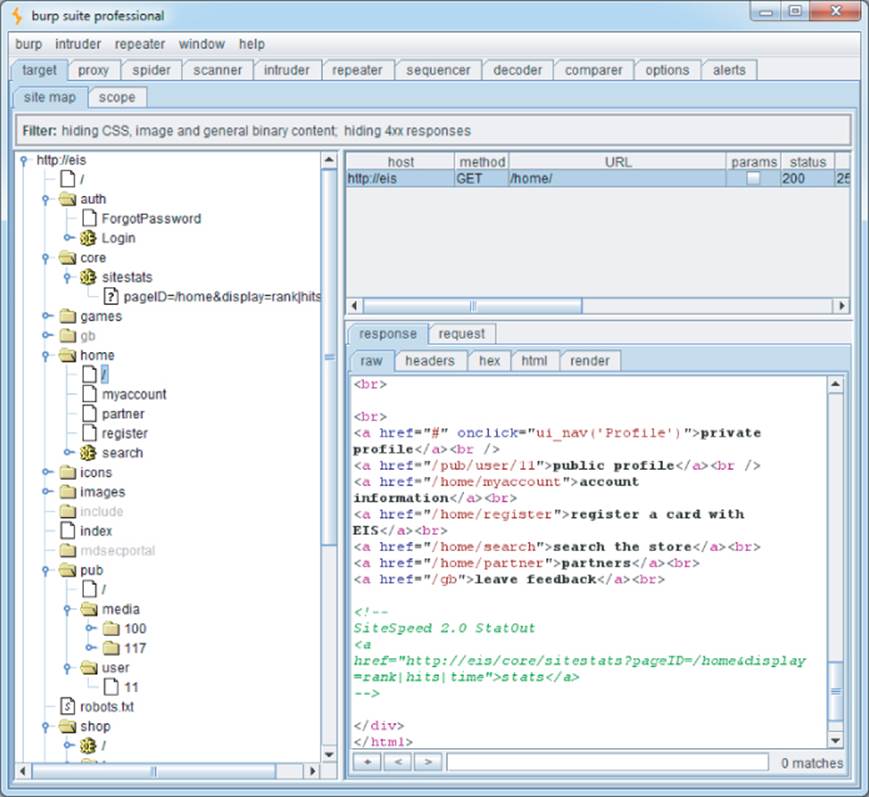
This reveals some additional resources within the home menu system. The figure shows a reference to a private profile that is accessed through a JavaScript function launched with the onClick event handler:
<a href="#" onclick="ui_nav(‘profile’)">private profile</a>
A conventional web spider that simply follows links within HTML is likely to miss this type of link. Even the most advanced automated application crawlers lag way behind the numerous navigational mechanisms employed by today's applications and browser extensions. With user-directed spidering, however, the user simply needs to follow the visible on-screen link using her browser, and the proxy/spider tool adds the resulting content to the site map.
Conversely, note that the spider has successfully identified the link to /core/sitestats contained in an HTML comment, even though this link is not shown on-screen to the user.
Tip
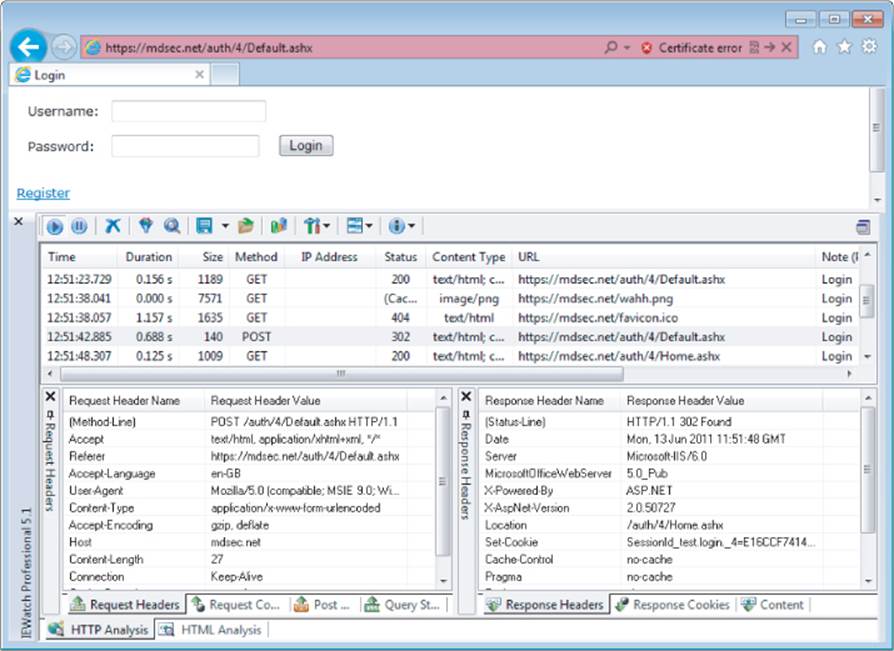
In addition to the proxy/spider tools just described, another range of tools that are often useful during application mapping are the various browser extensions that can perform HTTP and HTML analysis from within the browser interface. For example, the IEWatch tool shown in Figure 4.3, which runs within Microsoft Internet Explorer, monitors all details of requests and responses, including headers, request parameters, and cookies. It analyzes every application page to display links, scripts, forms, and thick-client components. Of course, all this information can be viewed in your intercepting proxy, but having a second record of useful mapping data can only help you better understand the application and enumerate all its functionality. See Chapter 20 for more information about tools of this kind.
Figure 4.3 IEWatch performing HTTP and HTML analysis from within the browser
Hack Steps
1. Configure your browser to use either Burp or WebScarab as a local proxy (see Chapter 20 for specific details about how to do this if you're unsure).
2. Browse the entire application normally, attempting to visit every link/URL you discover, submitting every form, and proceeding through all multistep functions to completion. Try browsing with JavaScript enabled and disabled, and with cookies enabled and disabled. Many applications can handle various browser configurations, and you may reach different content and code paths within the application.
3. Review the site map generated by the proxy/spider tool, and identify any application content or functions that you did not browse manually. Establish how the spider enumerated each item. For example, in Burp Spider, check the Linked From details. Using your browser, access the item manually so that the response from the server is parsed by the proxy/spider tool to identify any further content. Continue this step recursively until no further content or functionality is identified.
4. Optionally, tell the tool to actively spider the site using all of the already enumerated content as a startingpoint. To do this, first identify any URLs that are dangerous or likely to break the application session, and configure the spider to exclude these from its scope. Run the spider and review the results for any additional content it discovers.
The site map generated by the proxy/spider tool contains a wealth of information about the target application, which will be useful later in identifying the various attack surfaces exposed by the application.
Discovering Hidden Content
It is common for applications to contain content and functionality that is not directly linked to or reachable from the main visible content. A common example is functionality that has been implemented for testing or debugging purposes and has never been removed.
Another example arises when the application presents different functionality to different categories of users (for example, anonymous users, authenticated regular users, and administrators). Users at one privilege level who perform exhaustive spidering of the application may miss functionality that is visible to users at other levels. An attacker who discovers the functionality may be able to exploit it to elevate her privileges within the application.
There are countless other cases in which interesting content and functionality may exist that the mapping techniques previously described would not identify:
· Backup copies of live files. In the case of dynamic pages, their file extension may have changed to one that is not mapped as executable, enabling you to review the page source for vulnerabilities that can then be exploited on the live page.
· Backup archives that contain a full snapshot of files within (or indeed outside) the web root, possibly enabling you to easily identify all content and functionality within the application.
· New functionality that has been deployed to the server for testing but not yet linked from the main application.
· Default application functionality in an off-the-shelf application that has been superficially hidden from the user but is still present on the server.
· Old versions of files that have not been removed from the server. In the case of dynamic pages, these may contain vulnerabilities that have been fixed in the current version but that can still be exploited in the old version.
· Configuration and include files containing sensitive data such as database credentials.
· Source files from which the live application's functionality has been compiled.
· Comments in source code that in extreme cases may contain information such as usernames and passwords but that more likely provide information about the state of the application. Key phrases such as “test this function” or something similar are strong indicators of where to start hunting for vulnerabilities.
· Log files that may contain sensitive information such as valid usernames, session tokens, URLs visited, and actions performed.
Effective discovery of hidden content requires a combination of automated and manual techniques and often relies on a degree of luck.
Brute-Force Techniques
Chapter 14 describes how automated techniques can be leveraged to speed up just about any attack against an application. In the present context of information gathering, automation can be used to make huge numbers of requests to the web server, attempting to guess the names or identifiers of hidden functionality.
For example, suppose that your user-directed spidering has identified the following application content:
http://eis/auth/Login
http://eis/auth/ForgotPassword
http://eis/home/
http://eis/pub/media/100/view
http://eis/images/eis.gif
http://eis/include/eis.css
The first step in an automated effort to identify hidden content might involve the following requests, to locate additional directories:
http://eis/About/
http://eis/abstract/
http://eis/academics/
http://eis/accessibility/
http://eis/accounts/
http://eis/action/
...
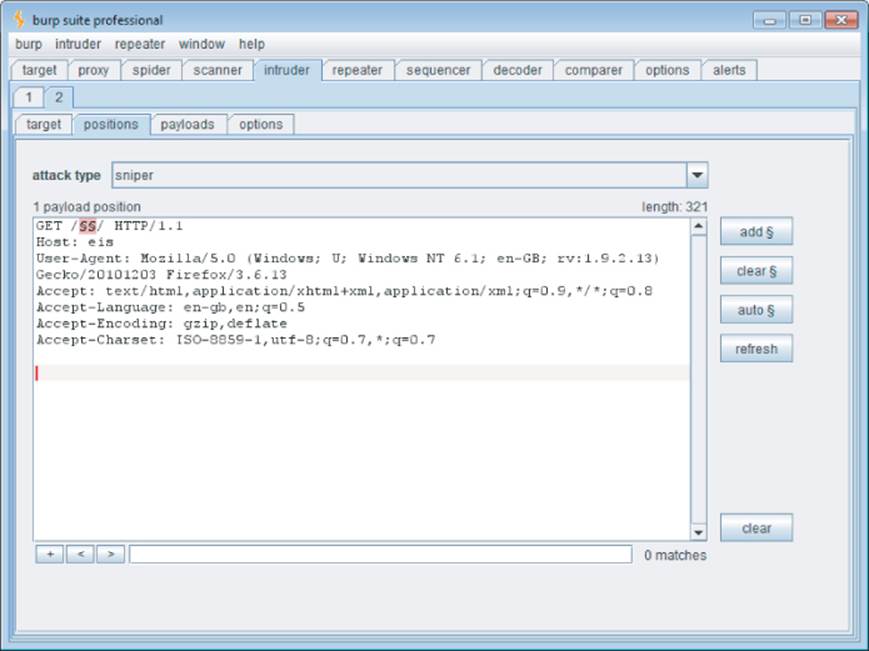
Burp Intruder can be used to iterate through a list of common directory names and capture details of the server's responses, which can be reviewed to identify valid directories. Figure 4.4 shows Burp Intruder being configured to probe for common directories residing at the web root.
Figure 4.4 Burp Intruder being configured to probe for common directories
When the attack has been executed, clicking column headers such as “status” and “length” sorts the results accordingly, enabling you to quickly identify a list of potential further resources, as shown in Figure 4.5.
Figure 4.5 Burp Intruder showing the results of a directory brute-force attack
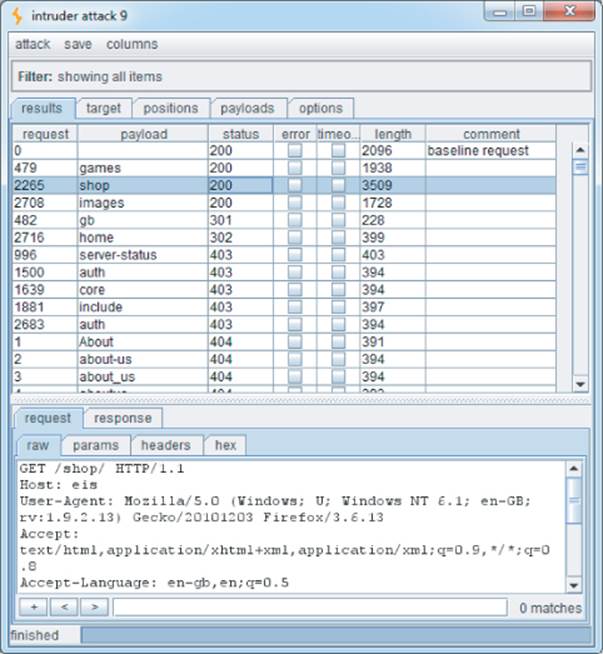
Having brute-forced for directories and subdirectories, you may then want to find additional pages in the application. Of particular interest is the /auth directory containing the Login resource identified during the spidering process, which is likely to be a good starting point for an unauthenticated attacker. Again, you can request a series of files within this directory:
http://eis/auth/About/
http://eis/auth/Aboutus/
http://eis/auth/AddUser/
http://eis/auth/Admin/
http://eis/auth/Administration/
http://eis/auth/Admins/
...
Figure 4.6 shows the results of this attack, which has identified several resources within the /auth directory:
Login
Logout
Register
Profile
Figure 4.6 Burp Intruder showing the results of a file brute-force attack
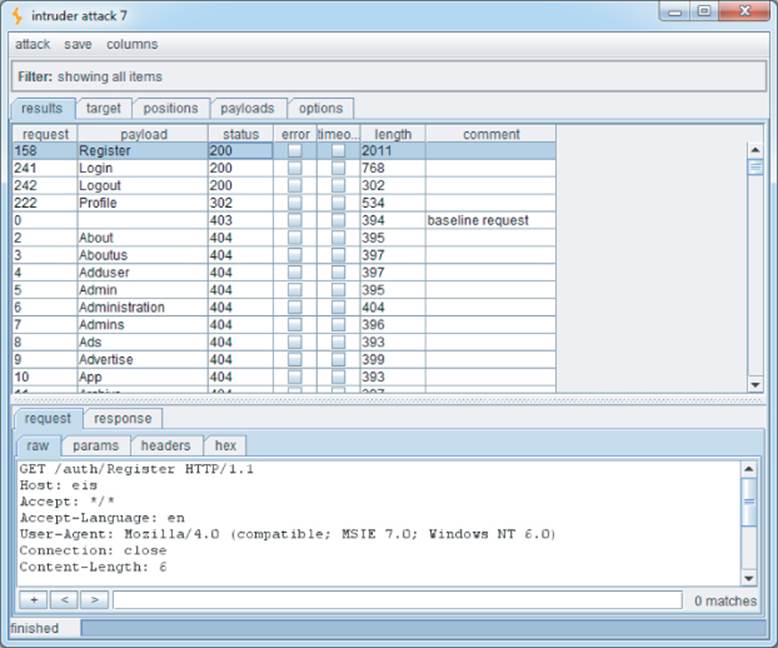
Note that the request for Profile returns the HTTP status code 302. This indicates that accessing this link without authentication redirects the user to the login page. Of further interest is that although the Login page was discovered during spidering, the Register page was not. It could be that this extra functionality is operational, and an attacker could register a user account on the site.
Note
Do not assume that the application will respond with 200 OK if a requested resource exists and 404 Not Found if it does not. Many applications handle requests for nonexistent resources in a customized way, often returning a bespoke error message and a 200 response code. Furthermore, some requests for existent resources may receive a non-200 response. The following is a rough guide to the likely meaning of the response codes that you may encounter during a brute-force exercise looking for hidden content:
· 302 Found — If the redirect is to a login page, the resource may be accessible only by authenticated users. If the redirect is to an error message, this may indicate a different reason. If it is to another location, the redirect may be part of the application's intended logic, and this should be investigated further.
· 400 Bad Request — The application may use a custom naming scheme for directories and files within URLs, which a particular request has not complied with. More likely, however, is that the wordlist you are using contains some whitespace characters or other invalid syntax.
· 401 Unauthorized or 403 Forbidden — This usually indicates that the requested resource exists but may not be accessed by any user, regardless of authentication status or privilege level. It often occurs when directories are requested, and you may infer that the directory exists.
· 500 Internal Server Error — During content discovery, this usually indicates that the application expects certain parameters to be submitted when requesting the resource.
The various possible responses that may indicate the presence of interesting content mean that is difficult to write a fully automated script to output a listing of valid resources. The best approach is to capture as much information as possible about the application's responses during the brute-force exercise and manually review it.
Hack Steps
1. Make some manual requests for known valid and invalid resources, and identify how the server handles the latter.
2. Use the site map generated through user-directed spidering as a basis for automated discovery of hidden content.
3. Make automated requests for common filenames and directories within each directory or path known to exist within the application. Use Burp Intruder or a custom script, together with wordlists of common files and directories, to quickly generate large numbers of requests. If you have identified a particular way in which the application handles requests for invalid resources (such as a customized “file not found” page), configure Intruder or your script to highlight these results so that they can be ignored.
4. Capture the responses received from the server, and manually review them to identify valid resources.
5. Perform the exercise recursively as new content is discovered.
Inference from Published Content
Most applications employ some kind of naming scheme for their content and functionality. By inferring from the resources already identified within the application, it is possible to fine-tune your automated enumeration exercise to increase the likelihood of discovering further hidden content.
In the EIS application, note that all resources in /auth start with a capital letter. This is why the wordlist used in the file brute forcing in the previous section was deliberately capitalized. Furthermore, since we have already identified a page called ForgotPassword in the /auth directory, we can search for similarly named items, such as the following:
http://eis/auth/ResetPassword
Additionally, the site map created during user-directed spidering identified these resources:
http://eis/pub/media/100
http://eis/pub/media/117
http://eis/pub/user/11
Other numeric values in a similar range are likely to identify further resources and information.
Tip
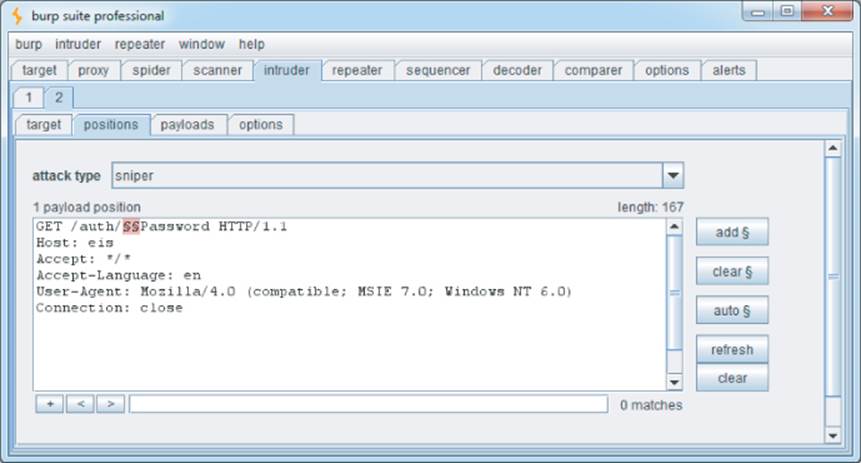
Burp Intruder is highly customizable and can be used to target any portion of an HTTP request. Figure 4.7 shows Burp Intruder being used to perform a brute-force attack on the first half of a filename to make the requests:
http://eis/auth/AddPassword
http://eis/auth/ForgotPassword
http://eis/auth/GetPassword
http://eis/auth/ResetPassword
http://eis/auth/RetrievePassword
http://eis/auth/UpdatePassword
...
Figure 4.7 Burp Intruder being used to perform a customized brute-force attack on part of a filename
Hack Steps
1. Review the results of your user-directed browsing and basic brute-force exercises. Compile lists of the names of all enumerated subdirectories, file stems, and file extensions.
2. Review these lists to identify any naming schemes in use. For example, if there are pages called AddDocument.jsp and ViewDocument.jsp, there may also be pages called EditDocument.jsp and RemoveDocument.jsp. You can often get a feel for developers' naming habits just by reading a few examples. For example, depending on their personal style, developers may be verbose (AddANewUser.asp), succinct (AddUser.asp), use abbreviations (AddUsr.asp), or even be more cryptic (AddU.asp). Getting a feel for the naming styles in use may help you guess the precise names of content you have not already identified.
3. Sometimes, the naming scheme used for different content employs identifiers such as numbers and dates, which can make inferring hidden content easy. This is most commonly encountered in the names of static resources, rather than dynamic scripts. For example, if a company's website links to AnnualReport2009.pdf and AnnualReport2010.pdf, it should be a short step to identifying what the next report will be called. Somewhat incredibly, there have been notorious cases of companies placing files containing financial reports on their web servers before they were publicly announced, only to have wily journalists discover them based on the naming scheme used in earlier years.
4. Review all client-side code such as HTML and JavaScript to identify any clues about hidden server-side content. These may include HTML comments related to protected or unlinked functions, HTML forms with disabled SUBMIT elements, and the like. Often, comments are automatically generated by the software that has been used to generate web content, or by the platform on which the application is running. References to items such as server-side include files are of particular interest. These files may actually be publicly downloadable and may contain highly sensitive information such as database connection strings and passwords. In other cases, developers' comments may contain all kinds of useful tidbits, such as database names, references to back-end components, SQL query strings, and so on. Thick-client components such as Java applets and ActiveX controls may also contain sensitive data that you can extract. See Chapter 15 for more ways in which the application may disclose information about itself.
5. Add to the lists of enumerated items any further potential names conjectured on the basis of the items that you have discovered. Also add to the file extension list common extensions such as txt, bak, src, inc, and old, which may uncover the source to backup versions of live pages. Also add extensions associated with the development languages in use, such as .java and .cs, which may uncover source files that have been compiled into live pages. (See the tips later in this chapter for identifying technologies in use.)
6. Search for temporary files that may have been created inadvertently by developer tools and file editors. Examples include the .DS_Store file, which contains a directory index under OS X, file.php∼1, which is a temporary file created when file.php is edited, and the .tmp file extension that is used by numerous software tools.
7. Perform further automated exercises, combining the lists of directories, file stems, and file extensions to request large numbers of potential resources. For example, in a given directory, request each file stem combined with each file extension. Or request each directory name as a subdirectory of every known directory.
8. Where a consistent naming scheme has been identified, consider performing a more focused brute-force exercise. For example, if AddDocument.jsp and ViewDocument.jsp are known to exist, you may create a list of actions (edit, delete, create) and make requests of the form XxxDocument.jsp. Alternatively, create a list of item types (user, account, file) and make requests of the formAddXxx.jsp.
9. Perform each exercise recursively, using new enumerated content and patterns as the basis for further user-directed spidering and further automated content discovery. You are limited only by your imagination, time available, and the importance you attach to discovering hidden content within the application you are targeting.
Note
You can use the Content Discovery feature of Burp Suite Pro to automate most of the tasks described so far. After you have manually mapped an application's visible content using your browser, you can select one or more branches of Burp's site map and initiate a content discovery session on those branches.
Burp uses the following techniques when attempting to discover new content:
· Brute force using built-in lists of common file and directory names
· Dynamic generation of wordlists based on resource names observed within the target application
· Extrapolation of resource names containing numbers and dates
· Testing for alternative file extensions on identified resources
· Spidering from discovered content
· Automatic fingerprinting of valid and invalid responses to reduce false positives
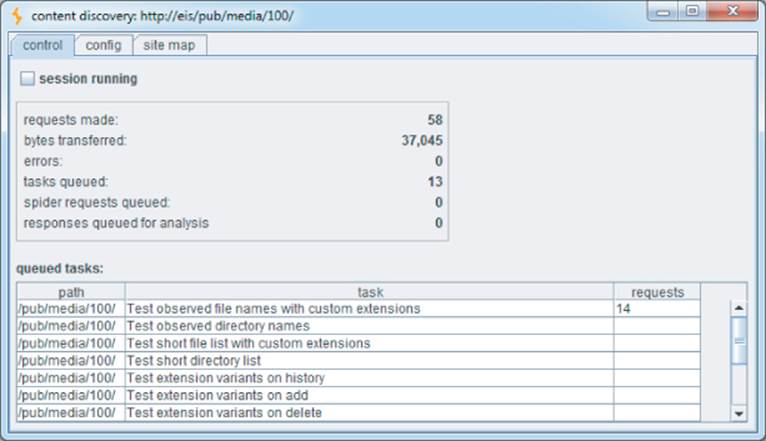
All exercises are carried out recursively, with new discovery tasks being scheduled as new application content is discovered. Figure 4.8 shows a content discovery session in progress against the EIS application.
Figure 4.8 A content discovery session in progress against the EIS application
Tip
The DirBuster project from OWASP is also a useful resource when performing automated content discovery tasks. It includes large lists of directory names that have been found in the wild, ordered by frequency of occurrence.
Use of Public Information
The application may contain content and functionality that are not presently linked from the main content but that have been linked in the past. In this situation, it is likely that various historical repositories will still contain references to the hidden content. Two main types of publicly available resources are useful here:
· Search engines such as Google, Yahoo, and MSN. These maintain a fine-grained index of all content that their powerful spiders have discovered, and also cached copies of much of this content, which persists even after the original content has been removed.
· Web archives such as the WayBack Machine, located at www.archive.org/. These archives maintain a historical record of a large number of websites. In many cases they allow users to browse a fully replicated snapshot of a given site as it existed at various dates going back several years.
In addition to content that has been linked in the past, these resources are also likely to contain references to content that is linked from third-party sites, but not from within the target application itself. For example, some applications contain restricted functionality for use by their business partners. Those partners may disclose the existence of the functionality in ways that the application itself does not.
Hack Steps
1. Use several different search engines and web archives (listed previously) to discover what content they indexed or stored for the application you are attacking.
2. When querying a search engine, you can use various advanced techniques to maximize the effectiveness of your research. The following suggestions apply to Google. You can find the corresponding queries on other engines by selecting their Advanced Search option.
· site:www.wahh-target.com returns every resource within the target site that Google has a reference to.
· site:www.wahh-target.com login returns all the pages containing the expression login. In a large and complex application, this technique can be used to quickly home in on interesting resources, such as site maps, password reset functions, and administrative menus.
· link:www.wahh-target.com returns all the pages on other websites and applications that contain a link to the target. This may include links to old content, or functionality that is intended for use only by third parties, such as partner links.
· related:www.wahh-target.com returns pages that are “similar” to the target and therefore includes a lot of irrelevant material. However, it may also discuss the target on other sites, which may be of interest.
3. Perform each search not only in the default Web section of Google, but also in Groups and News, which may contain different results.
4. Browse to the last page of search results for a given query, and select Repeat the Search with the Omitted Results Included. By default, Google attempts to filter out redundant results by removing pages that it believes are sufficiently similar to others included in the results. Overriding this behavior may uncover subtly different pages that are of interest to you when attacking the application.
5. View the cached version of interesting pages, including any content that is no longer present in the actual application. In some cases, search engine caches contain resources that cannot be directly accessed in the application without authentication or payment.
6. Perform the same queries on other domain names belonging to the same organization, which may contain useful information about the application you are targeting.
If your research identifies old content and functionality that is no longer linked to within the main application, it may still be present and usable. The old functionality may contain vulnerabilities that do not exist elsewhere within the application.
Even where old content has been removed from the live application, the content obtained from a search engine cache or web archive may contain references to or clues about other functionality that is still present within the live application and that can be used to attack it.
Another public source of useful information about the target application is any posts that developers and others have made to Internet forums. There are numerous such forums in which software designers and programmers ask and answer technical questions. Often, items posted to these forums contain information about an application that is of direct benefit to an attacker, including the technologies in use, the functionality implemented, problems encountered during development, known security bugs, configuration and log files submitted to assist in troubleshooting, and even extracts of source code.
Hack Steps
1. Compile a list containing every name and e-mail address you can discover relating to the target application and its development. This should include any known developers, names found within HTML source code, names found in the contact information section of the main company website, and any names disclosed within the application itself, such as administrative staff.
2. Using the search techniques described previously, search for each identified name to find any questions and answers they have posted to Internet forums. Review any information found for clues about functionality or vulnerabilities within the target application.
Leveraging the Web Server
Vulnerabilities may exist at the web server layer that enable you to discover content and functionality that are not linked within the web application itself. For example, bugs within web server software can allow an attacker to list the contents of directories or obtain the raw source for dynamic server-executable pages. See Chapter 18 for some examples of these vulnerabilities and ways in which you can identify them. If such a bug exists, you may be able to exploit it to directly obtain a listing of all pages and other resources within the application.
Many application servers ship with default content that may help you attack them. For example, sample and diagnostic scripts may contain known vulnerabilities or functionality that may be leveraged for a malicious purpose. Furthermore, many web applications incorporate common third-party components for standard functionality, such as shopping carts, discussion forums, or content management system (CMS) functions. These are often installed to a fixed location relative to the web root or to the application's starting directory.
Automated tools lend themselves naturally to this type of task, and many issue requests from a large database of known default web server content, third-party application components, and common directory names. While these tools do not rigorously test for any hidden custom functionality, they can often be useful in discovering other resources that are not linked within the application and that may be of interest in formulating an attack.
Wikto is one of the many free tools that performs these types of scans, additionally containing a configurable brute-force list for content. As shown in Figure 4.9, when used against the Extreme Internet Shopping site, it identifies some directories using its internal wordlist. Because it has a large database of common web application software and scripts, it has also identified the following directory, which an attacker would not discover through automated or user-driven spidering:
http://eis/phpmyadmin/
Figure 4.9 Wikto being used to discover content and some known vulnerabilities
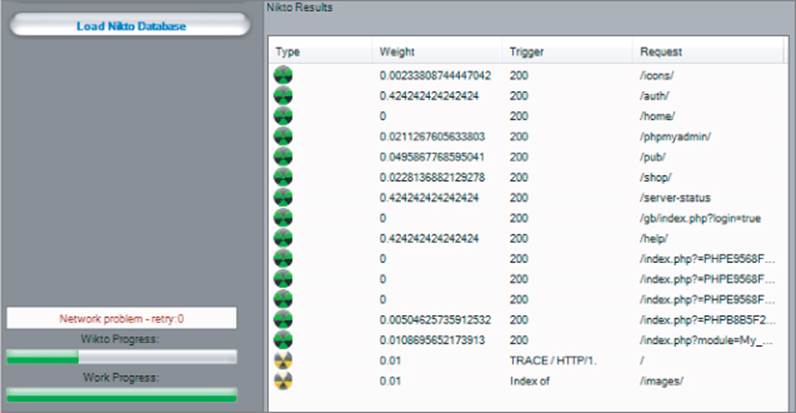
Additionally, although the /gb directory had already been identified via spidering, Wikto has identified the specific URL:
/gb/index.php?login=true
Wikto checks for this URL because it is used in the gbook PHP application, which contains a publicly known vulnerability.
Warning
Like many commercial web scanners, tools such as Nikto and Wikto contain vast lists of default files and directories and consequently appear to be industrious at performing a huge number of checks. However, a large number of these checks are redundant, and false positives are common. Worse still, false negatives may occur regularly if a server is configured to hide a banner, if a script or collection of scripts is moved to a different directory, or if HTTP status codes are handled in a custom manner. For this reason it is often better to use a tool such as Burp Intruder, which allows you to interpret the raw response information and does not attempt to extract positive and negative results on your behalf.
Hack Steps
Several useful options are available when you run Nikto:
1. If you believe that the server is using a nonstandard location for interesting content that Nikto checks for (such as /cgi/cgi-bin instead of /cgi-bin), you can specify this alternative location using the option –root /cgi/. For the specific case of CGI directories, these can also be specified using the option –Cgidirs.
2. If the site uses a custom “file not found” page that does not return the HTTP 404 status code, you can specify a particular string that identifies this page by using the -404 option.
3. Be aware that Nikto does not perform any intelligent verification of potential issues and therefore is prone to report false positives. Always check any results Nikto returns manually.
Note that with tools like Nikto, you can specify a target application using its domain name or IP address. If a tool accesses a page using its IP address, the tool treats links on that page that use its domain name as belonging to a different domain, so the links are not followed. This is reasonable, because some applications are virtually hosted, with multiple domain names sharing the same IP address. Ensure that you configure your tools with this fact in mind.
Application Pages Versus Functional Paths
The enumeration techniques described so far have been implicitly driven by one particular picture of how web application content may be conceptualized and cataloged. This picture is inherited from the pre-application days of the World Wide Web, in which web servers functioned as repositories of static information, retrieved using URLs that were effectively filenames. To publish some web content, an author simply generated a bunch of HTML files and copied these into the relevant directory on a web server. When users followed hyperlinks, they navigated the set of files created by the author, requesting each file via its name within the directory tree residing on the server.
Although the evolution of web applications has fundamentally changed the experience of interacting with the web, the picture just described is still applicable to the majority of web application content and functionality. Individual functions are typically accessed via a unique URL, which is usually the name of the server-side script that implements the function. The parameters to the request (residing in either the URL query string or the body of a POST request) do not tell the application what function to perform; they tell it what information to use when performing it. In this context, the methodology of constructing a URL-based map can be effective in cataloging the application's functionality.
In applications that use REST-style URLs, parts of the URL file path contain strings that in fact function as parameter values. In this situation, by mapping URLs, a spider maps both the application functions and the list of known parameter values to those functions.
In some applications, however, the picture based on application “pages” is inappropriate. Although it may be possible to shoehorn any application's structure into this form of representation, in many cases a different picture, based on functional paths, is far more useful for cataloging its content and functionality. Consider an application that is accessed using only requests of the following form:
POST /bank.jsp HTTP/1.1
Host: wahh-bank.com
Content-Length: 106
servlet=TransferFunds&method=confirmTransfer&fromAccount=10372918&to
Account=
3910852&amount=291.23&Submit=Ok
Here, every request is made to a single URL. The parameters to the request are used to tell the application what function to perform by naming the Java servlet and method to invoke. Further parameters provide the information to use in performing the function. In the picture based on application pages, the application appears to have only a single function, and a URL-based map does not elucidate its functionality. However, if we map the application in terms of functional paths, we can obtain a much more informative and useful catalog of its functionality. Figure 4.10 is a partial map of the functional paths that exist within the application.
Figure 4.10 A mapping of the functional paths within a web application
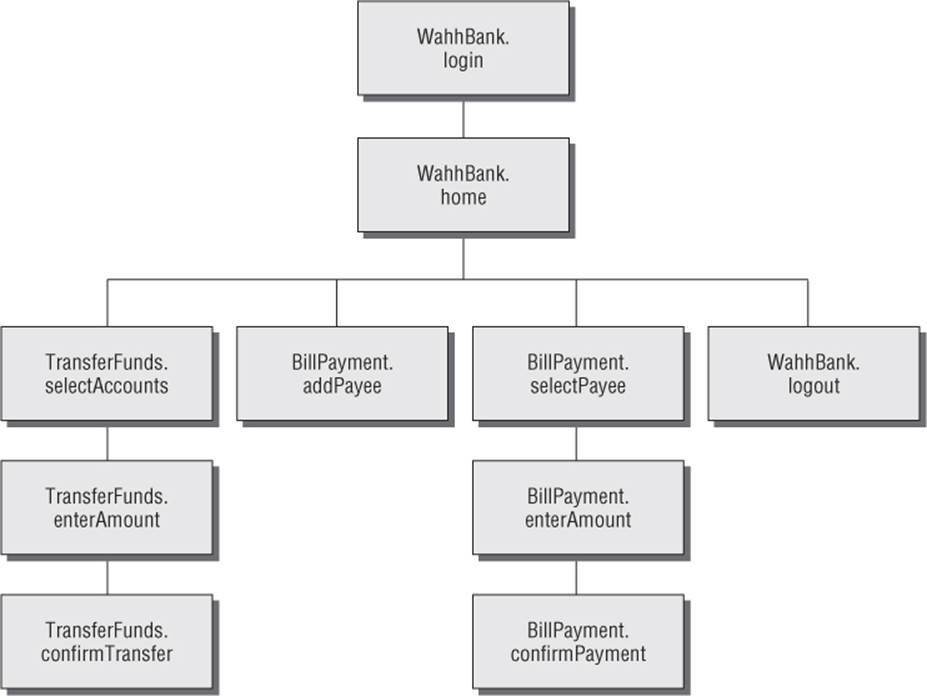
Representing an application's functionality in this way is often more useful even in cases where the usual picture based on application pages can be applied without any problems. The logical relationships and dependencies between different functions may not correspond to the directory structure used within URLs. It is these logical relationships that are of most interest to you, both in understanding the application's core functionality and in formulating possible attacks against it. By identifying these, you can better understand the expectations and assumptions of the application's developers when implementing the functions. You also can attempt to find ways to violate these assumptions, causing unexpected behavior within the application.
In applications where functions are identified using a request parameter, rather than the URL, this has implications for the enumeration of application content. In the previous example, the content discovery exercises described so far are unlikely to uncover any hidden content. Those techniques need to be adapted to the mechanisms actually used by the application to access functionality.
Hack Steps
1. Identify any instances where application functionality is accessed not by requesting a specific page for that function (such as /admin/editUser.jsp) but by passing the name of a function in a parameter (such as /admin.jsp?action=editUser).
2. Modify the automated techniques described for discovering URL-specified content to work on the content-access mechanisms in use within the application. For example, if the application uses parameters that specify servlet and method names, first determine its behavior when an invalid servlet and/or method is requested, and when a valid method is requested with other invalid parameters. Try to identify attributes of the server's responses that indicate “hits” — valid servlets and methods. If possible, find a way of attacking the problem in two stages, first enumerating servlets and then methods within these. Using a method similar to the one used for URL-specified content, compile lists of common items, add to these by inferring from the names actually observed, and generate large numbers of requests based on these.
3. If applicable, compile a map of application content based on functional paths, showing all the enumerated functions and the logical paths and dependencies between them.
Discovering Hidden Parameters
A variation on the situation where an application uses request parameters to specify which function should be performed arises where other parameters are used to control the application's logic in significant ways. For example, an application may behave differently if the parameter debug=true is added to the query string of any URL. It might turn off certain input validation checks, allow the user to bypass certain access controls, or display verbose debug information in its response. In many cases, the fact that the application handles this parameter cannot be directly inferred from any of its content (for example, it does not include debug=false in the URLs it publishes as hyperlinks). The effect of the parameter can only be detected by guessing a range of values until the correct one is submitted.
Hack Steps
1. Using lists of common debug parameter names (debug, test, hide, source, etc.) and common values (true, yes, on, 1, etc.), make a large number of requests to a known application page or function, iterating through all permutations of name and value. For POST requests, insert the added parameter to both the URL query string and the message body.
Burp Intruder can be used to perform this test using multiple payload sets and the “cluster bomb” attack type (see Chapter 14 for more details).
2. Monitor all responses received to identify any anomalies that may indicate that the added parameter has had an effect on the application's processing.
3. Depending on the time available, target a number of different pages or functions for hidden parameter discovery. Choose functions where it is most likely that developers have implemented debug logic, such as login, search, and file uploading and downloading.
Analyzing the Application
Enumerating as much of the application's content as possible is only one element of the mapping process. Equally important is the task of analyzing the application's functionality, behavior, and technologies employed to identify the key attack surfaces it exposes and to begin formulating an approach to probing the application for exploitable vulnerabilities.
Here are some key areas to investigate:
· The application's core functionality — the actions that can be leveraged to perform when used as intended
· Other, more peripheral application behavior, including off-site links, error messages, administrative and logging functions, and the use of redirects
· The core security mechanisms and how they function — in particular, management of session state, access controls, and authentication mechanisms and supporting logic (user registration, password change, and account recovery)
· All the different locations at which the application processes user-supplied input — every URL, query string parameter, item of POST data, and cookie
· The technologies employed on the client side, including forms, client-side scripts, thick-client components (Java applets, ActiveX controls, and Flash), and cookies
· The technologies employed on the server side, including static and dynamic pages, the types of request parameters employed, the use of SSL, web server software, interaction with databases, e-mail systems, and other back-end components
· Any other details that may be gleaned about the internal structure and functionality of the server-side application — the mechanisms it uses behind the scenes to deliver the functionality and behavior that are visible from the client perspective
Identifying Entry Points for User Input
The majority of ways in which the application captures user input for server-side processing should be obvious when reviewing the HTTP requests that are generated as you walk through the application's functionality. Here are the key locations to pay attention to:
· Every URL string up to the query string marker
· Every parameter submitted within the URL query string
· Every parameter submitted within the body of a POST request
· Every cookie
· Every other HTTP header that the application might process — in particular, the User-Agent, Referer, Accept, Accept-Language, and Host headers
URL File Paths
The parts of the URL that precede the query string are often overlooked as entry points, since they are assumed to be simply the names of directories and files on the server file system. However, in applications that use REST-style URLs, the parts of the URL that precede the query string can in fact function as data parameters and are just as important as entry points for user input as the query string itself.
A typical REST-style URL could have this format:
http://eis/shop/browse/electronics/iPhone3G/
In this example, the strings electronics and iPhone3G should be treated as parameters to store a search function.
Similarly, in this URL:
http://eis/updates/2010/12/25/my-new-iphone/
each of the URL components following updates may be being handled in a RESTful manner.
Most applications using REST-style URLs are easy to identify given the URL structure and application context. However, no hard-and-fast rules should be assumed when mapping an application, because it is up to the application's authors how users should interact with it.
Request Parameters
Parameters submitted within the URL query string, message body, and HTTP cookies are the most obvious entry points for user input. However, some applications do not employ the standard name=value format for these parameters. They may employ their own custom scheme, which may use nonstandard query string markers and field separators, or they may embed other data schemes such as XML within parameter data.
Here are some examples of nonstandard parameter formats that the authors have encountered in the wild:
· /dir/file;foo=bar&foo2=bar2
· /dir/file?foo=bar$foo2=bar2
· /dir/file/foo%3dbar%26foo2%3dbar2
· /dir/foo.bar/file
· /dir/foo=bar/file
· /dir/file?param=foo:bar
· /dir/file?data=%3cfoo%3ebar%3c%2ffoo%3e%3cfoo2%3ebar2%3c%2ffoo2%3e
If a nonstandard parameter format is being used, you need to take this into account when probing the application for all kinds of common vulnerabilities. For example, suppose that, when testing the final URL in this list, you ignore the custom format and simply treat the query string as containing a single parameter called data, and therefore submit various kinds of attack payloads as the value of this parameter. You would miss many kinds of vulnerabilities that may exist in the processing of the query string. Conversely, if you dissect the format and place your payloads within the embedded XML data fields, you may immediately discover a critical bug such as SQL injection or path traversal.
HTTP Headers
Many applications perform custom logging functions and may log the contents of HTTP headers such as Referer and User-Agent. These headers should always be considered as possible entry points for input-based attacks.
Some applications perform additional processing on the Referer header. For example, an application may detect that a user has arrived via a search engine, and seek to provide a customized response tailored to the user's search query. The application may echo the search term or may attempt to highlight matching expressions within the response. Some applications seek to boost their search rankings by dynamically adding content such as HTML keywords, containing strings that recent visitors from search engines have been searching for. In this situation, it may be possible to persistently inject content into the application's responses by making a request numerous times containing a suitably crafted Referer URL.
An important trend in recent years has been for applications to present different content to users who access the application via different devices (laptop, cell phone, tablet). This is achieved by inspecting the User-Agent header. As well as providing an avenue for input-based attacks directly within the User-Agent header itself, this behavior provides an opportunity to uncover an additional attack surface within the application. By spoofing the User-Agent header for a popular mobile device, you may be able to access a simplified user interface that behaves differently than the primary interface. Since this interface is generated via different code paths within the server-side application, and may have been subjected to less security testing, you may identify bugs such as cross-site scripting that do not exist in the primary application interface.
Tip
Burp Intruder contains a built-in payload list containing a large number of user agent strings for different types of devices. You can carry out a simple attack that performs a GET request to the main application page supplying different user agent strings and then review the intruder results to identify anomalies that suggest a different user interface is being presented.
In addition to targeting HTTP request headers that your browser sends by default, or that application components add, in some situations you can perform successful attacks by adding further headers that the application may still process. For example, many applications perform some processing on the client's IP address to carry out functions such as logging, access control, or user geolocation. The IP address of the client's network connection typically is available to applications via platform APIs. However, to handle cases where the application resides behind a load balancer or proxy, applications may use the IP address specified in the X-Forwarded-For request header if it is present. Developers may then mistakenly assume that the IP address value is untainted and process it in dangerous ways. By adding a suitably crafted X-Forwarded-For header, you may be able to deliver attacks such as SQL injection or persistent cross-site scripting.
Out-of-Band Channels
A final class of entry points for user input includes any out-of-band channel by which the application receives data that you may be able to control. Some of these entry points may be entirely undetectable if you simply inspect the HTTP traffic generated by the application, and finding them usually requires an understanding of the wider context of the functionality that the application implements. Here are some examples of web applications that receive user-controllable data via an out-of-band channel:
· A web mail application that processes and renders e-mail messages received via SMTP
· A publishing application that contains a function to retrieve content via HTTP from another server
· An intrusion detection application that gathers data using a network sniffer and presents this using a web application interface
· Any kind of application that provides an API interface for use by non-browser user agents, such as cell phone apps, if the data processed via this interface is shared with the primary web application
Identifying Server-Side Technologies
Normally it is possible to fingerprint the technologies employed on the server via various clues and indicators.
Banner Grabbing
Many web servers disclose fine-grained version information, both about the web server software itself and about other components that have been installed. For example, the HTTP Server header discloses a huge amount of detail about some installations:
Server: Apache/1.3.31 (Unix) mod_gzip/1.3.26.1a mod_auth_passthrough/
1.8 mod_log_bytes/1.2 mod_bwlimited/1.4 PHP/4.3.9 FrontPage/
5.0.2.2634a mod_ssl/2.8.20 OpenSSL/0.9.7a
In addition to the Server header, the type and version of software may be disclosed in other locations:
· Templates used to build HTML pages
· Custom HTTP headers
· URL query string parameters
HTTP Fingerprinting
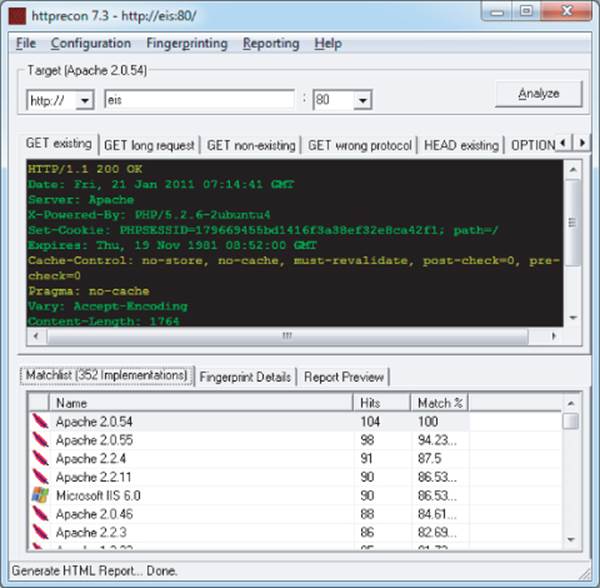
In principle, any item of information returned by the server may be customized or even deliberately falsified, and banners like the Server header are no exception. Most application server software allows the administrator to configure the banner returned in the Server HTTP header. Despite measures such as this, it is usually possible for a determined attacker to use other aspects of the web server's behavior to determine the software in use, or at least narrow down the range of possibilities. The HTTP specification contains a lot of detail that is optional or left to an implementer's discretion. Also, many web servers deviate from or extend the specification in various ways. As a result, a web server can be fingerprinted in numerous subtle ways, other than via its Server banner. Httprecon is a handy tool that performs a number of tests in an attempt to fingerprint a web server's software. Figure 4.11 shows Httprecon running against the EIS application and reporting various possible web servers with different degrees of confidence.
Figure 4.11 Httprecon fingerprinting the EIS application
File Extensions
File extensions used within URLs often disclose the platform or programming language used to implement the relevant functionality. For example:
· asp — Microsoft Active Server Pages
· aspx — Microsoft ASP.NET
· jsp — Java Server Pages
· cfm — Cold Fusion
· php — The PHP language
· d2w — WebSphere
· pl — The Perl language
· py — The Python language
· dll — Usually compiled native code (C or C++)
· nsf or ntf — Lotus Domino
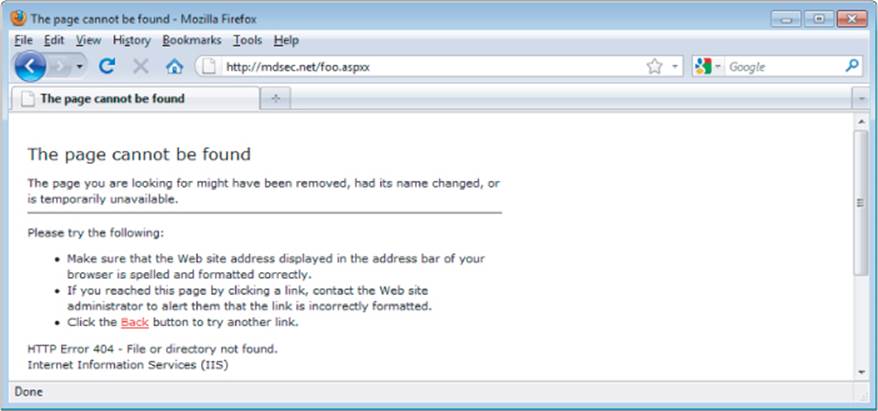
Even if an application does not employ a particular file extension in its published content, it is usually possible to verify whether the technology supporting that extension is implemented on the server. For example, if ASP.NET is installed, requesting a nonexistent .aspx file returns a customized error page generated by the ASP.NET framework, as shown in Figure 4.12. Requesting a nonexistent file with a different extension returns a generic error message generated by the web server, as shown in Figure 4.13.
Figure 4.12 A customized error page indicating that the ASP.NET platform is present on the server
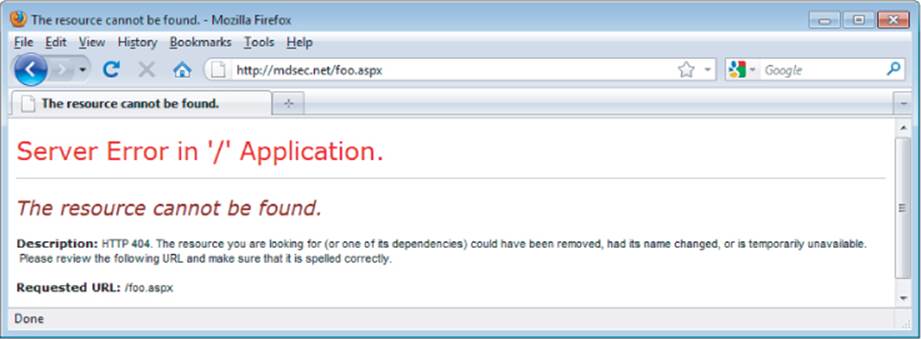
Figure 4.13 A generic error message created when an unrecognized file extension is requested
Using the automated content discovery techniques already described, it is possible to request a large number of common file extensions and quickly confirm whether any of the associated technologies are implemented on the server.
The divergent behavior described arises because many web servers map specific file extensions to particular server-side components. Each different component may handle errors (including requests for nonexistent content) differently. Figure 4.14 shows the various extensions that are mapped to different handler DLLs in a default installation of IIS 5.0.
Figure 4.14 File extension mappings in IIS 5.0
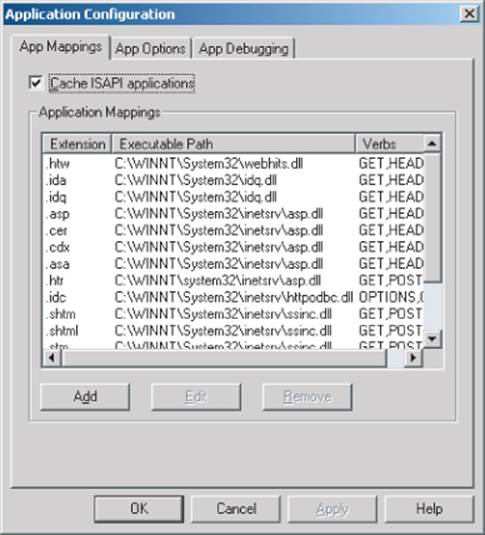
It is possible to detect the presence of each file extension mapping via the different error messages generated when that file extension is requested. In some cases, discovering a particular mapping may indicate the presence of a web server vulnerability. For example, the .printer and .ida/.idqhandlers in IIS have in the past been found vulnerable to buffer overflow vulnerabilities.
Another common fingerprint to be aware of are URLs that look like this:
https://wahh-app/news/0,,2-421206,00.html
The comma-separated numbers toward the end of the URL are usually generated by the Vignette content management platform.
Directory Names
It is common to encounter subdirectory names that indicate the presence of an associated technology. For example:
· servlet — Java servlets
· pls — Oracle Application Server PL/SQL gateway
· cfdocs or cfide — Cold Fusion
· SilverStream — The SilverStream web server
· WebObjects or {function}.woa — Apple WebObjects
· rails — Ruby on Rails
Session Tokens
Many web servers and web application platforms generate session tokens by default with names that provide information about the technology in use. For example:
· JSESSIONID — The Java Platform
· ASPSESSIONID — Microsoft IIS server
· ASP.NET_SessionId — Microsoft ASP.NET
· CFID/CFTOKEN — Cold Fusion
· PHPSESSID — PHP
Third-Party Code Components
Many web applications incorporate third-party code components to implement common functionality such as shopping carts, login mechanisms, and message boards. These may be open source or may have been purchased from an external software developer. When this is the case, the same components often appear within numerous other web applications on the Internet, which you can inspect to understand how the component functions. Often, other applications use different features of the same component, enabling you to identify additional behavior and functionality beyond what is directly visible in the target application. Also, the software may contain known vulnerabilities that have been discussed elsewhere, or you may be able to download and install the component yourself and perform a source code review or probe it for defects in a controlled way.
Hack Steps
1. Identify all entry points for user input, including URLs, query string parameters, POST data, cookies, and other HTTP headers processed by the application.
2. Examine the query string format used by the application. If it does not employ the standard format described in Chapter 3, try to understand how parameters are being transmitted via the URL. Virtually all custom schemes still employ some variation on the name/value model, so try to understand how name/value pairs are being encapsulated into the nonstandard URLs you have identified.
3. Identify any out-of-bound channels via which user-controllable or other third-party data is being introduced into the application's processing.
4. View the HTTP Server banner returned by the application. Note that in some cases, different areas of the application are handled by different back-end components, so different Server headers may be received.
5. Check for any other software identifiers contained within any custom HTTP headers or HTML source code comments.
6. Run the httprint tool to fingerprint the web server.
7. If fine-grained information is obtained about the web server and other components, research the software versions in use to identify any vulnerabilities that may be exploited to advance an attack (see Chapter 18).
8. Review your map of application URLs to identify any interesting-looking file extensions, directories, or other sub-sequences that may provide clues about the technologies in use on the server.
9. Review the names of all session tokens issued by the application to identify the technologies being used.
10. Use lists of common technologies, or Google, to establish which technologies may be in use on the server, or discover other websites and applications that appear to employ the same technologies.
11. Perform searches on Google for the names of any unusual cookies, scripts, HTTP headers, and the like that may belong to third-party software components. If you locate other applications in which the same components are being used, review these to identify any additional functionality and parameters that the components support, and verify whether these are also present in your target application. Note that third-party components may look and feel quite different in each implementation, due to branding customizations, but the core functionality, including script and parameter names, is often the same. If possible, download and install the component and analyze it to fully understand its capabilities and, if possible, discover any vulnerabilities. Consult repositories of known vulnerabilities to identify any known defects with the component in question.
Identifying Server-Side Functionality
It is often possible to infer a great deal about server-side functionality and structure, or at least make an educated guess, by observing clues that the application discloses to the client.
Dissecting Requests
Consider the following URL, which is used to access a search function:
https://wahh-app.com/calendar.jsp?name=new%20applicants&isExpired=
0&startDate=22%2F09%2F2010&endDate=22%2F03%2F2011&OrderBy=name
As you have seen, the .jsp file extension indicates that Java Server Pages are in use. You may guess that a search function will retrieve its information from either an indexing system or a database. The presence of the OrderBy parameter suggests that a back-end database is being used and that the value you submit may be used as the ORDER BY clause of a SQL query. This parameter may well be vulnerable to SQL injection, as may any of the other parameters if they are used in database queries (see Chapter 9).
Also of interest among the other parameters is the isExpired field. This appears to be a Boolean flag specifying whether the search query should include expired content. If the application designers did not expect ordinary users to be able retrieve any expired content, changing this parameter from 0 to 1 could identify an access control vulnerability (see Chapter 8).
The following URL, which allows users to access a content management system, contains a different set of clues:
https://wahh-app.com/workbench.aspx?template=NewBranch.tpl&loc=
/default&ver=2.31&edit=false
Here, the .aspx file extension indicates that this is an ASP.NET application. It also appears highly likely that the template parameter is used to specify a filename, and the loc parameter is used to specify a directory. The possible file extension .tpl appears to confirm this, as does the location/default, which could very well be a directory name. It is possible that the application retrieves the template file specified and includes the contents in its response. These parameters may well be vulnerable to path traversal attacks, allowing arbitrary files to be read from the server (see Chapter 10).
Also of interest is the edit parameter, which is set to false. It may be that changing this value to true will modify the registration functionality, potentially enabling an attacker to edit items that the application developer did not intend to be editable. The ver parameter does not have any readily guessable purpose, but it may be that modifying this will cause the application to perform a different set of functions that an attacker could exploit.
Finally, consider the following request, which is used to submit a question to application administrators:
POST /feedback.php HTTP/1.1
Host: wahh-app.com
Content-Length: 389
from=user@wahh-mail.com&to=helpdesk@wahh-app.com&subject=
Problem+logging+in&message=Please+help...
As with the other examples, the .php file extension indicates that the function is implemented using the PHP language. Also, it is extremely likely that the application is interfacing with an external e-mail system, and it appears that user-controllable input is being passed to that system in all relevant fields of the e-mail. The function may be exploitable to send arbitrary messages to any recipient, and any of the fields may also be vulnerable to e-mail header injection (see Chapter 10).
Tip
It is often necessary to consider the whole URL and application context to guess the function of different parts of a request. Recall the following URL from the Extreme Internet Shopping application:
http://eis/pub/media/117/view
The handling of this URL is probably functionally equivalent to the following:
http://eis/manager?schema=pub&type=media&id=117&action=view
While it isn't certain, it seems likely that resource 117 is contained in the collection of resources media and that the application is performing an action on this resource that is equivalent to view. Inspecting other URLs would help confirm this.
The first consideration would be to change the action from view to a possible alternative, such as edit or add. However, if you change it to add and this guess is right, it would likely correspond to an attempt to add a resource with an id of 117. This will probably fail, since there is already a resource with an id of 117. The best approach would be to look for an add operation with anid value higher than the highest observed value or to select an arbitrary high value. For example, you could request the following:
http://eis/pub/media/7337/add
It may also be worthwhile to look for other data collections by altering media while keeping a similar URL structure:
http://eis/pub/pages/1/view
http://eis/pub/users/1/view
Hack Steps
1. Review the names and values of all parameters being submitted to the application in the context of the functionality they support.
2. Try to think like a programmer, and imagine what server-side mechanisms and technologies are likely to have been used to implement the behavior you can observe.
Extrapolating Application Behavior
Often, an application behaves consistently across the range of its functionality. This may be because different functions were written by the same developer or to the same design specification, or share some common code components. In this situation, it may be possible to draw conclusions about server-side functionality in one area and extrapolate these to another area.
For example, the application may enforce some global input validation checks, such as sanitizing various kinds of potentially malicious input before it is processed. Having identified a blind SQL injection vulnerability, you may encounter problems exploiting it, because your crafted requests are being modified in unseen ways by the input validation logic. However, other functions within the application might provide good feedback about the kind of sanitization being performed — for example, a function that echoes some user-supplied data to the browser. You may be able to use this function to test different encodings and variations of your SQL injection payload to determine what raw input must be submitted to achieve the desired attack string after the input validation logic has been applied. If you are lucky, the validation works in the same way across the application, enabling you to exploit the injection flaw.
Some applications use custom obfuscation schemes when storing sensitive data on the client to prevent casual inspection and modification of this data by users (see Chapter 5). Some such schemes may be extremely difficult to decipher given access to only a sample of obfuscated data. However, there may be functions within the application where a user can supply an obfuscated string and retrieve the original. For example, an error message may include the deobfuscated data that led to the error. If the same obfuscation scheme is used throughout the application, it may be possible to take an obfuscated string from one location (such as a cookie) and feed it into the other function to decipher its meaning. It may also be possible to reverse-engineer the obfuscation scheme by submitting systematically varying values to the function and monitoring their deobfuscated equivalents.
Finally, errors are often handled inconsistently within the application. Some areas trap and handle errors gracefully, and other areas simply crash and return verbose debugging information to the user (see Chapter 15). In this situation, it may be possible to gather information from the error messages returned in one area and apply it to other areas where errors are handled gracefully. For example, by manipulating request parameters in systematic ways and monitoring the error messages received, it may be possible to determine the internal structure and logic of the application component. If you are lucky, aspects of this structure may be replicated in other areas.
Hack Steps
1. Try to identify any locations within the application that may contain clues about the internal structure and functionality of other areas.
2. It may not be possible to draw any firm conclusions here; however, the cases identified may prove useful at a later stage of the attack when you're attempting to exploit any potential vulnerabilities.
Isolating Unique Application Behavior
Sometimes the situation is the opposite of that just described. In many well-secured or mature applications, a consistent framework is employed that prevents numerous types of attacks, such as cross-site scripting, SQL injection, and unauthorized access. In these cases, the most fruitful areas for hunting vulnerabilities generally are the portions of the application that have been added retrospectively, or “bolted on,” and hence are not handled by the application's general security framework. Additionally, they may not be correctly tied into the application through authentication, session management, and access control. These are often identifiable through differences in GUI appearance, parameter naming conventions, or explicitly through comments in source code.
Hack Steps
1. Make a note of any functionality that diverges from the standard GUI appearance, parameter naming, or navigation mechanism used within the rest of the application.
2. Also make a note of functionality that is likely to have been added retrospectively. Examples include debug functions, CAPTCHA controls, usage tracking, and third-party code.
3. Perform a full review of these areas, and do not assume that the standard defenses used elsewhere in the application apply.
Mapping the Attack Surface
The final stage of the mapping process is to identify the various attack surfaces exposed by the application and the potential vulnerabilities that are commonly associated with each one. The following is a rough guide to some key types of behavior and functionality that you may identify, and the kinds of vulnerabilities that are most commonly found within each one. The remainder of this book is concerned with the practical details of how you can detect and exploit each of these problems:
· Client-side validation — Checks may not be replicated on the server
· Database interaction — SQL injection
· File uploading and downloading — Path traversal vulnerabilities, stored cross-site scripting
· Display of user-supplied data — Cross-site scripting
· Dynamic redirects — Redirection and header injection attacks
· Social networking features — username enumeration, stored cross-site scripting
· Login — Username enumeration, weak passwords, ability to use brute force
· Multistage login — Logic flaws
· Session state — Predictable tokens, insecure handling of tokens
· Access controls — Horizontal and vertical privilege escalation
· User impersonation functions — Privilege escalation
· Use of cleartext communications — Session hijacking, capture of credentials and other sensitive data
· Off-site links — Leakage of query string parameters in the Referer header
· Interfaces to external systems — Shortcuts in the handling of sessions and/or access controls
· Error messages — Information leakage
· E-mail interaction — E-mail and/or command injection
· Native code components or interaction — Buffer overflows
· Use of third-party application components — Known vulnerabilities
· Identifiable web server software — Common configuration weaknesses, known software bugs
Mapping the Extreme Internet Shopping Application
Having mapped the content and functionality of the EIS application, many paths could be followed to attack the application, as shown in Figure 4.15.
Figure 4.15 The attack surface exposed by the EIS application
The /auth directory contains authentication functionality. A full review of all authentication functions, session handling, and access control is worthwhile, including further content discovery attacks.
Within the /core path, the sitestats page appears to accept an array of parameters delimited by the pipe character (|). As well as conventional input-based attacks, other values could be brute-forcible, such as source, location, and IP, in an attempt to reveal more information about other users or about the page specified in pageID. It may also be possible to find out information about inaccessible resources or to try a wildcard option in pageID, such as pageID=all or pageID=*. Finally, because the observed pageID value contains a slash, it may indicate a resource being retrieved from the file system, in which case path traversal attacks may be a possibility.
The /gb path contains the site's guestbook. Visiting this page suggests it is used as a discussion forum, moderated by an administrator. Messages are moderated, but the login bypass login=true means that an attacker can attempt to approve malicious messages (to deliver cross-site scripting attacks, for example) and read other users' private messages to the administrator.
The /home path appears to hold authenticated user content. This could make a good basis for attempts to launch a horizontal privilege escalation attack to access another user's personal information and to ensure that access controls are present and enforced on every page.
A quick review shows that the /icons and /images paths hold static content. It may be worth brute-forcing for icon names that could indicate third-party software, and checking for directory indexing on these directories, but they are unlikely to be worth significant effort.
The /pub path contains REST-style resources under /pub/media and /pub/user. A brute-force attack could be used to find the profile pages of other application users by targeting the numeric value in /pub/user/11. Social networking functionality such as this can reveal user information, usernames, and other users' logon status.
The /shop path contains the online shopping site and has a large number of URLs. However, they all have a similar structure, and an attacker could probably probe all of the relevant attack surface by looking at just one or two items. The purchasing process may contain interesting logic flaws that could be exploited to obtain unauthorized discounts or avoid payment.
Hack Steps
1. Understand the core functionality implemented within the application and the main security mechanisms in use.
2. Identify all features of the application's functionality and behavior that are often associated with common vulnerabilities.
3. Check any third-party code against public vulnerability databases such as www.osvdb.org to determine any known issues.
4. Formulate a plan of attack, prioritizing the most interesting-looking functionality and the most serious of the associated potential vulnerabilities.
Summary
Mapping the application is a key prerequisite to attacking it. It may be tempting to dive in and start probing for bugs, but taking time to gain a sound understanding of the application's functionality, technologies, and attack surface will pay dividends down the line.
As with almost all of web application hacking, the most effective approach is to use manual techniques supplemented where appropriate by controlled automation. No fully automated tool can carry out a thorough mapping of the application in a safe way. To do this, you need to use your hands and draw on your own experience. The core methodology we have outlined involves the following:
· Manual browsing and user-directed spidering to enumerate the application's visible content and functionality
· Use of brute force combined with human inference and intuition to discover as much hidden content as possible
· An intelligent analysis of the application to identify its key functionality, behavior, security mechanisms, and technologies
· An assessment of the application's attack surface, highlighting the most promising functions and behavior for more focused probing into exploitable vulnerabilities
Questions
Answers can be found at http://mdsec.net/wahh.
1. While mapping an application, you encounter the following URL:
https://wahh-app.com/CookieAuth.dll?GetLogon?curl=Z2Fdefault.aspx
What information can you deduce about the technologies employed on the server and how it is likely to behave?
2. The application you are targeting implements web forum functionality. Here is the only URL you have discovered:
http://wahh-app.com/forums/ucp.php?mode=register
How might you obtain a listing of forum members?
3. While mapping an application, you encounter the following URL:
https://wahh-app.com/public/profile/Address.
asp?action=view&location
=default
What information can you infer about server-side technologies? What can you conjecture about other content and functionality that may exist?
4. A web server's responses include the following header:
Server: Apache-Coyote/1.1
What does this indicate about the technologies in use on the server?
5. You are mapping two different web applications, and you request the URL /admin.cpf from each application. The response headers returned by each request are shown here. From these headers alone, what can you deduce about the presence of the requested resource within each application?
HTTP/1.1 200 OK
Server: Microsoft-IIS/5.0
Expires: Mon, 20 Jun 2011 14:59:21 GMT
Content-Location: http://wahh-
app.com/includes/error.htm?404;http://wahh-app.com/admin.cpf
Date: Mon, 20 Jun 2011 14:59:21 GMT
Content-Type: text/html
Accept-Ranges: bytes
Content-Length: 2117
HTTP/1.1 401 Unauthorized
Server: Apache-Coyote/1.1
WWW-Authenticate: Basic realm="Wahh Administration Site"
Content-Type: text/html;charset=utf-8
Content-Length: 954
Date: Mon, 20 Jun 2011 15:07:27 GMT
Connection: close
All materials on the site are licensed Creative Commons Attribution-Sharealike 3.0 Unported CC BY-SA 3.0 & GNU Free Documentation License (GFDL)
If you are the copyright holder of any material contained on our site and intend to remove it, please contact our site administrator for approval.
© 2016-2026 All site design rights belong to S.Y.A.