The Maker's Manual: A Practical Guide to the New Industrial Revolution 1st Edition (2015)
Part IV. Giving Life to Objects
Chapter 20. The Internet of Things
In the previous chapters we got acquainted with the tools needed to create many different things. We have used additive and subtractive technologies to build physical objects, and we have made them interactive through the use of computers and computer languages. So, what’s our next step?
Physical Computing
Physical computing concerns itself with the creation of interactive physical environments and systems, using hardware and software able to perceive what is going on in the surrounding area and to react accordingly. People who deal with this subject first try to study the relationships between people and systems, in order to simplify and make the interactions between humans and objects as natural as possible.
Neil Gershenfeld, Director of the MIT’s Center for Bits and Atoms (CBA), speaks about “putting the computer in your shoe”, i.e. designing objects in a way that hides the complexity which accompanies technology. A physical computing project is first of all a design problem in which the people who are going to interact with that system are the first thing that has to be considered.
Thanks to platforms like Arduino and all the other boards that have been developed in the past few years, it is possible to quickly create prototypes able to perceive nearly any type of external stimulus and interact with the surrounding environment by using motors, servos, network messages, or any other kind of signal.
What used to be a subject for researchers and pioneers, now raises the interest of companies, eager to find out the potentialities of this topic.
This New World
You have seen that a small computer can be embedded in an object and can interact with you and other objects. The extension of such interaction mechanisms through the Internet leads to the idea of the Internet of things, abbreviated IoT.
The Internet of things opens a new world to us. For example, not only can we record our performance while we are outside jogging and transfer the data to a server for analysis and filing, but we can also take part in virtual competitions with people jogging somewhere on the other side of the world, thus exploiting the social component as a way to involve people and objects. We can trace the journey of a package from Asia to our front door, wondering why carriers keep taking absurd turns before finding us.
The number of connected objects was estimated in 2012 to be 8.7 billion (serving a human population of about 7 billion, remember), but the number of connectable things is thought to be 1.5 trillion. This disparity means that new business models and new opportunities will open before our eyes, starting with a sort of ritual sacrifice of the non-connected objects in favor of tools with the same functionalities but connected to the net, so that we can remotely interact with them to set the temperature in our homes, turn on the oven, turn off the lights we have left on and many other things.
We are speaking of things that are sort of aware of themselves, of their history (at least, they keep track of their state over time) and of the world surrounding them, with which they interact in a more or less integrated way.
Cosmic Level
Picture an environmental sensor station based on Arduino to detect various aspects of the environment. We would like to publish the data read by the sensors so that anyone can make use of them, but without having to do this all over again. We have already said that all programmers are lazy, haven’t we? To become good programmers, we decided to become lazy, so we used Pachube, which later became Cosm and now has become Xively. Time flies so quickly when we have fun!
In this case it is really simple: we just needed to register on the site and specify what kind of device we wanted to link: automatically, the system generates the code for our Arduino, within which we will only have to specify where the values we want to publish come from. All we have to do is to verify the sketch, upload it and that’s it!
With this service, for example, creative makers created a device able to trace the amount of beer they had drunk at the Oktoberfest and published the data obtained. What’s more, the device is multifunctional: for example, it can also be used to calculate the number of sandwiches that had kept company to the beer!
From Ivrea to Rome: Flyport
The Internet of things is not only Arduino: there are so many other solutions, for example the Flyport (Figure 20-1), produced by the Roman company OpenPicus, is a tiny and powerful card that allows your to connect to the Internet very easily through Wi-Fi, Ethernet, or even via quadband mobile technology. We are just spoilt for choice! In this case the hardware is open source, too, and the programming environment is completely free of charge. Flyport can be extended very easily thanks to nests, which are similar to Arduino shields; in particular, the Grove Nest puts at your disposal many components that can be easily integrated to simplify and accelerate the prototyping of your objects.
In contrast to the Arduino IDE, OpenPicus puts a more powerful interface at your disposal: it can manage all files in the project and the external libraries, autocompletion of code, the possibility to import web pages created with other tools, as well as a tool that guides you step by step in the configuration of the network parameters.
For example, in the wiki of OpenPicus you can find a very interesting hack that helps you not only know whether you have to take an umbrella with you, but also not to forget it! The idea is quite simple: when you are about to leave home, a movement sensor informs Flyport which, in turn, interrogates a web service offering the weather conditions in your area and, on the basis of the answer received, colors an LED accordingly. This gives you the piece of information at the exact moment and place you need it.
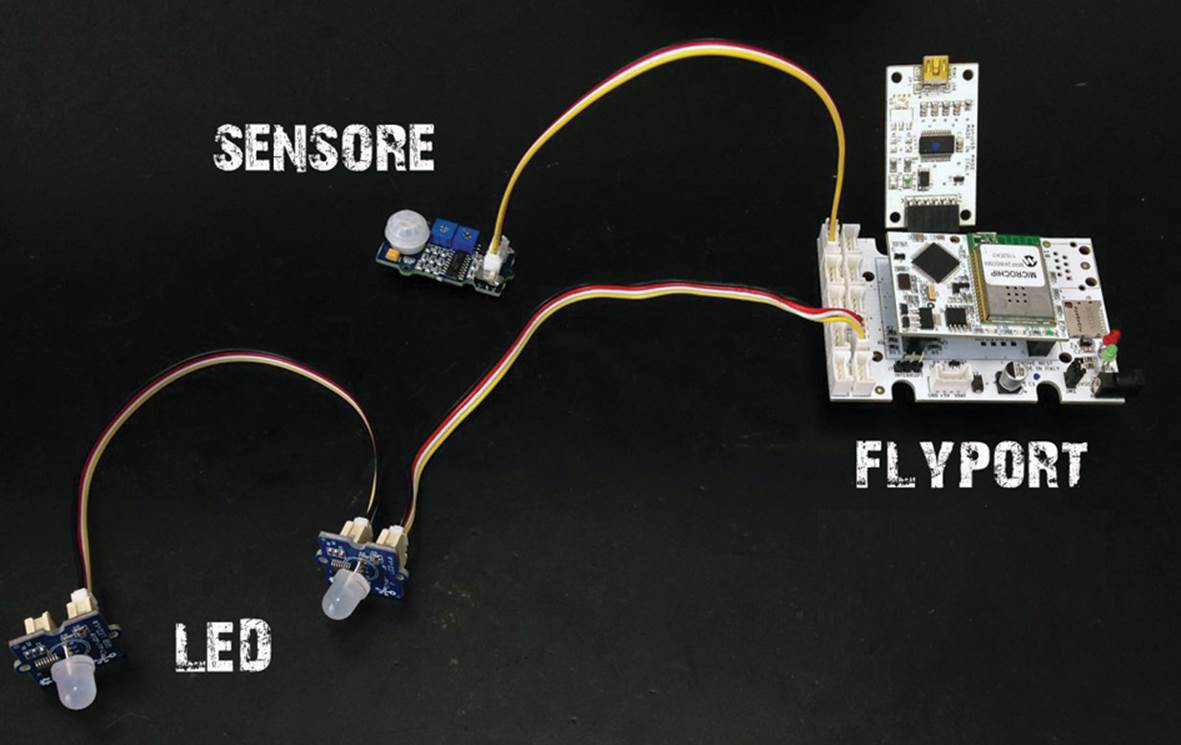
Figure 20-1. Flyport
Raspberry Pi On The Net
Thanks to the large number of libraries crated for it, Python allows you to perform even complex operations with few lines of code. So why not use it in your programs to access the Internet?
The modules urllib and urllib2 provide simple methods to access online resources. With two code lines you can read the content of a web page just by using the urlopen and read methods, as shown in Example 20-1.
Example 20-1. A python on the net
import urllib
import urllib2
service = urllib2.urlopen("http://www.google.it/")
webpage = service.read()
print(webpage)
Let’s try to use Raspberry Pi to interrogate a web service. On the Internet, you can find many services you can use for free. Suppose you want to create a circuit to turn off a light at dawn. You can start with a simple LED. For this project, connect an LED to the Raspberry Pi’s GPIO25 pin, just as in Chapter 18.
One of the many web services that offers all the information you need can be found at http://www.earthtools.org/webservices.htm#sun. Simply provide the service with some parameters in the URL address. To find out at what time the sun rises requires the coordinates of the place where you are (latitude and longitude), the date you are interested in, and some data on time zone and daylight saving time. The parameters must be given in the following format:
http://www.earthtools.org/sun/<latitude>/<longitude>/<day>/<month>/<timezone>/<dst>
For example, if we wanted to know at what time the sun rises in Milan on May 14th we should type the address of the service in this way:
http://www.earthtools.org/sun/45.4641611/9.1903361/14/5/1/1
where the coordinates of Milan are 45.4641611 for latitude and 9.1903361 for longitude, 14 is the day, 5 is the month, 1 is the time zone (but you can also type in 99 and the service will calculate it for us) and the last number, 1, indicates that the daylight saving time must be considered. Enter that URL into a web browser, and you’ll get back a data dump (Figure 20-2), which you can mine for the relevant information.
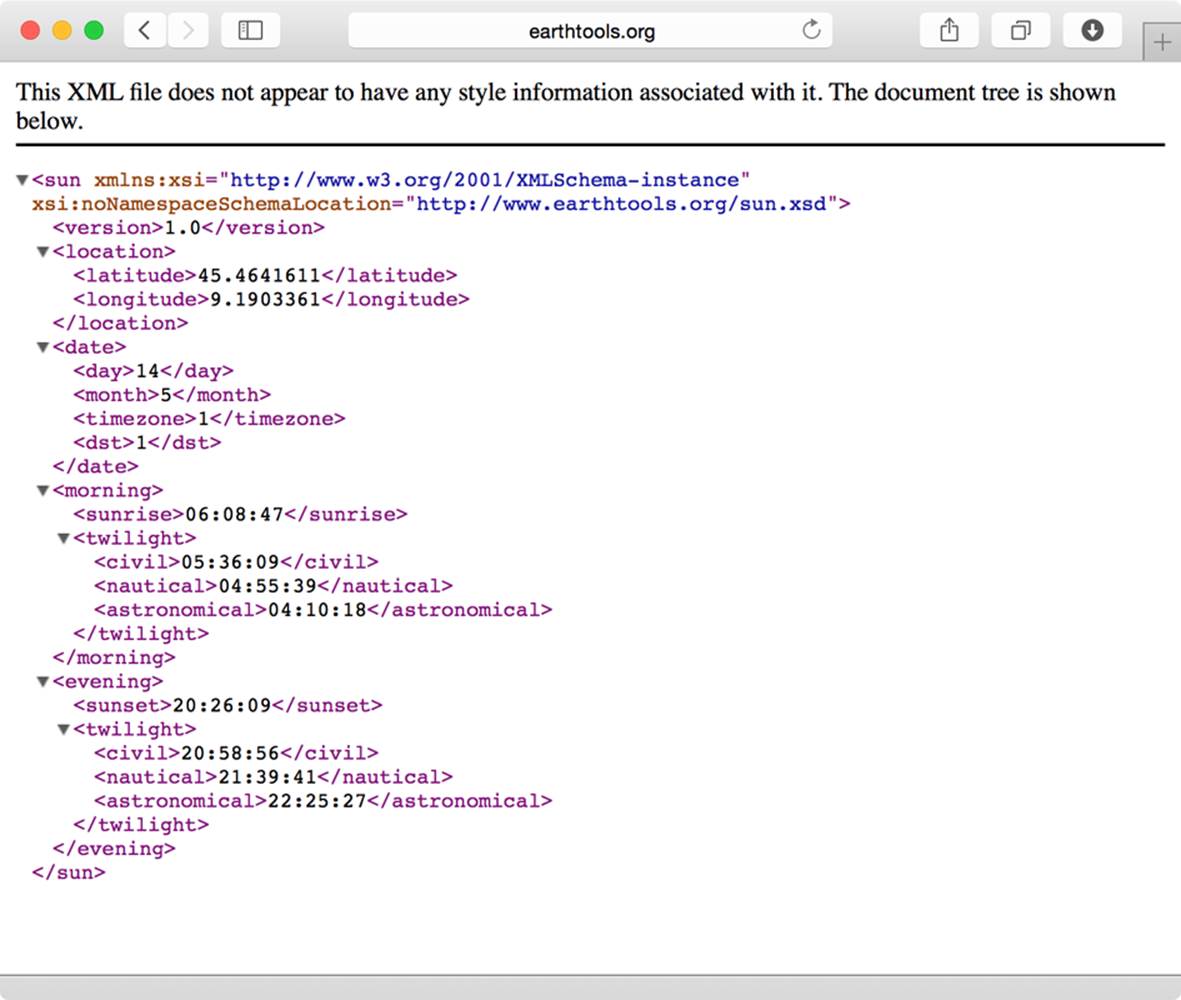
Figure 20-2. The XML results
The format in which the web service provides you with the data is called XML, which stands for eXtensible Markup Language. It is a text format able to represent data as a complex tree structure; what’s more, even if it has been created to let machines communicate with one another, it can be easily read by people, too.
In order to read data in the XML format, you need a further library; this library, though, is not simple and is composed of many sub-parts. Sometimes, for simplicity reasons, it is not necessary to import the whole module, but only the part you need. Luckily, the different components have been placed in a well-defined hierarchical structure, so you can identify them with names separated by dots, just like when we write the trace of a file on our hard disk. To import only a part of the library, you can use the following syntax:
import xml.etree.ElementTree
Unfortunately, in this way, each time you use ElementTree, you will have to repeat the complete name: xml.etree.ElementTree. This is really too much for a programmer! Luckily you can give to such a long name an alias you like, for example etree:
import xml.etree.ElementTree as etree
Then you will need the datetime object of the datetime moduleg:
from datetime import datetime
With the from ... import syntax, in the rest of the code you can simply write:
datetime.strptime(...)
To control the LED, you will use the GPIO libraries. Then you will name the web service urlopen, giving the address and the parameters to use. The result will be saved in the response variable. The program must work each day, so you will have to name the service using today’s date:
now = datetime.now()
service = urllib2.urlopen(
"http://www.earthtools.org/sun/45.4641611/9.1903361/"
+ now.day + "/" + now.month + "/1/1")
response = service.read()
The fromstring() function of the xml module builds a tree of data in the memory, starting from the result of the call to the service that we insert in the tree variable:
responsetree = etree.fromstring(response)
You need to get the information on the sunrise time. The tree built by Python has a main node, or root, <sun> under which there are five more nodes: <version>, <location>, <date>, <morning>, <evening>, as shown in Figure 20-3
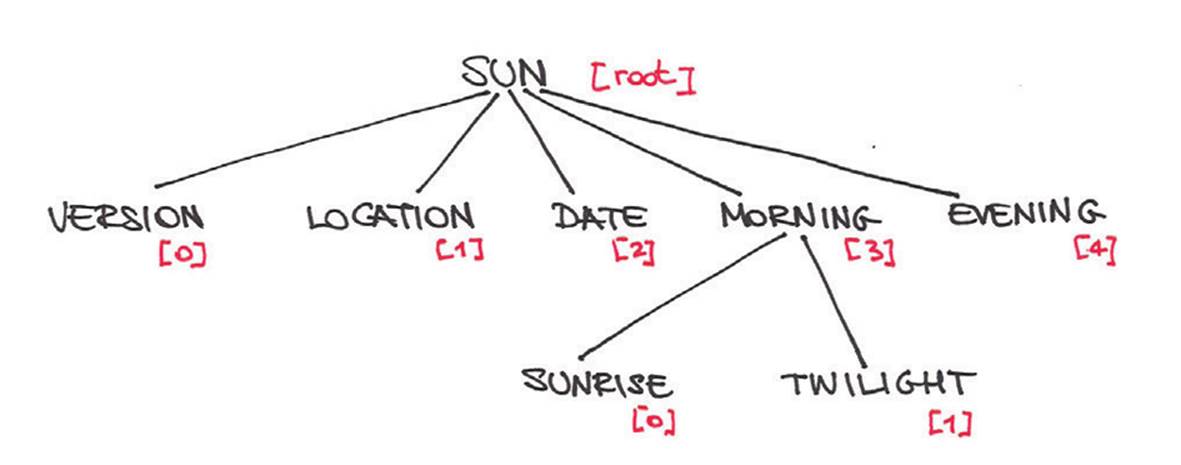
Figure 20-3. The tree of data provided by the service
The information you need is in the <sunrise> node, placed under the <morning> node, the fourth one. As Python counts starting from 0, the index to use is 3.
By writing tree[3] you will place yourself in the <morning> node, which includes the <sunrise> and <twilight> nodes.
The <sunrise> node is the first one, so the index to use is 0:
responsetree[3][0]
The time you are interested in is included between the <sunrise> and </sunrise> tags. To extract the text between the two delimiters we will use the text method:
responsetree[3][0].text
Now you have some text with the time of sunrise. Unfortunately, for a computer this text is not a date or a time: you have to convert it. For this purpose you will use the datetime module. The function to make conversions hasn’t got a very intuitive name: strptime.
datetime.strptime(
responsetree[3][0].text, '%H:%M:%S')
The strptime function needs two parameters: the text to convert and its format. In the 06:08:47 string the first two numbers express the time, then you have a separator (:) for the minutes and a further separator for the seconds. Tell strptime that a number is expressed in hours with %H, while %M indicates minutes and %S seconds. Now the function is able to understand and create a datetime object that we will call wakeup. But you are still half way...
A datetime object is a sort of a watch: it memorizes a date and a time. When you created wakeup, you set its time but not its date: let’s copy today’s date, which is the same you used when we called the service. To copy year, month and day in the wakeup object, use the replace method:
wakeup = wakeup.replace(now.year,
now.month,
now.day)
Now it does make sense to make a comparison between wakeup and now! If the date is the same and we are before the sunrise, the light must be on, otherwise it must be off.
Example 20-2. When does the sun rise?
import urllib
import urllib2
import xml.etree.ElementTree as etree
from datetime import datetime
import RPi.GPIO as GPIO
GPIO.setmode(GPIO.BCM)
#the GPIO25 pin will be used as output
GPIO.setup(25, GPIO.OUT)
#creates the datetime object corresponding to the present
now = datetime.now()
service = urllib2.urlopen(
"http://www.earthtools.org/sun/45.4641611/9.1903361/" + str(now.day)
+ "/" + str(now.month) + "/1/1")
response = service.read()
#parses the xml from a string:
responsetree = etree.fromstring(response)
print "The sun rises at: " + responsetree[3][0].text
#converts the time from text into a datetime object
wakeup = datetime.strptime(responsetree[3][0].text, '%H:%M:%S')
#wakeup hasn't set the date: we need to copy it from now
wakeup = wakeup.replace(now.year, now.month, now.day)
if (now > wakeup):
print "turn off the light"
GPIO.output(25, GPIO.LOW)
else:
print "turn on the light"
GPIO.output(25, GPIO.HIGH)
Things to try: modify the script so that the light turns on after the sunset. The information on time can be found somewhere in the twilight node.
Features of a service
What have you learned about creating an Internet of Things service? It all boils down to eight elements. Some IoT projects will have all eight, some will only focus on a few. How many of these elements does your favorite IoT project have?
Events
The starting point is an event we are interested in. It can be pressing a button, the temperature rising or falling too much, or the noise level exceeding a specific limit. It can also be the passing of time, as with the smart containers of medicines that remind patients when it is time to take a pill.
Controllers
A controller oversees the environment in which the event takes place. The controller is equipped with tools able to recognize the occurrence of the event, and knows how to behave accordingly. In general, controllers are the objects interacting with us and with the system as a whole.
Sensors
To monitor events, controllers use a series of sensors, each of which is specialized to detect a particular kind of event: thermistors for temperature, photoresistors for light, proximity sensors for distance, even down to simple on/off buttons. Whatever it’s measuring, the sensor only generates the signal; it relies on the controller to process the signal correctly.
Log
IoT objects are (or should be) aware of their own history. When a sensor generates a signal, the controller doesn’t just communicate that signal; it can also record the event on a storage medium somewhere. In this way, it may be possible, for example, to reiterate a series of events as you wish, as you could do with motion capture.
Upload
The Internet of Things is nothing if the data can’t get into the internet. Controllers collect data from their sensors and then make them available to the rest of the world via the internet.
Analysis
Controllers usually don’t have the power to analyze data. That analysis, if it happens at all, is performed on another computer after the data has been uploaded. After the analysis you can decide which behavior the system must adopt.
Network Effects
The social component has a strong incidence on defining a success or a failure within the Internet of Things. Data become not only information, but also occasions for meetings and exchanges which will end up enriching complex systems thus increasing their value over time.
Action
If the analysis defines that a certain action must be carried out, the controller makes sure that the corresponding actuator operates accordingly: it may be something simple, like a servomotor rotating based on how many tweets with a specific hashtag appear in a specific time frame, or complex actions involving many other systems.
The power of the Internet of Things lies in the fact that it is a system of loosely coupled components, i.e. easily interchangeable with other components having the same interface, and so the same behavior.
In this context the most important thing you must keep in mind is always the user’s benefit: in the Internet of Things everything is a service. We must never forget it! To quote Chris Anderson, “We are all designers now, we might as well get good at it.”
All materials on the site are licensed Creative Commons Attribution-Sharealike 3.0 Unported CC BY-SA 3.0 & GNU Free Documentation License (GFDL)
If you are the copyright holder of any material contained on our site and intend to remove it, please contact our site administrator for approval.
© 2016-2026 All site design rights belong to S.Y.A.