Sams Teach Yourself Java in 24 Hours, 7th Edition (2014)
Part I: Getting Started
Hour 3. Vacationing in Java
THIS HOUR’S TO-DO LIST:
 Discover the history of Java.
Learn the benefits of using the language.
See examples of Java at work.
Before you venture further into Java programming, it’s worthwhile to learn more about the language and see what programmers are doing with it today. Though Java has long outgrown its origins as a language focused on web browser programs, you can still find some interesting examples of how Java is used on the Web.
During this hour, we take a look at sites that feature Java programs and talk about the history and development of the language.
To go on this vacation, you need a web browser that has been set up to run Java programs.
Load your browser of choice, put on your best batik shirt, and get ready to take a vacation. You won’t be leaving your house, and you won’t experience the simpler pleasures of tourism, such as exotic locales, exotic locals, exotic food, exotic locals with food, and so on.
Look on the bright side though: no traveler’s check hassles, no passports, and no Montezuma’s revenge.
First Stop: Oracle
The Java vacation begins at www.java.com, a site published by Oracle, the company that controls the Java language.
A Java program that runs as part of a web page is called an applet. Applets are placed on pages like other elements of a page, such as photos and text. The markup language HTML defines where the program should be displayed, how big it is, and what the program does when it runs. Java also enhances the Web in two other ways: Desktop programs written in Java can be launched from a web browser, and Java servlets are run by web servers to deliver web applications.
Figure 3.1 shows RuneScape, a massively multiplayer online game powered by Java. You can play the game for free by using any web browser to visit www.runescape.com. When you visit the site, you’re invited to run it and play the game on the home page. This program is implemented with the Java language.
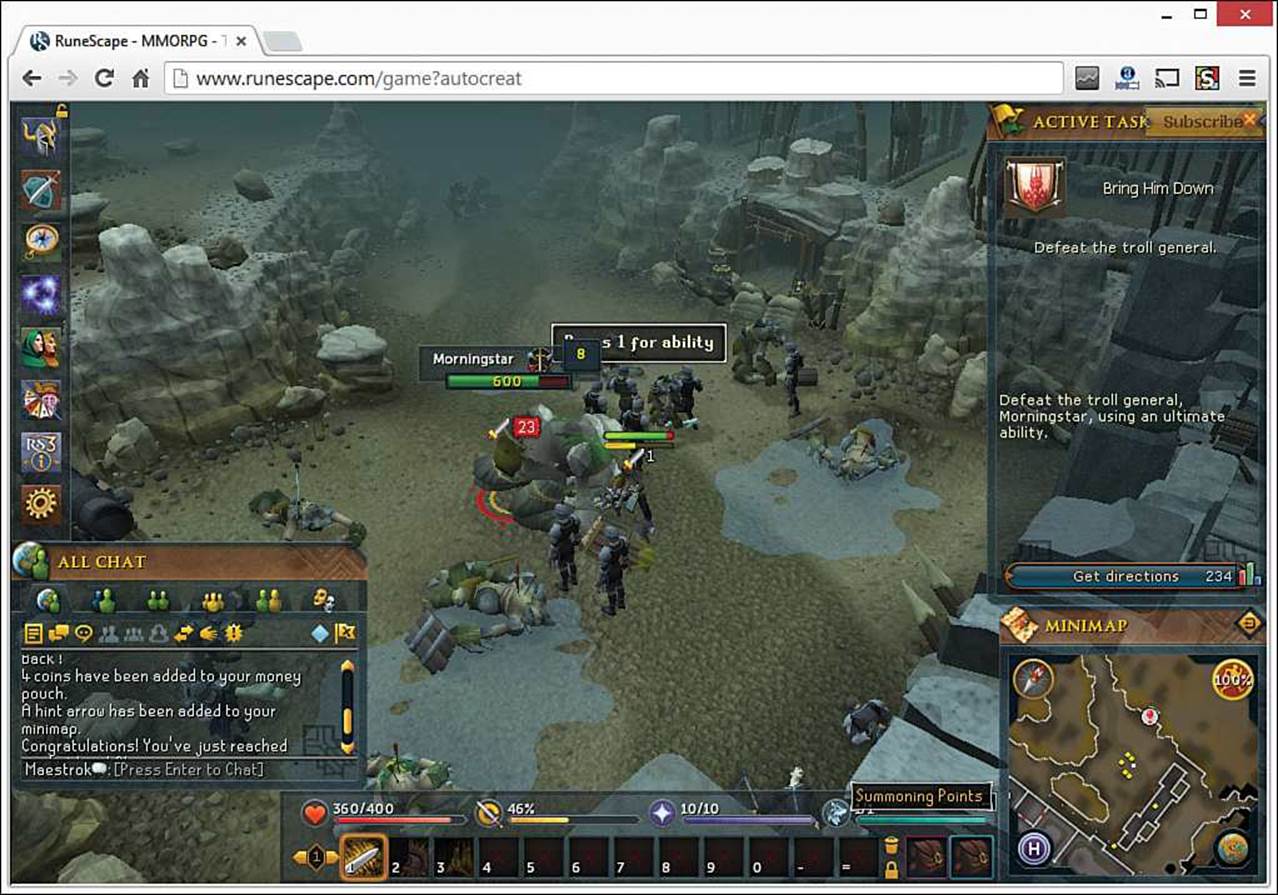
FIGURE 3.1 The Java-powered online game RuneScape.
When you run it, the game loads within seconds and you can begin creating a character and exploring a fantasy world.
Oracle’s Java division leads the development of the Java language. Java Magazine, an online magazine available for free from Oracle at Java.com, showcases how Java is being used on websites, Android phones, and other platforms. Billions of devices run programs written with Java.
The Java.com website helps people install a browser enhancement that enables them to run applets. It also describes some ways the language currently is being used across the Internet.
Oracle also offers a more technically oriented website for Java programmers at www.oracle.com/technetwork/java. This site is the place to find the latest released versions of NetBeans and the Java Development Kit along with other programming resources.
Tip
Oracle includes the Java Plug-in with the JDK and other products, so it might already be installed on your computer. If you are not sure whether Java is installed, visit the www.java.com website. The “Do I Have Java?” link can detect the presence of Java. If it isn’t found, you will be offered a chance to download it.
A Brief History of Java
Bill Joy, one of the executives at Sun Microsystems when the company created Java, called the language “the end result of 15 years of work to produce a better, more reliable way to write computer programs.” Java’s creation was a little more complicated than that.
Java was developed in 1990 by James Gosling as a language that would serve as the brains for smart appliances (interactive TVs, omniscient ovens, time-traveling Terminators, SkyNet military satellites that enslave mankind, and so on). Gosling was unhappy with the results he was getting by writing programs with a programming language called C++. In a burst of inspiration, he holed up in his office and wrote a new language to better suit his needs.
Note
You might have heard that Java is an acronym that stands for Just Another Vague Acronym. You also might have heard that it was named for Gosling’s love of coffee.
The story behind Java’s naming contains no secret messages or declarations of liquid love. Java was chosen as the name for the same reason that the comedian Jerry Seinfeld likes to say the word salsa: It just sounds cool.
Gosling named his new language Oak after a tree he could see from his office window. The language was part of his company’s strategy to make a fortune when interactive TV became a multimillion-dollar industry. That still hasn’t happened today (though Netflix, Hulu, and others are making a game attempt), but something completely different took place for Gosling’s new language. Just as Oak was about to be scrapped, the Web became popular.
In a fortuitous circumstance, many qualities that made Gosling’s language good on its appliance project made it suitable for adaptation to the Web. His team devised a way for programs to be run safely from web pages, and a catchy new name was chosen to accompany the language’s new purpose: Java.
Although Java can be used for many other things, the Web provided the original showcase it needed to seize the attention of the world’s software developers. When the language rose to prominence, you had to be in solitary confinement or a long-term orbital mission to avoid hearing about it.
There have been nine major releases of the Java language, each with some essential new features. Here are the first eight:
 Java 1.0—The original release (1995)
Java 1.1—Java Database Connectivity (JDBC), improved graphical user interfaces (1997)
Java 2 version 1.2—Inner classes, the Java Plug-in for web browsers, and data structures (1998)
Java 2 version 1.3—Enhanced multimedia (2000)
Java 2 version 1.4—Improved Internet support, XML processing, and assertions (2002)
Java 5—Generics, new for loops, annotations, and automatic data conversion (2005)
Java 6—The built-in Derby database and web services (2006)
Java 7—Memory and resource management improvements and the Nimbus graphical user interface (2011)
Note
Are you wondering why Java’s versions are numbered so strangely, skipping from 2 to 6, calling the seventh version Java 6, and including an integer and decimal number in some versions? Me, too!
Fortunately, the numbering scheme has made more sense since 2006, with each new release an integer one higher than the last.
The current release, Java 8, came out in March 2014. Three years in the making, this new version introduces closures, an eagerly anticipated feature for advanced Java programming you learn about during Hour 20, “Using Inner Classes and Closures.” There’s also a better way to work with dates and times and some useful new collections and annotations.
If you don’t know what all these things are—such as inner classes, generics, or XML—don’t freak out. You’ll learn about them over the next 21 hours.
Caution
When you visit this site to run the applet, you might get an “Application Blocked” security warning on Windows. Shortly before this book went to press, Oracle changed how the Java Plug-in handles applets that do not contain a digital signature verifying their authorship. Now the applets fail with a warning, instead of users being asked whether to run them.
You can edit your Java security settings to allow a specific web page’s applet to run. Open the Control Panel, click Java, and then click the Security tab. Click the Edit Site Lists button to add a web page and allow its applet (or applets) to load.
Going to School with Java
The Web includes numerous resources for educators and schoolchildren. Because Java programs can offer a more interactive experience than standard web pages, some programmers have used the language to write learning programs for the Internet.
For one such example, visit www.cs.ubc.ca/~van/sssjava to access a ski jump simulator created by Michiel van de Panne, a computer science professor at the University of British Columbia. The program uses Java to demonstrate physics-based animation as a skier tries several different slopes and jumps. The motion of the skier is controlled by moving a mouse one of eight directions, each of which affects the success of a jump. Figure 3.2 shows one run of the program right before my virtual skier met a gruesome end.
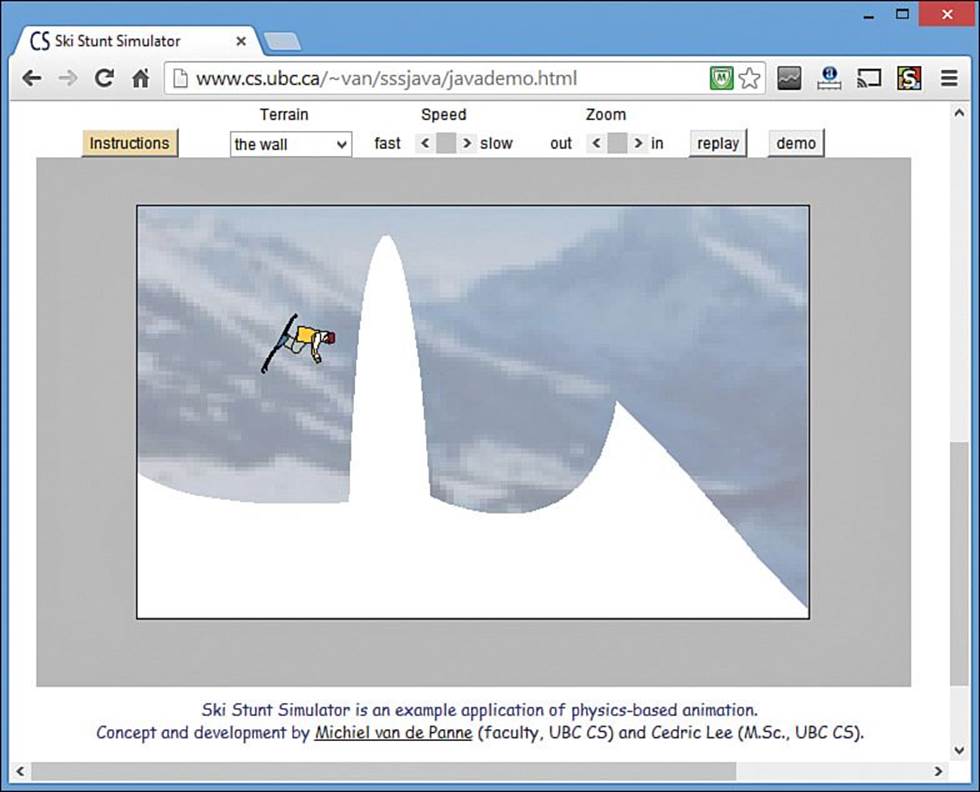
FIGURE 3.2 A ski-jump simulator can be experienced interactively on the Web using a Java program.
Numerous educational programs are available for many operating systems, but one thing that makes this program stand out is its availability. The simulator is run directly from a web page. No special installation is needed, and, unlike most desktop software, it isn’t limited to a particular operating system. You can run Java programs on any computer that has a Java Virtual Machine (JVM).
The JVM loaded by a browser is the same you used to run the Saluton program during Hour 2, “Writing Your First Program.” A browser’s JVM can run only Java programs that are set up to run on web pages and cannot handle programs set up to run elsewhere, such as on a desktop computer.
The first browsers to support Java included a built-in JVM. Today, browsers support Java by relying on Oracle’s Java Plug-in, a JVM that works as a browser enhancement.
A Java program, such as the ski-jump simulator, does not have to be written for a specific operating system. Because operating systems like Windows also are called platforms, this advantage is called platform independence. Java was created to work on multiple systems. Java’s developers believed it needed to be multiplatform because it would be used on a variety of appliances and other electronic devices.
Users can run the programs you write with Java on a variety of systems without requiring any extra work from you. Under the right circumstances, Java can remove the need to create specific versions of a program for different operating systems and devices.
Lunch in JavaWorld
After working up an appetite on the slopes, take a lunch break with JavaWorld, an online magazine for Java programmers. Visit www.javaworld.com.
JavaWorld offers how-to articles, news stories, and research centers on hot areas of Java development. One of the advantages of the publication’s web format is that it can display functional Java programs in conjunction with articles. Figure 3.3 shows a Java poetry magnet board that accompanied a tutorial explaining how it was written.
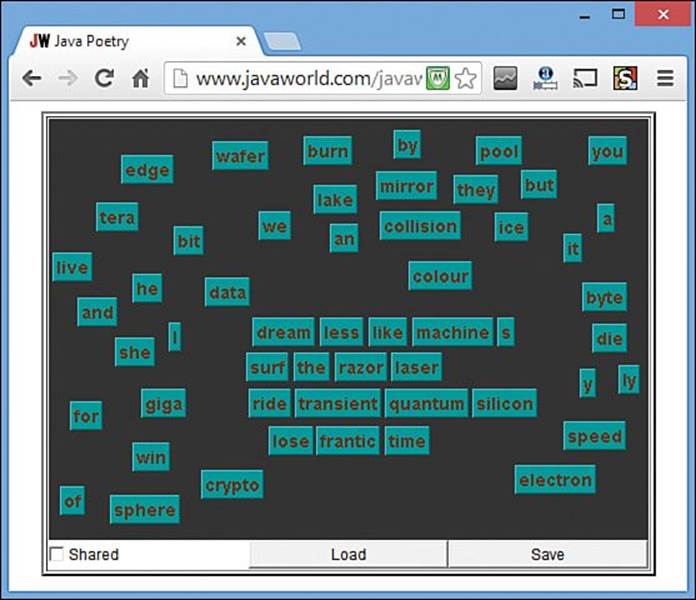
FIGURE 3.3 A JavaWorld how-to article on how to create a poetry magnet board includes a working example of the program.
Note
JavaWorld occasionally moves things around, but you can go directly to the poetry magnet board tutorial at www.cadenhead.org/poetry.
JavaWorld publishes articles and commentary about the language and its development. One issue that has been hotly debated since Java’s introduction is whether the language is secure.
Security is important because of the way Java programs work when they are placed on a web page. The Java programs you try during this hour are downloaded to your computer. When the program is finished downloading, it runs on your computer.
Unless you know a whole lot of people, most web pages you visit are published by strangers. In terms of security, running their programs isn’t a lot different than letting the general public come over and borrow your computer. If the Java language did not have safeguards to prevent abuse, its programs could introduce viruses onto your system, delete files, play the spoken-word song performances of William Shatner, and do other unspeakable things.
Java includes several kinds of security to make sure that its programs are safe when run from web pages. The main security is provided by restrictions on Java applets running over the Web:
No applet can open, read, write, or delete files or system properties on the user’s computer.
No applet can run other programs on the user’s computer.
All windows created by the applet are identified clearly as Java windows.
Applets cannot make connections to websites other than the one that hosted them.
All applets are verified to make sure that nothing was modified after they were compiled.
The language generally has been considered safe enough to be usable over the Web, but security holes exploited in recent years have prompted some security experts to recommend that users turn off Java entirely in their browsers. To address these concerns, Oracle provides a Java update tool with the Java Plug-in to ensure that when exploits are discovered, the language can be upgraded to stop them.
The Java language also offers a more flexible security policy for programs that run in a browser. You can designate some companies and programmers as trusted developers, which enables their Java applets to run in your browser without the restrictions that normally would be in place.
This system of trust is established through the use of signed applets that have digital signatures, files that clearly identify the author of a Java program. These signatures are created in collaboration with independent verification groups such as VeriSign.
If you ever have authorized a program to run in a browser such as Internet Explorer or Google Chrome, you have worked with a similar system of trust and identity verification.
Applets still can be useful today, but over the years other technology, such as Flash, Silverlight, and HTML5, has been employed for web page-based programs. Java is more commonly encountered by users on mobile apps, server programs, and desktop software.
Watching the Skies at NASA
The first afternoon stop on the Java tour is a trip to NASA, a U.S. government agency that makes extensive use of Java. One notable example is SkyWatch, an applet that helps stargazers keep an eye out for orbiting satellites. Load it in your browser by visiting www.cadenhead.org/nasa; you are forwarded automatically to NASA’s SkyWatch site.
SkyWatch superimposes the current location and path of satellites—which you can add or drop from view—over a globe of the world. The applet running in Figure 3.4 shows the Galaxy Evolution Explorer satellite (GALEX) making a path through the Aquarius constellation for around three minutes shortly before 6 a.m.
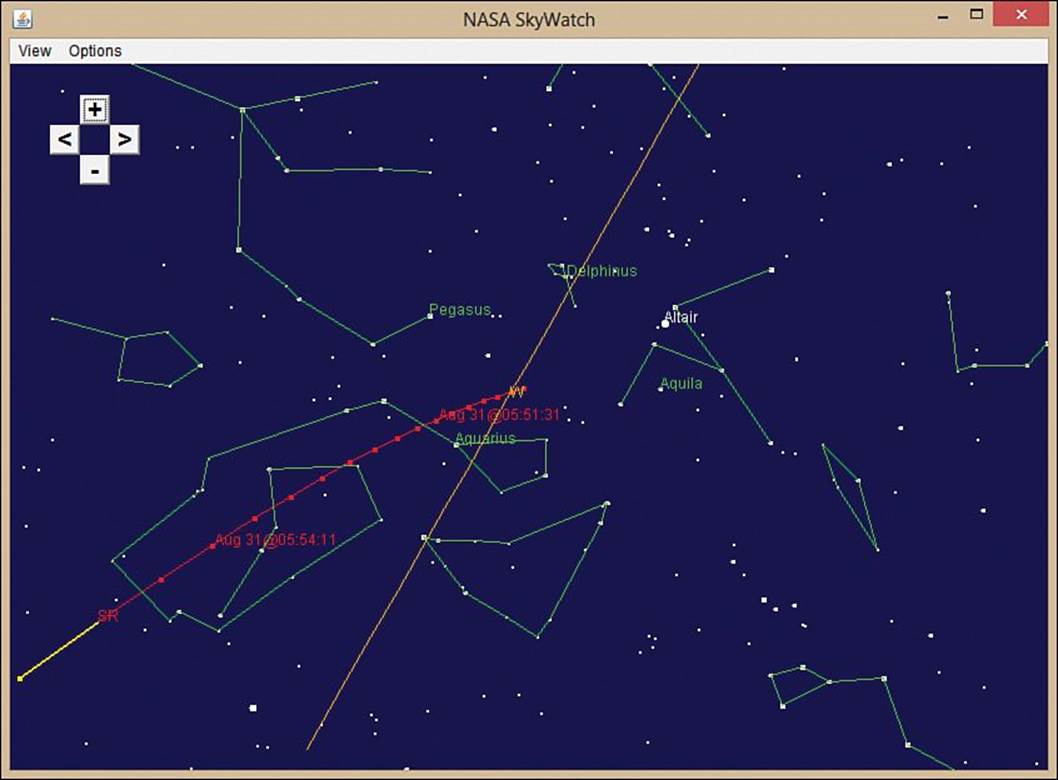
FIGURE 3.4 NASA’s SkyWatch applet monitors the location and path of orbiting satellites, a boon to metal birdwatchers.
The applet redraws the position of each tracked satellite as it runs. This kind of real-time update is possible because the Java language is multithreaded. Multithreading is a way for the computer to do more than one thing at the same time. One part of a program takes care of one task, another part takes care of a different task, and the two parts can pay no attention to each other. Each part of a program in this example is called a thread.
In a program such as SkyWatch, each satellite could run in its own thread. If you use an operating system such as Windows 8, you’re using a type of this behavior when you run more than one program at the same time. If you’re at work playing Desktop Tower Defense in one window while running a company sales report in another window and making a long-distance call to a friend, congratulate yourself—you’re multithreading!
Getting Down to Business
At this point in your travels, you might have the impression that Java is primarily of use to space buffs, atrocious poets, and terrible skiers. The next stop on our trip shows an example of Java getting down to business.
Direct your web browser to the QuoteMedia website at www.quotemedia.com. This company offers a Java applet that displays stock quotes for use on other websites. Figure 3.5 shows a demo of its scrolling stock ticker. (To see it yourself, visit www.cadenhead.org/stocks to be redirected to that page.)
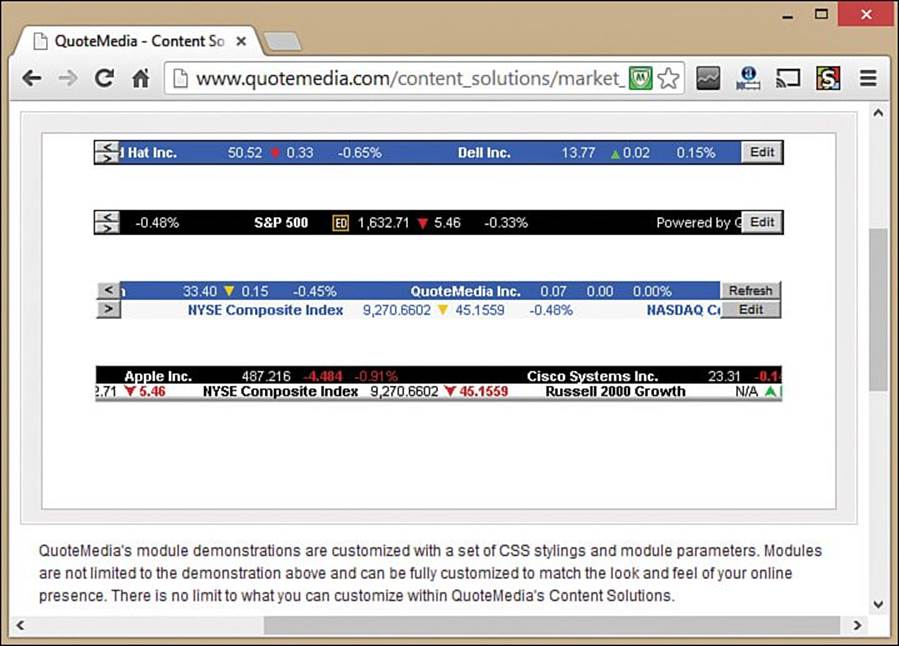
FIGURE 3.5 Java programs from QuoteMedia report stock market prices.
Unlike other stock analysis programs that require the installation of software on the computers of each employee who needs access, the use of Java enables customers of QuoteMedia to make the programs available to anyone with a web browser. All employees have to do is access the company’s website.
You can think of a program like this stock ticker applet in several ways. One is to think of a program as an object—something that exists in the world, takes up space, and has certain things it can do. Object-oriented programming (OOP), which Java uses as you discover in Hour 10, “Creating Your First Object,” is a way of creating computer programs as a group of objects. Each object handles a specific job and knows how to speak to other objects. For example, a stock ticker program could be set up as the following group of objects:
A quote object, which represents an individual stock quote
A portfolio object, which holds a set of quotes for specific stocks
A ticker object, which displays a portfolio
An Internet object, a user object, and many others
Under that model, the stock ticker software is a collection of all the objects necessary to get work done.
OOP is a powerful way to create programs, and it makes the programs you write more useful. Consider the stock software. If the programmer wants to use the quote capabilities of that program with some other software, the quote object can be used with the new program. No changes need to be made.
Programs created with objects are easier to maintain because they are better organized. An object contains the data necessary to do its job and the code required to do that work. Objects also make a program more extensible. A new object can be patterned after an existing one and enhanced with new capabilities.
Stopping by SourceForge for Directions
This world tour of Java programs is being led by a professional who is well versed in the hazards and highlights of web-based travel. You’ll be venturing out on your own trips soon, so it’s worthwhile to learn the lay of the land at an incredibly useful site for programmers: SourceForge, one of the best places to find complete examples of working programs written with Java (or any other language). Find it at www.sourceforge.net.
SourceForge is an enormous website devoted to collaborative programming projects. If you have an interest in working with others on a program you are developing, you can start a project on SourceForge, share all its files, recruit others, and communicate with them. The 300,000-plus projects on the site all are open source, which means that the programmers have shared all the source code. In case you’re unfamiliar with the term, source code is another name for the text files that are used to create computer programs. The Saluton.java file you developed during Hour 2 is an example of source code.
If you use the search box atop the SourceForge home page to search for Java applets, you’ll find more than 7,000 listings in the site’s directory of projects.
One of the programs on SourceForge is Aleksey Udovydchenko’s Absolute, an arcade-style space videogame in which you control a ship and blast your way through an asteroid field (see Figure 3.6). The game features scrolling animation, graphics, keyboard control, and sound. To learn more, visit www.cadenhead.org/absolute to play the game and www.sourceforge.net/projects/absolutejava to download the source code.
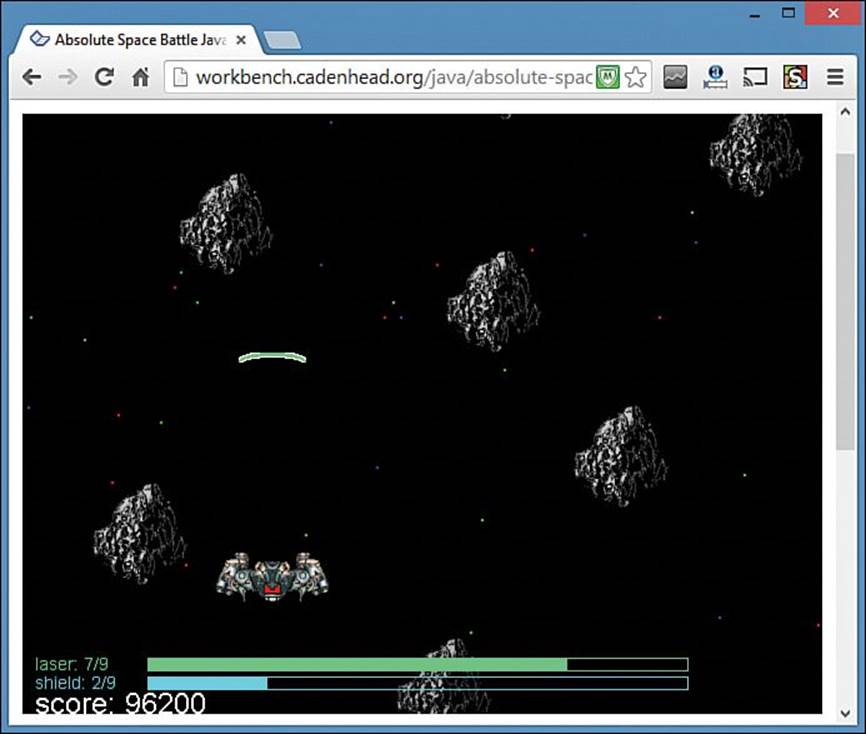
FIGURE 3.6 Source code for Java programs such as Aleksey Udovydchenko’s space shoot-’em-up Absolute can be found on SourceForge.
The entire Absolute program was written in just more than 700 lines of code. That’s an extremely small number considering everything the program does. One reason this is possible is because Java includes an enormous library of classes you can use in your own programs. Udovydchenko employs the library’s Image class to display graphics such as asteroids and its AudioClip class to play laser fire and explosion sounds.
One reason so many programs are created with Java—on SourceForge and elsewhere—is because the language was designed to be easier to learn in spite of its powerful functionality.
An original design goal for the language was to make it quicker to master than C++, the language Gosling was having fits with on his smart-appliance project back in the 1990s. Much of Java is based on C++, so programmers who have learned to use that language find it easier to learn Java. However, some of the elements of C++ that are the hardest to learn and use correctly are not present in Java.
For people learning programming for the first time, Java is easier to learn than C++. Some languages are created to make it easier for experienced programmers to harness the capabilities of the computer in their programs. These languages include shortcuts and other features that programming veterans easily understand.
Java does not use some of these features, preferring to make the language as simple as an object-oriented programming language can be. Java was created to be easy to learn, easy to debug, and easy to use. Java includes numerous enhancements that make it a worthy competitor to other languages.
Running Java on Your Phone
The last stop on your whirlwind tour of Java is the nearest Google Android cell phone. Every single program that runs on Android has been programmed with Java. These mobile programs, which extend the functionality of the phones, are called apps. One of the most popular apps is Angry Birds, shown in Figure 3.7.
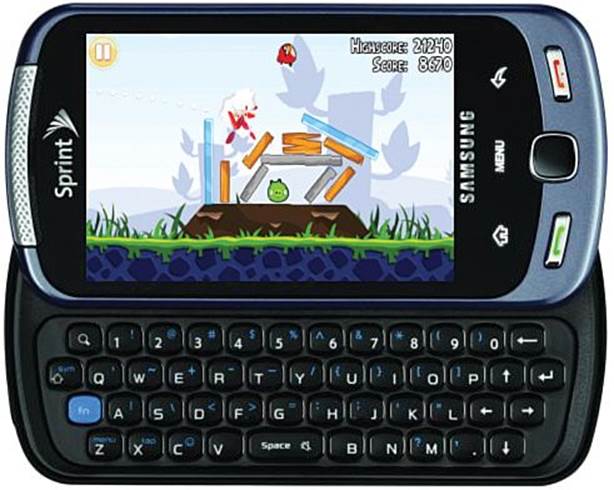
FIGURE 3.7 Angry Birds and all other Android apps were created with the Java language.
You can learn more about this game, if you’re not already familiar with it, by visiting www.angrybirds.com. (But don’t do it! The game will obliterate any hope you had of being productive for the rest of the day, week, or even month—depending on how much you hate fortified pigs.)
Android ends the trip around Java because it’s becoming an incredibly popular place for the language to be used. After you learn Java, you can apply your skills developing your own apps using the Android Software Development Kit (SDK), a free programming toolkit that runs on Windows, Mac OS, and Linux.
More than 250,000 apps have been created for Android phones and other devices that run the mobile operating system. You learn more about how to create them in Hour 24, “Writing Android Apps.”
Summary
Now that the hour-long vacation is over, it’s time to put away your luggage and get ready for a return to actual Java programming.
During the next 21 hours, you will master the basic building blocks of the Java language, learn how to create your own objects to accomplish tasks in object-oriented programming, design graphical user interfaces, and much more.
Unless you stopped reading this book to play Angry Birds.
Workshop
Q&A
Q. Why are Java applets no longer popular?
A. When the Java language was introduced in the mid-1990s, most people were learning the language to write applets. Java was the only way to create interactive programs that ran in a web browser. Over the years, alternatives emerged. Macromedia Flash, Microsoft Silverlight, and the new web publishing HTML5 standard all offer ways to put programs on web pages.
Applets were hampered by poor loading times and slow support for new versions of Java by browser developers. The Java Plug-in was introduced to run the current version of Java in browsers, but by that time Java had outgrown its origins and was a sophisticated general-purpose programming language.
Q. What’s the difference between Java SE (Java Standard Edition) and Java EE (Java Enterprise Edition)? Does Java EE cost money?
A. Java Enterprise Edition is an expansion of the Java Standard Edition that includes packages to support advanced technology such as Enterprise JavaBeans, XML processing, and the development of servlets—Java programs that run on a web server. Java EE also includes an application server, a sophisticated environment for executing Java software that’s tailored for corporations and other large organizations with heavy computing needs. The Java EE development kit can be downloaded at no cost from Oracle at www.oracle.com/technetwork/java/javaee.
Q. What’s a Chris Steak House, and why does Ruth have one?
A. Ruth’s Chris Steak House, the chain of more than 120 upscale steak restaurants across the United States and a handful of other countries, has an odd two-first-name name that reveals its humble origins and the stubborn streak of its founder.
The chain was founded in 1965 as a solitary New Orleans restaurant owned by Ruth Fertel, a single mother of two sons. Fertel saw a classified ad offering a restaurant for sale and took out a $22,000 home mortgage to buy it (equivalent to around $150,000 in present dollars).
She reached a deal to keep the name Chris Steak House with original owner Chris Matulich, but later had to relocate after a kitchen fire.
Fertel’s contract did not permit her to use the Chris Steak House name anywhere but the original location, so she renamed it Ruth’s Chris Steak House. Though she had no restaurant or culinary expertise, the business was so successful that she began offering it as a franchise within 12 years. She disregarded several suggestions over the years to change the name to broaden its appeal.
“I’ve always hated the name,” she once told a reporter for Fortune magazine, “but we’ve always managed to work around it.”
Fertel, who died in 2002, was born on February 5, 1927—the same day that Matulich opened the original steakhouse.
Quiz
If your mind hasn’t taken a vacation by this point, test your knowledge of this hour with the following questions.
1. How did object-oriented programming get its name?
A. Programs are considered to be a group of objects working together.
B. People often object because it’s hard to master.
C. Its parents named it.
2. Which of the following isn’t a part of Java’s security?
A. Web programs cannot run programs on the user’s computer.
B. The identity of a program’s author is always verified.
C. Java windows are labeled as Java windows.
3. What does a computer or device need to run Java programs?
A. A Java compiler
B. A Java Virtual Machine
C. Both
Answers
1. A. It’s also abbreviated as OOP.
2. B. Programmers can use digital signatures and an identity-verification company such as VeriSign in Java, but it isn’t required.
3. B. The Java Virtual Machine (JVM) is an interpreter that converts Java bytecode into instructions the computer or device can run. A compiler is required to create Java programs, but not to run them.
Activities
Before unpacking your luggage, you can explore the topics of this hour more fully with the following activities:
Use SourceForge at www.sourceforge.net to find out what card games have been developed using the Java language.
Visit Oracle’s website for Java users, www.java.com, and click the “Do I Have Java?” link. Follow the instructions to see whether Java is present on your computer. Download and install the most up-to-date version, if prompted to do so.
Solutions for the activities in this book are presented on the book’s website at www.java24hours.com.
All materials on the site are licensed Creative Commons Attribution-Sharealike 3.0 Unported CC BY-SA 3.0 & GNU Free Documentation License (GFDL)
If you are the copyright holder of any material contained on our site and intend to remove it, please contact our site administrator for approval.
© 2016-2026 All site design rights belong to S.Y.A.